This post contains affiliate links. If you purchase through them, we may earn a small commission at no extra cost to you. This product was provided through the Amazon Vine program for our honest review. All opinions are our own. Thanks for supporting Gaming Gear Drop.
Pros
- Budget Friendly
- Cool RGB Lighting
- Long Battery Life
- Multi-Platform Support
- Programmable Paddles
- App Customization
Cons
- Manual Required
- Bad Batch Complaints
- Quality Complaints
Quick Summary
This third-party Switch Pro Controller is a feature-rich, budget-friendly alternative designed for gamers who want versatility and style. It connects wirelessly to Nintendo Switch, iOS, and Android, and works wired on PC. Its standout features include a massive 1200mAh battery for long play sessions, vibrant customizable RGB lighting, and programmable back paddles that allow for complex macros. It even supports the “Keylinker” app for deeper customization like joystick tuning.
However, it is not without its flaws. While many users love the value and the cool look, others report that the build quality feels a bit cheap compared to official controllers. There are also consistent complaints about long-term reliability, with some units suffering from disconnecting issues or back paddles that stop working over time. It lacks premium features like Hall Effect joysticks, but for the price, it offers a lot of functionality.
For more information, stick around and read below for my take on this product.
Hey there, welcome to our review of the Kammkonb NS60 Programmable RGB Switch Pro Controller! We’re here to offer insights and hopefully make your decision-making a tad easier. We’ve collected details about the gaming accessory to share with you.
Throughout this review, we’ll delve into discussing its key features, highlighting user feedback, our impressions, and who might benefit most from it.
So, if you’re considering getting the Kammkonb NS60 Programmable RGB Switch Pro Controller and want to know if it suits your needs, stick around!
Key Features
App Support (KeyLinker)
You can use the “KeyLinker” mobile app to adjust settings that aren’t available directly on the controller. This app allows you to customize the response curve of the joysticks, change the RGB lighting effects, and update the controller’s firmware.
Joystick & Trigger Customization (App)
Using the KeyLinker app, you can adjust the analog inputs. You can change the effective range and dead zones of the joysticks to help prevent drift or adjust responsiveness. You can also customize the sensitivity curves for both the sticks and the triggers, and swap the functions of the left and right sticks or triggers if needed.
Button Remapping & Macros
Through the app, you can remap any button to perform a different function. You can also set up macros, which allow you to record a sequence of button presses and assign them to a single key.
Adjustable Vibration
The controller is equipped with dual electric motors for vibration feedback. You can adjust the strength in two ways. For quick changes, hold the “Turbo” button and move the left joystick up or down to cycle through four levels (none, weak, medium, strong). Alternatively, you can use the KeyLinker app to adjust the left and right motors independently with 5 levels each, or set a specific vibration strength from 0% to 100%.
Adjustable Turbo
You can set a Turbo function for most action buttons to enable rapid-fire effects. You can adjust this manually on the controller with three speed settings (8, 15, or 25 shots per second). You can also use the KeyLinker app to assign Turbo to specific buttons and adjust the speed and frequency (Hz).
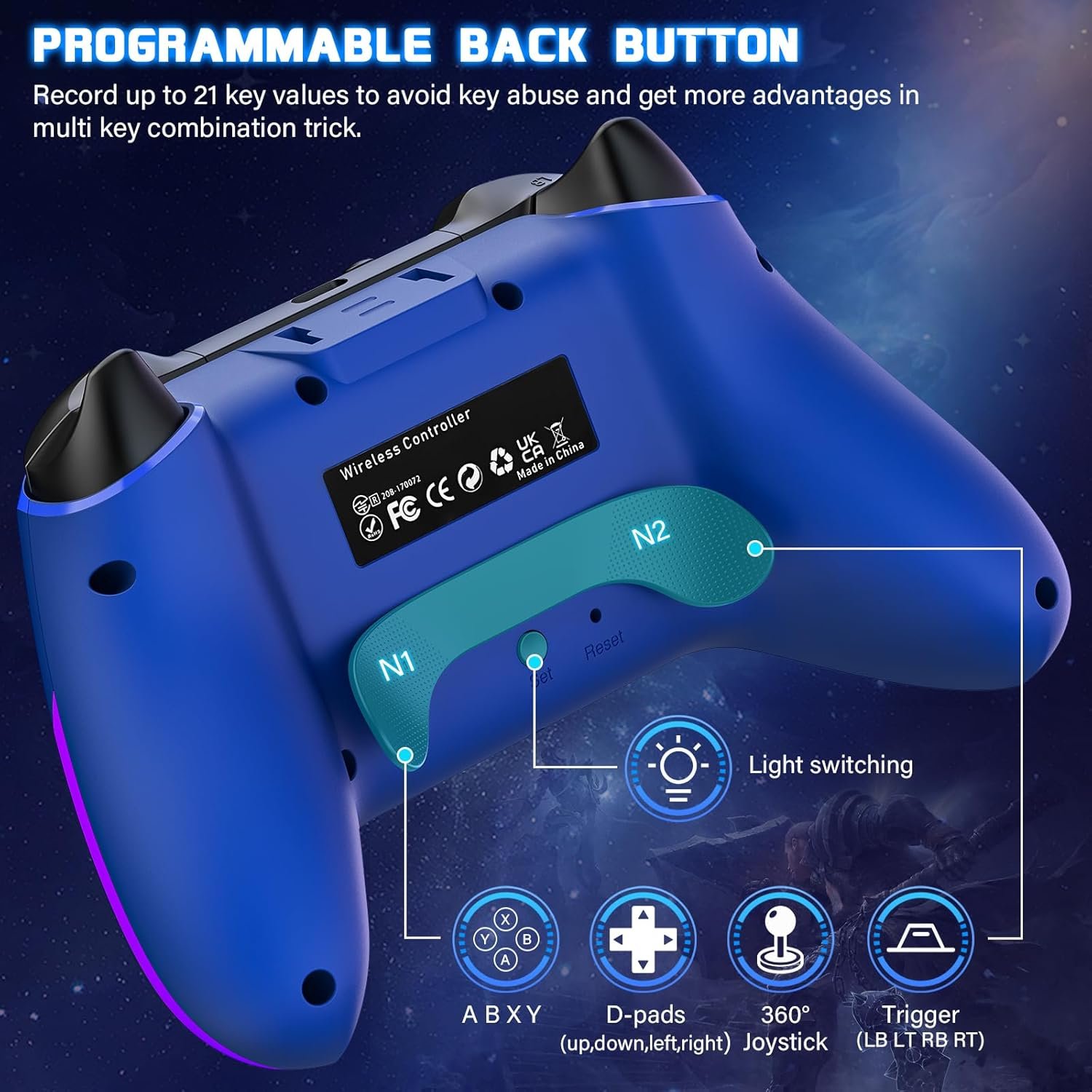
Programmable Back Buttons
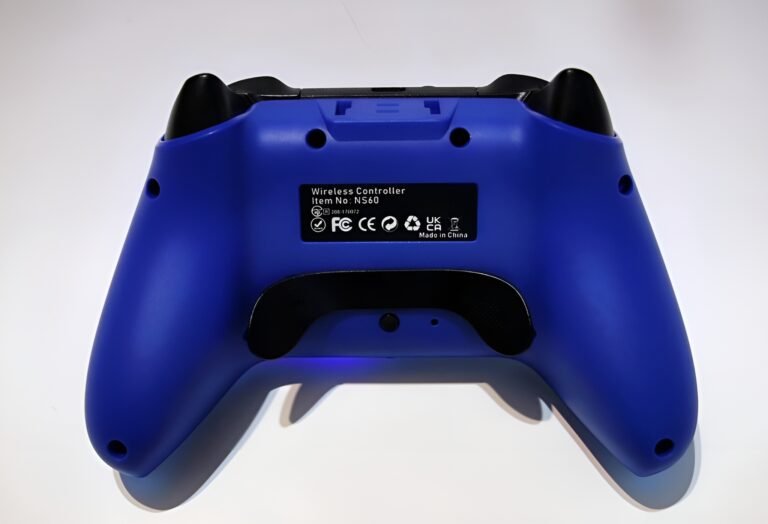
The controller features two extra buttons on the back, N1 and N2. You can program these to map up to 21 different function inputs to a single button, including the timing between presses.
Customizable RGB Lighting
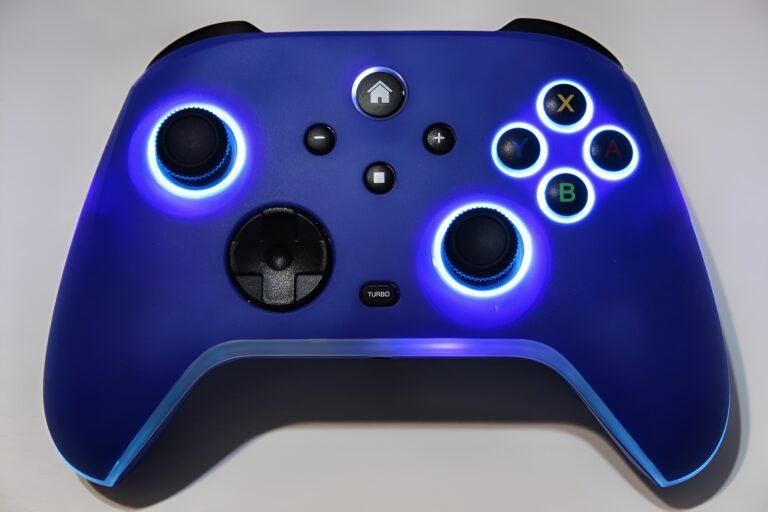
The LED lights feature 10 different modes, including dynamic breathing effects and 8 fixed colors. You can cycle through these or turn the lights off using the “Set” button on the controller. The KeyLinker app allows you to pick specific colors, switch between light or breathe effects, and adjust the brightness and speed.
Multi-Platform Connectivity
This controller connects wirelessly via Bluetooth to Switch consoles, iOS devices, and Android devices. You can also connect it to a Windows PC using the included USB-C cable, with support for both X-INPUT and D-INPUT modes.
Audio Support
When you use the controller with a wired connection to an official Nintendo Switch dock, you can use the built-in audio jack to plug in wired headphones.
Motion Control
The controller includes 6-axis somatosensory mapping. It uses a built-in gyroscope to detect tilt and motion, allowing you to control direction or aim by moving the controller itself in supported games.
Performance & Feedback
Overall, many customers have a positive experience with this Switch Pro Controller, especially considering its budget-friendly price point. Users frequently praise the cool LED lighting and beautiful colors, which add a fun aesthetic to their setup. In terms of gameplay, many find that it plays just as well as the official Pro Controller, offering good tactile feedback and satisfying vibration features. The connection process is generally described as easy, and despite some mixed reports, many users find the battery life to be long-lasting and reliable for extended gaming sessions.
However, there are some consistent complaints that potential buyers should know about. The build quality leaves something to be desired for some, with reports that the controller feels cheap in the hand. A significant number of users have issues with the back paddles, citing bad batches where the pedals malfunction or break. There are also concerns about longevity, with reports of the controller malfunctioning, unpairing, or disconnecting after continued use.
Technical enthusiasts often point out the lack of Hall Effect joysticks as a downside, meaning it may be more prone to drift over time compared to premium options. Additionally, while some praise the battery, others have experienced poor battery life, suggesting inconsistency in manufacturing. Finally, the connectivity is limited to Bluetooth and wired modes, lacking a 2.4GHz dongle option.
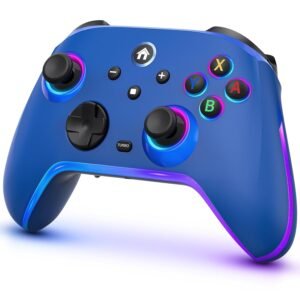
My Thoughts: Kammkonb NS60 Programmable RGB Switch Pro Controller


I tested this controller on both my PC and my Nintendo Switch. While I really like the overall design, I have to admit it does look a bit cheap. The layout reminds me a lot of an Xbox controller, which makes it very comfortable to hold. The back buttons are unique because they stick out more than usual. While I found them useful—especially for setting up Turbo options—they can be a bit invasive on the ergonomic grip, making it hard not to press them accidentally.
The RGB lighting is decent and offers several different patterns to choose from. However, the real value for me came from the Keylinker app. It allowed me to customize the controller further, tweaking the button layout and adjusting the calibration to get everything feeling right.
That said, the app isn’t perfect. While the help section is okay, I felt it needed better explanations for customizing the triggers and joysticks. Also, I couldn’t find an option to remap the back paddles inside the app itself, so keeping the manual handy is absolutely required to figure out how to set those up manually.
Who Would Likely Favor This Product?
Gamers who play on more than just the Nintendo Switch might really like this controller. Since it works with Switch, PC, Android, and iOS, it’s a great “all-in-one” option for people who want to use a single comfortable controller across all their different devices.
Players who want more options to customize their controller will appreciate the Keylinker app support. This feature allows you to fine-tune joystick sensitivity, remap buttons, and adjust vibration strength directly from your phone, giving you a level of control usually found on much more expensive controllers.
Players on a budget will also find this very appealing. It offers many of the same features as the official Pro Controller—like motion controls and wireless play—but at a much lower price point, making it a solid value pick.
Those who enjoy fast-paced arcade or shooting games might favor this for its Turbo feature. Being able to set a button to rapid-fire automatically can be a huge help in games that usually require constant button mashing.
Finally, gamers who love a flashy setup will enjoy the design. The transparent case and customizable RGB lighting with different modes let you add a lot of personal style and color to your gaming station.
FAQ (Frequently Asked Questions)
How do I get the KeyLinker app?
- For Apple: Visit the Apple App Store and search for Keylinker
- For Android: Visit the Google Play Store and search for Keylinker
How do I customize the controller using KeyLinker?
First, connect the controller to your Android or Apple device via Bluetooth. Then, open the KeyLinker app. The app will detect the device; select it, and then hit the gear icon on the selected gamepad to start customizing your controller settings.
Can I use headphones with this controller?
Yes, but there is a specific requirement. The 3.5mm audio jack only works when the controller is connected via a wired USB connection to the official Nintendo Switch dock. It does not support wireless audio.
If you are still interested in knowing more about the product, click the button below
Switch Pro Controller for Nintendo Switch/OLED/Lite 1200mAh Battery | 10 RGB Modes | Programmable Paddles | 6-Axis Gyro | Multi-Platform
- Vibrant RGB Lighting: The controller features 10 different RGB light colors and three distinct changing modes: Dazzling, Fixed Color Loop, and Single Color Breathing. You can even adjust the lighting settings via the “Keylinker” app to customize the look for different games.
- Multi-Platform Compatibility: This controller connects wirelessly to Nintendo Switch, OLED, and Lite consoles, as well as iOS (13+) and Android (9+) devices. It also supports wired connections for PC gaming (Windows 7-11), supporting both X-input and D-input modes. It features a simple “one-key wake-up” function for the Switch.
- Programmable Back Buttons: It is equipped with programmable back paddles (N1/N2) that support both single-key mapping and multi-key macros (up to 21 function keys). This allows you to customize controls to your habits and execute complex combos easily without repetitive keystrokes.
- Advanced Gaming Features: The controller includes a 6-axis gyro sensor for precise motion controls and dual motors with four adjustable vibration levels (none, weak, medium, strong). It also features manual and auto Turbo modes with three adjustable speeds (6, 10, or 20 shots per second).
- Long-Lasting Battery: Powered by a large 1200mAh rechargeable battery, this controller offers an impressive 16-20 hours of gameplay, even with the RGB lights on. It recharges fully in just 2-3 hours and has an auto-sleep feature to save power after 5 minutes of inactivity.
Images by Gaming Gear Drop unless otherwise noted. Additional photos sourced from the official Kammkonb Amazon listing for review purposes.