This post contains affiliate links. If you purchase through them, we may earn a small commission at no extra cost to you. This product was provided through the Amazon Vine program for our honest review. All opinions are our own. Thanks for supporting Gaming Gear Drop.
Pros
- Multi-platform
- Hall Effect
- Comfortable
- Long battery
- RGB lighting
- Turbo & macros
- NFC support
- Budget friendly
Cons
- No 2.4G dongle
- Design preferences
Quick Summary
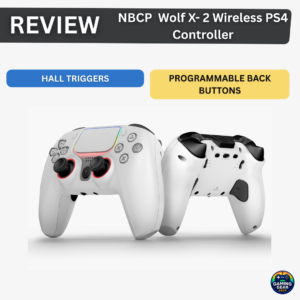
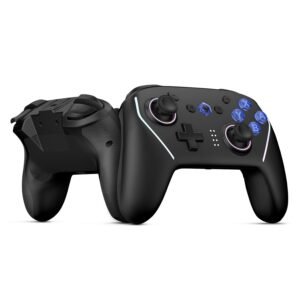
The NBCP wireless gaming controller is a budget-friendly option that stands out for its wide platform support and modern features. It feels comfortable in the hands, has a solid weight, and offers battery life that holds up well during longer play sessions. Players often point out the Hall Effect joysticks and triggers for their smooth, drift-resistant feel, along with useful extras like turbo, programmable back buttons, NFC support, and customizable RGB lighting.
There are a few downsides worth noting. The controller does not include a 2.4GHz wireless receiver, and some design choices—such as the back button placement—can lead to accidental presses for certain users. Even with those minor drawbacks, it’s generally seen as a good value for the price, especially compared to higher-cost controllers with similar features.
For more information, stick around and read below for my take on this product.
Hey there, welcome to our review of the NBCP Wolf V8 Wireless Gaming Controller.
For this review, we tested this controller to offer honest insights and hopefully make your decision-making a tad easier. We have gathered all the important details about this gaming accessory to share with you, specifically focusing on the black version of the controller.
Throughout this post, we will discuss its key features, highlight user feedback, share our personal impressions, and explain who might benefit most from it.
So, if you are looking for a reliable black wireless controller for your PC, Nintendo Switch, or mobile device, stick around to find out if this suits your needs.
Key Features
Multi-Platform Compatibility
The controller supports Nintendo Switch, Switch OLED, Switch Lite, Steam Deck, Windows PC, Android, and iOS devices. It can be used across consoles, computers, and mobile devices without needing separate controllers for each platform.
Wireless and Wired Connectivity
The controller supports Bluetooth wireless connections and wired USB-C connections. An optional 2.4G wireless receiver is also supported for PC use but is not included by default.
Built-In Drift Repair & Calibration
The controller includes built-in joystick calibration functions that allow users to recalibrate the sticks if movement becomes inaccurate over time. This can help correct drift-related issues without software.
6-Axis Gyroscope Motion Control
A built-in gyroscope allows motion-based controls for supported games. The gyroscope can be turned on or off, adjusted in real time, and manually calibrated when needed.
Dual Vibration with Adjustable Levels
Dual vibration motors provide in-game feedback, with four vibration intensity levels available. Vibration strength can be adjusted directly on the controller to match different game styles.
Turbo & Auto Fire Functions
Turbo and Auto Fire are supported on multiple buttons. Turbo speed can be adjusted across different levels, making it useful for games that require repeated button presses.
Programmable Back Buttons & Macros
Rear back buttons support macro programming, allowing multiple button actions to be assigned to a single press. Macro settings are saved even after the controller is powered off, reducing the need to reconfigure settings.
RGB Lighting Customization
The controller features RGB lighting on the joysticks and light bars. Users can adjust colors, brightness, lighting effects, synchronize lighting, or turn lights off completely using on-controller controls or supported software.
NFC Support for Nintendo Switch
Built-in NFC functionality allows compatible amiibo and NFC accessories to be used in supported Nintendo Switch games.
App-Based Customization (KeyLinker App)
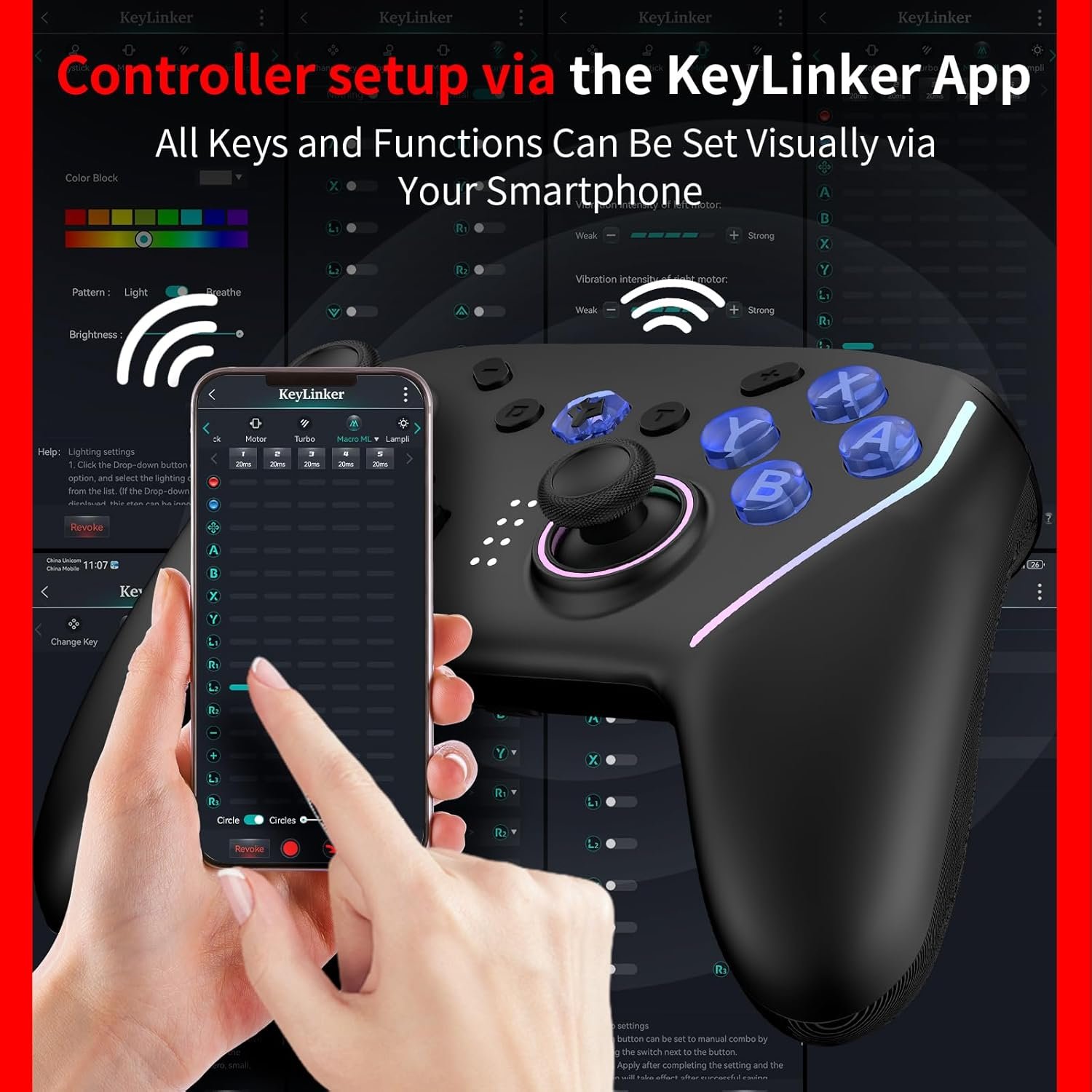
Using the KeyLinker app, users can remap buttons, adjust joystick and trigger sensitivity, fine-tune vibration levels, manage lighting effects, configure macros, and update firmware.
Battery & Power Management
The controller supports automatic sleep mode to conserve power when inactive. Battery status is shown through indicator lights, and charging is handled via USB-C.
Replaceable Battery Design
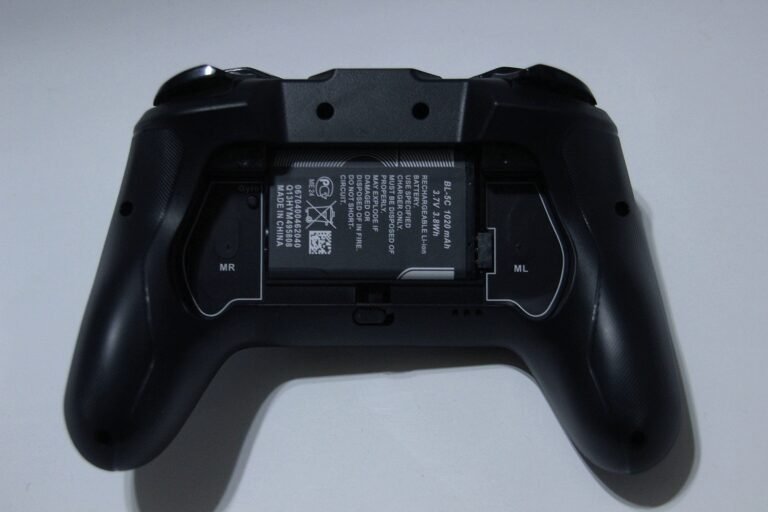
The controller uses a removable BL-5C lithium battery, allowing the battery to be replaced by removing the rear cover instead of replacing the entire controller.
Joystick and D-Pad Swap Function
Users can swap the function of the left joystick and directional pad using button combinations, allowing flexibility depending on game preference.
Performance & Feedback
Positive feedback mentions that the controller feels comfortable to hold and the buttons feel good to press during gameplay. Some comments point out that the joysticks move smoothly and stay accurate, without obvious drifting at the start. The controller’s weight is also brought up, with notes saying it feels light enough to use for longer play sessions without feeling tiring.
Other feedback talks about how easy the controller is to pair with different devices, including PC, Nintendo Switch, and mobile devices. Features like the back buttons, Turbo mode, and colorful lighting are mentioned as useful extras that can make certain games easier or more fun to play. Battery life is also mentioned, with users saying it lasts long enough for extended gaming before needing a recharge.
On the negative side, some feedback points out that the controller can go into sleep mode fairly quickly if left unused for a short time. There are also mentions of the design, with some people not liking certain button placements or the way the battery is positioned on the back. A few comments note that the controller feels more plastic-like compared to higher-end controllers, even though it still works as intended.
My Thoughts: NBCP Wolf V8 Gaming Controller
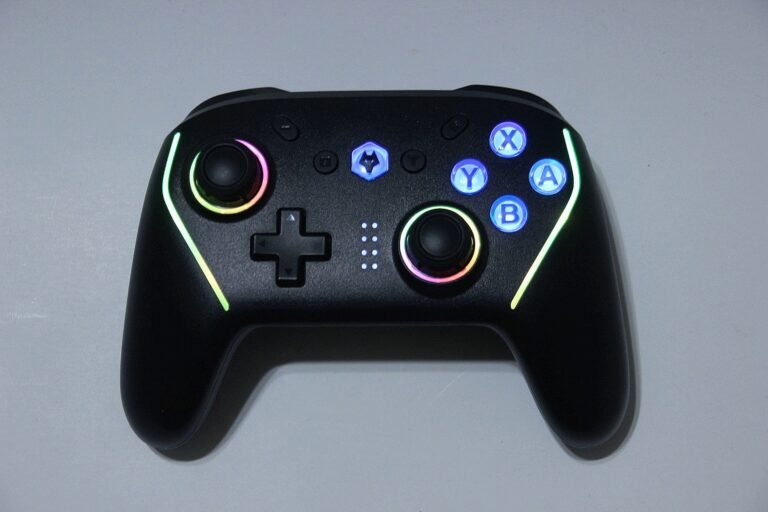
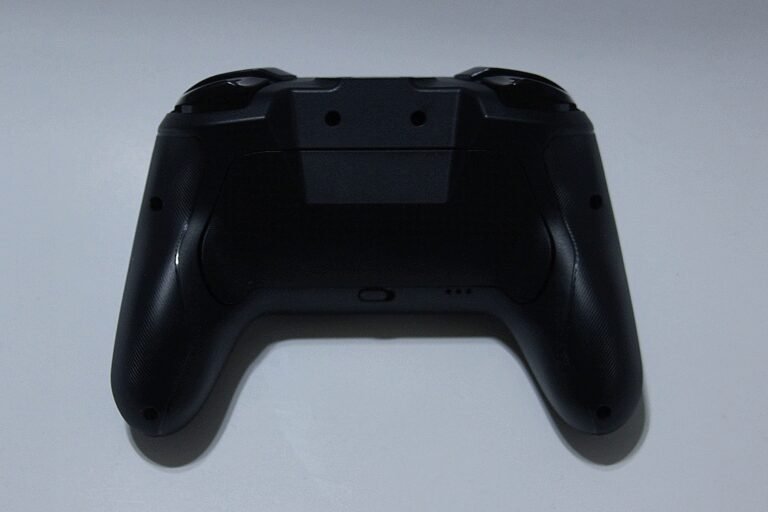
The controller’s layout looks great overall. The RGB lighting stands out right away, from the buttons to the rings around the analog sticks and along the side grips. During gameplay, the vibration feels solid, and the Turbo feature is a nice extra to have. The controller is fairly lightweight, feels good in the hands, and is comfortable to use for longer sessions. That said, the back buttons are easy to press by accident, which happened to me a few times while playing.
Installing the battery was straightforward. The latch on the back makes it easy to remove the cover and drop the battery in, though I would have preferred if the battery came pre-installed out of the box.
As for battery life, I was able to play for a couple of hours each day over about three to four days before getting a low-battery warning, which felt reasonable for regular use.
Connectivity is flexible, with support for Bluetooth, wireless, and wired connections. This makes it convenient to switch setups if needed. The controller does not include a wireless dongle, but I had a spare on hand, so it wasn’t an issue for me.
I tested the controller on both PC and Nintendo Switch, and it worked well on both platforms without any major problems.
Using the KeyLinker app for customization was also easy. It offers useful options like button remapping, adjusting vibration strength, and changing the lighting effects. There are additional settings available beyond those, but those were the ones I found myself using the most.
Who Would Likely Favor This Product?
Gamers who play across multiple platforms might want to look into this controller, as it supports Nintendo Switch, Switch OLED, Switch Lite, Switch 2, PC, Steam Deck, and mobile devices. It can be a practical option for anyone who wants one controller to handle several systems instead of switching between different controllers.
This controller may also appeal to players who like having extra control over how their controller behaves. Support for the KeyLinker app allows button remapping, lighting changes, vibration adjustments, and other settings, giving users the option to fine-tune things without needing a PC.
Those who prefer making quick changes directly on the controller may find it appealing as well. Features like Turbo, sensitivity adjustments, macros, and lighting controls can be managed using button inputs, which is useful if you don’t want to rely on software every time.
Finally, gamers who enjoy visual customization might appreciate the RGB lighting. The lighting effects can be adjusted or turned off entirely, letting players keep things flashy or simple depending on their setup.
FAQ (Frequently Asked Questions)
Does this controller work for PC?
Yes. It is fully compatible with Windows PC. You can connect it via Bluetooth, a Wired USB-C cable, or a 2.4G Wireless Dongle (if purchased). It is generally recognized as an Xbox Wireless Controller, so it works automatically with Steam, Epic Games, and most modern PC titles.
Does it work for Nintendo Switch?
Yes. It supports the standard Nintendo Switch, Switch OLED, and Switch Lite. It connects wirelessly via Bluetooth or can be used wired while the Switch is docked.
Does it work for Nintendo Switch 2?
Yes. The manufacturer states that this controller is designed to be compatible with the Nintendo Switch 2 as well as older models.
Does it work for Android?
Yes. It works with Android phones and tablets via Bluetooth. It is identified as an “Xbox Wireless Controller,” making it compatible with most controller-supported mobile games and streaming services like Game Pass.
Does it work for iOS (iPhone/iPad)?
Yes. It is compatible with Apple devices running iOS 10 or later. It connects via Bluetooth and works with games that support MFi or Xbox controllers.
How long does the battery last?
The controller uses a 1000mAh rechargeable battery. On a full charge, it generally provides several hours of playtime, though this depends on how strong you set the vibration and lights.
How long does it take to charge?
It typically takes about 2 to 3 hours to fully charge using the included USB-C cable.
Is the battery replaceable?
Yes. Unlike most modern controllers, this uses a removable BL-5C battery (the kind used in older phones). You can easily swap it out by removing the back cover.
Does the controller support NFC?
Yes. It includes built-in NFC support for compatible amiibo and NFC features on Nintendo Switch systems.
Does the controller use Hall Effect technology?
Yes. Both the joysticks and triggers use Hall Effect sensors to reduce wear and help prevent stick drift.
Does this controller support Turbo?
Yes. Turbo can be enabled on multiple buttons and the speed can be adjusted directly on the controller.
Connectivity Questions
How do I connect to Nintendo Switch?
You can connect wirelessly or with a cable.
- Wireless Pairing: Go to Controllers > Change Grip/Order. With the controller off, hold the Home button for 3 seconds until it connects.
- Wired Connection:
- On your Switch, go to System Settings > Controllers and Sensors and turn ON “Pro Controller Wired Communication.”
- Place the Switch in the Dock.
- Plug the USB cable into the Dock and the controller. (LED 1 will flash slowly to show it is charging).
- Note: If you unplug the cable, it will automatically switch to Bluetooth mode.
How do I connect to a PC (Windows)?
- Bluetooth: Press and hold Select (-) + Home for 2 seconds. Search for “Xbox Wireless Controller” on your PC to pair.
- Wired: Plug it in via USB-C. It defaults to X-Input mode.
- Dongle (Optional): If you have the receiver, plug it in and hold Home for 3 seconds to sync.
How do I connect to Android or iOS?
Press and hold Select (-) + Home for 3 seconds. Look for “Xbox Wireless Controller” in your phone’s Bluetooth settings and tap to pair.
Programming & Troubleshooting
How do I use the Turbo (Rapid Fire) function?
- Enable: Hold the Turbo (T) button and press the action button you want to set.
- Press Once: Manual Turbo (press and hold to fire).
- Press Twice: Auto-Turbo (fires automatically without holding). Note: The controller will not go to sleep while Auto-Turbo is active.
- Press 3 Times: Cancels Turbo for that button.
- Adjust Speed: Hold Turbo (T) and move the Left Joystick Up or Down. (Speeds: 8, 15, or 25 shots/second).
- Clear All: Hold Turbo (T) for 5 seconds to clear all Turbo settings.
How do I program the Back Buttons (Macros)?
- Hold Turbo (T) + Left Back Button (ML) (or Right MR) for 3 seconds. The lights will flash slowly.
- Record: Press the buttons you want to record (Supports A, B, X, Y, Triggers, D-pad, and Joysticks).
- Tip: If you press Turbo while recording, it will create a Loop (repeating action).
- Save: Press the Back Button again to finish.
- Turn Off/On: Hold Start (+) + the Back Button for 3 seconds to disable or enable it.
How do I reset or clear the Back Buttons?
- Clear All Settings: Press Start (+) + Select (-) + Turbo (T) simultaneously for 3 seconds.
How do I adjust the Vibration?
Hold the Turbo (T) button and move the Right Joystick Up (stronger) or Down (weaker). There are 4 levels: 100%, 70%, 30%, and Off.
If you are still interested in knowing more about the product, click the button below
NBCP V8 Wireless Gaming Controller – Dual Hall Effect Triggers | RGB Lighting | Multi-Platform
Universal Compatibility: Designed for players who use multiple systems, the NBCP V8 wireless controller supports Nintendo Switch, Switch OLED, Switch Lite, the upcoming Switch 2, Steam Deck, Windows PC, laptops, and mobile devices running Android or iOS 10 and above. One controller covers console, PC, and mobile gaming without the need to swap devices.
Precision Control & Anti-Drift Design: The controller uses Hall Effect technology in both the joysticks and triggers, relying on magnetic sensors rather than physical contact. This helps reduce long-term wear and improves resistance to stick drift. Built-in drift correction and recalibration options allow accuracy to be restored when needed.
Customizable Controls & Macros: Through the KeyLinker mobile app, buttons can be remapped, sensitivity adjusted, and custom profiles saved. Two rear programmable buttons support macro functions, allowing long command sequences to be assigned to a single press. Turbo mode is also included for rapid-fire inputs in supported games.
Immersive Feedback & Motion Support: Dual vibration motors provide adjustable feedback with four intensity levels, adding physical response during gameplay. A built-in 6-axis gyroscope supports motion controls for compatible titles, offering more precise aiming and steering where supported.
RGB Lighting, NFC & Battery Life: Customizable RGB ambient lighting and button backlighting allow the controller’s appearance to be adjusted or turned off entirely. An integrated NFC reader supports amiibo scanning on Nintendo Switch. Power comes from a rechargeable battery rated around 1000mAh, built to handle extended gaming sessions between charges.
Images by Gaming Gear Drop unless otherwise noted. Additional photos sourced from the official NBCP Amazon listing for review purposes.