This post contains affiliate links. If you purchase through them, we may earn a small commission at no extra cost to you. This product was provided through the Amazon Vine program for our honest review. All opinions are our own. Thanks for supporting Gaming Gear Drop.
Pros
- Gasket Design
- Quiet & Smooth Feel
- Hot-Swappable
- LCD Screen & Knob
- Tri-Mode Connectivity
- Good Battery Life
- RGB Lighting
- Great Value
Cons
- Software Issues
- Keycaps Not Shine-Through
- Limited Mac Support
- Screen Inaccuracy
Quick Summary
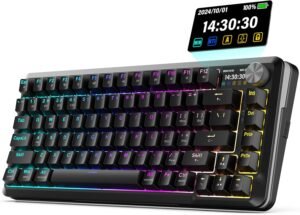
The Redragon K708 Pro is a wireless mechanical keyboard featuring a compact 81-key layout, a sturdy build, and a focus on a quiet, comfortable typing experience. Its gasket-mounted design and five layers of sound dampening contribute to a smooth, “creamy” feel with pre-lubed linear switches. Key features include tri-mode connectivity (Wired, 2.4GHz, Bluetooth), hot-swappable sockets for switch customization, a customizable LCD screen with a control knob, and vibrant RGB lighting. While many users praise its premium feel and features for the price, common complaints involve the Windows-only software being confusing or hard to find, the keycaps not being shine-through, and potential inaccuracies with the LCD screen’s battery indicator.
For more information, stick around and read below for my take on this product.
Hey there, welcome to our review of the Redragon K708 Pro Wireless Gaming Keyboard! We’re here to offer insights and hopefully make your decision-making a tad easier. We’ve collected details about the gaming accessory to share with you.
Throughout this review, we’ll delve into discussing its key features, highlighting user feedback, our impressions, and who might benefit most from it.
So, if you’re considering getting the Redragon K708 Pro Wireless Gaming Keyboard and want to know if it suits your needs, stick around!
Key Features
Tri-Mode Connectivity
This keyboard offers three ways to connect to your devices. You can plug it in with a USB cable, use the 2.4Ghz wireless dongle for a low-latency connection, or connect via Bluetooth. It supports pairing with up to three Bluetooth devices at once, and you can switch between them using a simple FN key shortcut.
Smart Info Screen & Control Knob
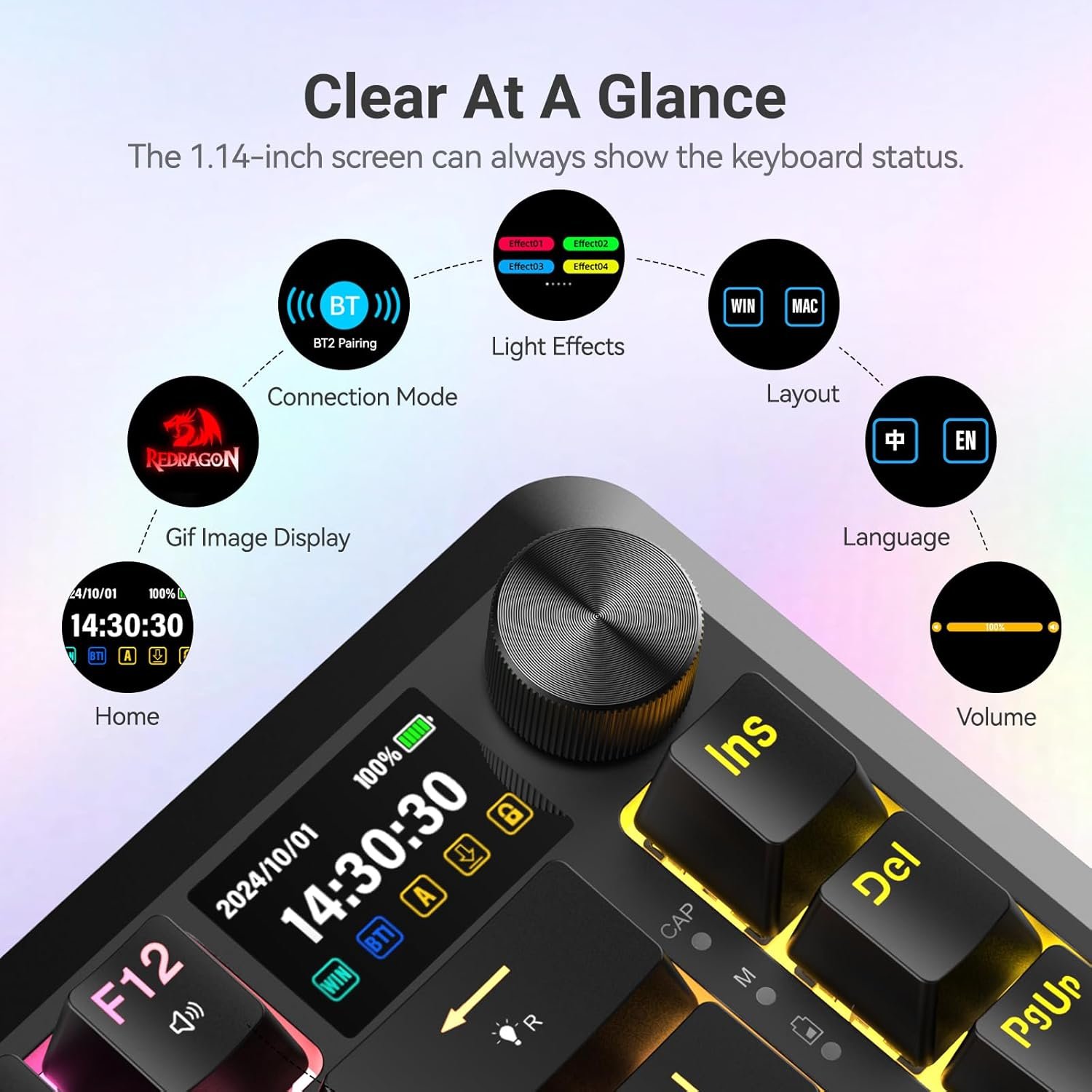
A built-in 1.14-inch TFT screen displays useful information like the current connection mode, battery level, RGB effects, and the time and date. An intuitive knob controls media volume by default, but you can press it to enter the LCD menu and adjust settings like lighting modes and screen displays.
Gasket-Mounted for a Creamy Typing Experience
The keyboard uses a gasket-mounted structure and has five layers of sound-dampening foam inside. This design, combined with pre-lubed Leopard L linear switches, helps reduce typing noise and creates a smooth, “buttery” keystroke with a quiet and responsive feel.
Hot-Swappable Customization
The K708 Pro features a hot-swappable PCB, which means you can easily pull out the switches and replace them with other 3-pin or 5-pin mechanical switches without any soldering. This allows for full customization of the keyboard’s typing feel.
On-Board Controls & Shortcuts
You can control many of the keyboard’s features directly without needing to open the software. Using FN key combinations, you can switch between 20 different backlight patterns, adjust the brightness and speed of the effects, change the lighting color, lock the Windows key, and access various multimedia and system shortcuts for both Windows and macOS.
Button Settings
Through the software, you can customize the keys to perform different actions. The options include assigning mouse functions, setting up turbo or auto-fire, mapping multimedia keys, triggering a macro, or using system and combo keys.
RGB Lighting Customization
The software provides 22 different lighting effects to choose from, including an option to turn them off completely. You can set up the lighting to sync with the rhythm of your system’s sound, and you have full control to adjust the color, speed, and brightness of the effects.
Macro Editor
The software also includes a feature that lets you set up and customize your own macros for automating tasks or creating shortcuts.
Screen Customization
You can personalize the on-board screen by uploading your own animated GIFs or pictures. The software even allows you to draw your own pixel art to be displayed on the screen.
Multi-Platform Compatibility
The keyboard is designed to work with a wide range of operating systems, including Windows (from XP to 11) and macOS.
Performance & Feedback
The Redragon K708 Pro has received a lot of positive feedback from customers, who often praise its comfortable and satisfying typing experience. Many users liked the soft and clicky feel of the keys, and the keyboard’s high-quality, sturdy build was another major plus. Customers also appreciated that the keyboard was easy to update.
The keyboard’s features are frequently highlighted as strong points. Customers enjoyed the tri-mode connectivity, which makes it easy to switch between devices, and many reported that the battery life is good. The RGB lighting is described as cool and vibrant, and the see-through keycaps are a nice touch. The neat LCD screen and the hot-swapping capabilities are also popular features, and many find the software is good for customizing the keyboard for gaming in general.
However, there are a few common complaints noted by some customers. The most significant issues seem to be with the software. Several users mentioned that they had a hard time navigating the website to find the correct software to download, finding the process misleading. Others reported performance problems like the program freezing, especially when trying to upload GIFs. A few users also reported that the information displayed on the LCD screen, such as the battery level, isn’t always accurate.
My Thoughts: Redragon K708 Pro
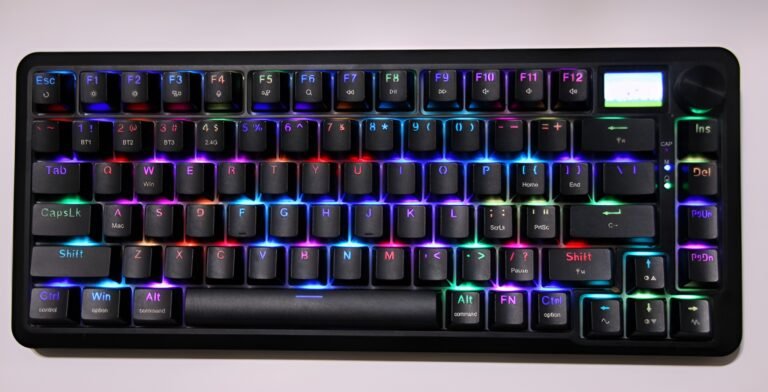
The keyboard has a solid battery life; it lasted about a week for me before needing another charge. The keys feel good to press and are relatively quiet, and the RGB lighting is very bright and colorful, which makes the keyboard visually pleasing. For a minimalist keyboard, it has a good weight to it—not so light that it feels cheap, but still easy enough to carry around if needed.
The LCD screen is a nice addition, and I appreciate that it features on-screen customization options, allowing you to adjust the keyboard without needing to open the software.
However, I did have a few complaints. The battery indicator on the LCD screen fluctuated and didn’t seem to provide an accurate reading of the remaining power. Also, when the battery gets low, the RGB lighting shuts off completely. Because the letters on the keycaps are not shine-through, this makes it very hard to see what you are typing in the dark.
My biggest issue was with the software experience. While it offers great custom features for the RGB lighting and LCD animations, the process of downloading it was confusing. The program is offered through more than one website, and I found versions with different names, like the K582 Pro Max, that still seemed to work. I just wish there were one clear, accurate website to download the correct program from. The software’s interface could also be improved; for example, when remapping keys, I wish there were better visual feedback to show which key I have selected to customize.
Who Would Likely Favor This Product?
Gamers who love customizing their gear might want to look into this keyboard. It is fully hot-swappable, meaning you can easily pull out the included switches and replace them with different ones to get the exact feel or sound you prefer, without any technical work. The software support, although currently Windows-only, allows for deep personalization, including remapping keys, creating macros, and designing your own RGB lighting effects.
Players who appreciate convenience and unique features could also find this keyboard appealing. The built-in screen provides useful information at a glance, like battery life and connection mode, and can even display custom GIFs. The control knob offers quick access to media volume and other settings without needing to use software. Plus, its tri-mode connectivity lets you easily switch between wireless (2.4GHz or Bluetooth) and wired connections across different devices.
Finally, gamers looking for a premium-feeling keyboard with a quieter typing experience might be interested. The gasket-mounted design and internal sound dampening provide a softer, more cushioned feel compared to traditional mechanical keyboards. The included pre-lubed linear switches offer a smooth and relatively quiet keystroke, making it suitable for shared spaces or late-night gaming sessions.
FAQ (Frequently Asked Questions)
Method 1 (Redragon Zone):
- Visit Redragon Zone
- Click on the “Downloads” tab.
- Look for “Redragon K708-RGB-PRO FLEKACT 3-Modes connection keyboard” in the list.
- Download the software found there.
Method 2 (Redragon Main Site):
- Visit Redragon
- Click on the “Downloads” tab.
- Find the software listed for the “Redragon K708-RGB-PRO Gaming Keyboard“.
- Note: The program found here might be named “KS82 Pro Max,” which is confusing, but it reportedly works with the K708 keyboard.
What does “gasket-mounted” mean?
A gasket-mounted keyboard uses soft material, like silicone, to cushion the internal plate that holds the switches. This design gives the keyboard a softer, bouncier typing feel and helps to reduce noise for a quieter experience.
Is this keyboard hot-swappable?
Yes, the keyboard is hot-swappable. This means you can easily pull out the mechanical switches with a tool and plug in different ones (both 3-pin and 5-pin are supported) to customize the keyboard’s feel and sound without any soldering.
What can I do with the LCD screen and knob?
The LCD screen can display keyboard information like the connection mode and battery level, and you can also upload your own custom GIFs to it. The knob is used to control media volume by default and to navigate the on-screen menu to adjust settings like RGB lighting and brightness.
Does the software work on Mac?
According to the product information, the software currently only works on Windows. Mac-compatible software is reportedly under development.
Are the keycaps shine-through?
Based on user feedback, the keycaps are not shine-through. The RGB lighting glows from around the keys rather than through the letters, which can make them harder to see in the dark.
If you are still interested in knowing more about the product, click the button below
Redragon K708 Pro Wireless Mechanical Gaming Keyboard Gasket-Mounted | 81 Hot-Swap Keys | Smart LCD Screen & Knob | 3-Mode Connectivity
- Smart Interactive Screen & Control Hub: Elevate your setup with a 1.14″ customizable LCD screen that shows Bluetooth status, battery life, RGB effects, and the date-time at a glance, and even lets you upload personal images or GIFs for a unique flair. An intuitive control knob provides instant adjustments for volume, lighting modes, and screen displays during gameplay.
- Triple-Mode Wireless Freedom: Seamlessly switch between 2.4GHz ultra-low latency for competitive gaming, Bluetooth 5.0 with 3-device pairing, and a classic USB-C wired mode. This keyboard offers excellent cross-platform compatibility, working with Windows, Mac, PS5, Xbox, and mobile devices.
- Gasket-Mounted for a Creamy Typing Experience: Enjoy premium sound dampening and buttery keystrokes with Redragon’s signature 5-layer gasket-mounted structure. It comes paired with pre-lubed Leopard L linear switches (45g actuation) for whisper-quiet operation and cloud-like responsiveness, perfect for long gaming sessions.
- Fully Hot-Swappable for Pro Customization: Unleash your creativity with fully hot-swappable sockets that support most 3-pin and 5-pin switches from brands like Akko and Gateron. You can reprogram every key, RGB zone, and the screen display using the intuitive software (Note: Software is currently Windows-only).
- Dynamic RGB Lighting & Long-Life Battery: Command 21 dynamic RGB backlight modes via the software or shortcut keys to create your ideal battle station. The 4000mAh battery provides up to 130 hours of wireless runtime with RGB off (22 hours with it on), and the real-time battery percentage display on the screen eliminates power anxiety.
Images by Gaming Gear Drop unless otherwise noted. Additional photos sourced from the official Redragon Amazon listing for review purposes.