This post contains affiliate links. If you purchase through them, we may earn a small commission at no extra cost to you. This product was provided through the Amazon Vine program for our honest review. All opinions are our own. Thanks for supporting Gaming Gear Drop.
Pros
Gasket-Mounted Design
Customizable LCD Screen
Multi-Function Knob
Tri-Mode Connectivity
Hot-Swappable Switches
Software Support
Cons
Software Complaints
Battery Life Complaints
Quality Control Issues
Quick Summary
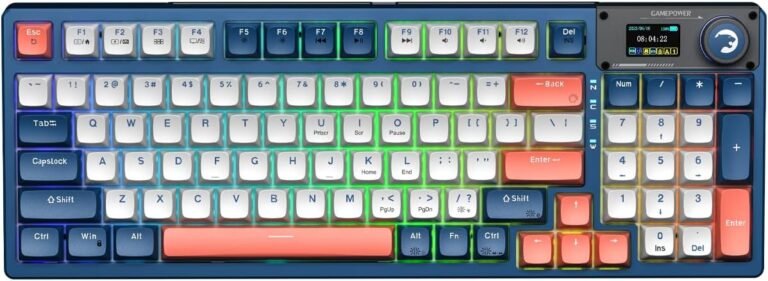
The GAMEPOWER Gasket Elite is a feature-packed mechanical keyboard that offers a high level of customization and a premium typing feel. It features a gasket-mounted design for a soft and quiet keystroke, a 95-key layout with a multi-function knob, and a customizable LCD screen that can display settings or custom GIFs. With tri-mode connectivity for multiple platforms and deep software support for macros and RGB lighting, it’s a very versatile option. However, some users have noted that the software is Windows-only and can be confusing, and there are occasional complaints about battery life and quality control issues. Overall, it’s a strong choice for gamers who want a customizable keyboard with lots of features and a comfortable typing experience.
For more information, stick around and read below for my take on this product.
Hey there, welcome to our review of the GAMEPOWER Gasket Elite Mechanical Gaming Keyboard! We’re here to offer insights and hopefully make your decision-making a tad easier. We’ve collected details about the gaming accessory to share with you.
Throughout this review, we’ll delve into discussing its key features, highlighting user feedback, our impressions, and who might benefit most from it.
So, if you’re considering getting the GAMEPOWER Gasket Elite Mechanical Gaming Keyboard and want to know if it suits your needs, stick around!
Key Features
Gasket-Mounted Design for a Softer Feel
The GAMEPOWER Gasket Elite keyboard uses a gasket structure, which means it has thin rubber or silicone strips placed between the internal parts to provide a more comfortable and satisfying typing experience. This design, combined with sound-dampening foam, helps absorb shock to create a quieter, more muted sound, provides a cushioned feel to reduce fatigue, and makes the keyboard feel more solid and stable.
Customizable LCD Screen & Knob Control
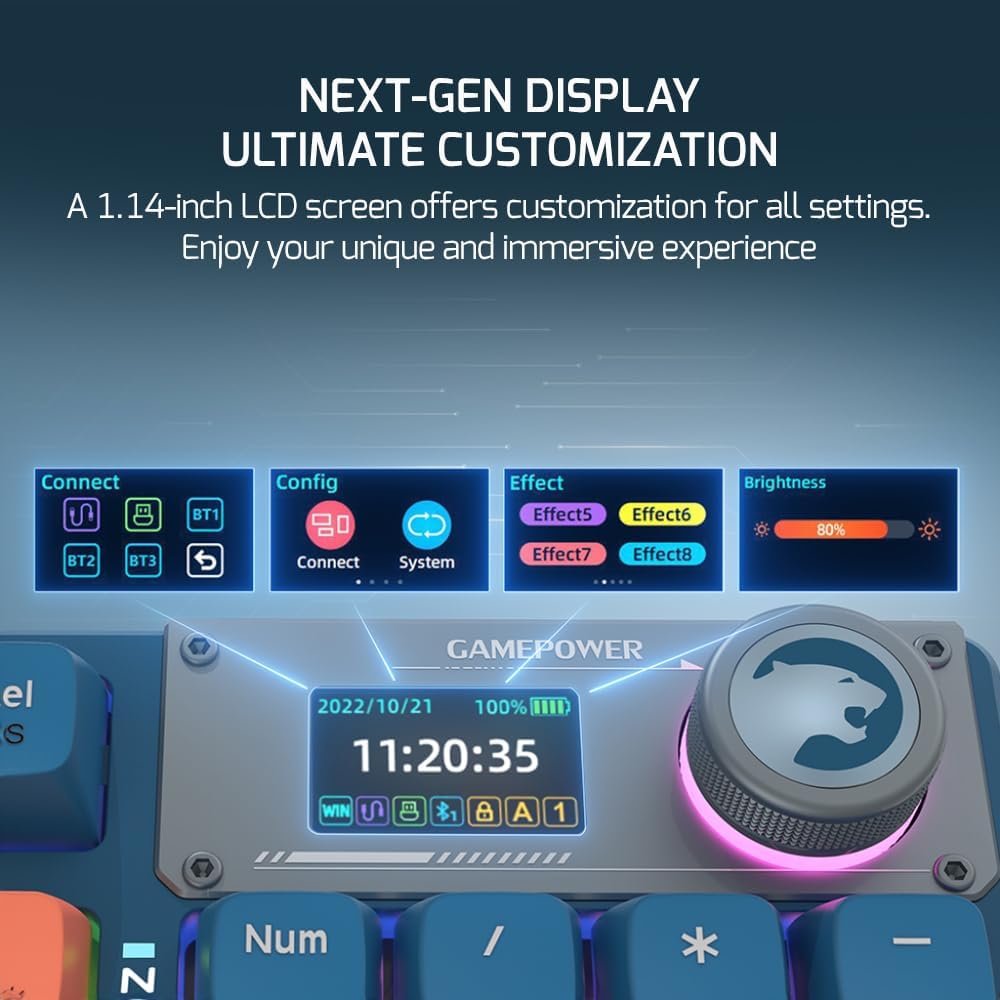
A built-in 1.14-inch LCD screen allows you to see and change settings directly on the keyboard. You can use the multi-function knob to switch between connection modes, select your operating system, and cycle through 19 different RGB lighting effects, adjusting their color, brightness, and speed. For added personality, the software can be used to upload custom GIFs to the screen.
Tri-Mode Connectivity & Multi-Platform Support
The keyboard offers three ways to connect: a detachable wired USB-C cable, low-latency 2.4GHz wireless, and Bluetooth. It is designed to work with multiple systems, including Windows, macOS, iOS, and Android.
Hot-Swappable Switches & Durable Keycaps
The Gamepower mechanical switches are hot-swappable, meaning you can easily pull them out and replace them with other types (like Linear, Clicky, or Tactile) to customize the keyboard’s feel. The included switches are rated for a 60 million keystroke lifetime. The keyboard is topped with durable PBT keycaps made with a double-shot and dye sublimation process in a stylish triple-tone design.
RGB Lighting Customization
The keyboard features fully customizable RGB lighting with 16.8 million colors to choose from. You can select from 19 different built-in lighting effects or use the software to create your own style. There is also a music sync feature that allows the keyboard’s lighting to react to the music playing on your computer.
Software Support
The keyboard has software support that allows you to customize a variety of settings. You can change the software’s language, reset it to default or factory settings, select different keyboard modes, and upgrade the firmware.
Key Remapping
All 95 keys on the keyboard are fully programmable. The software allows you to remap their functions for both the main layer and the FN layer to fit your needs.
Macro Customization
Through the software’s ‘Macro Manager,’ you can record and assign complex macros. These are custom sequences of keystrokes, mouse clicks, and delays that can be activated with a single button press.
Anti-Ghosting
The Gasket Elite is built for performance, featuring 100% anti-ghosting with N-key roll-over. This ensures that every single key press is registered accurately, even during the most intense and fast-paced gaming sessions.
Performance & Feedback
The GAMEPOWER Gasket Elite generally receives positive feedback, with many users praising its great build quality and high-performance feel. The keyboard is described as ergonomic and comfortable, with nice clicky keys that function well and have no delay. Its compact design is also a frequently mentioned plus for saving desk space.
Customers often highlight the useful multi-function knob and the easy, reliable tri-mode connectivity as standout features. The vibrant RGB lighting and the functional LCD screen are also praised for their visual appeal.
Many users report that the keyboard has a solid battery life, noting they hardly have to charge it daily.
However, there are some negative feedback noted by some users. A complaint is that the software support is limited to Windows, and Mac users have reported issues getting the keyboard to work properly. Some find the software is not intuitive to use.
There are also complaints about the battery, with some users stating the LCD screen doesn’t accurately report the charge level and that the battery life gets shorter over months of use.
Another key issue is that the keycaps are not shine-through, meaning the RGB light glows around the keys but not through the letters, which can make them hard to see in the dark.
Finally, there are some ‘bad batch’ complaints, including keyboards arriving with a broken dial or experiencing a general decline in quality over time.
My Thoughts: GAMEPOWER Gasket Elite Mechanical Gaming Keyboard
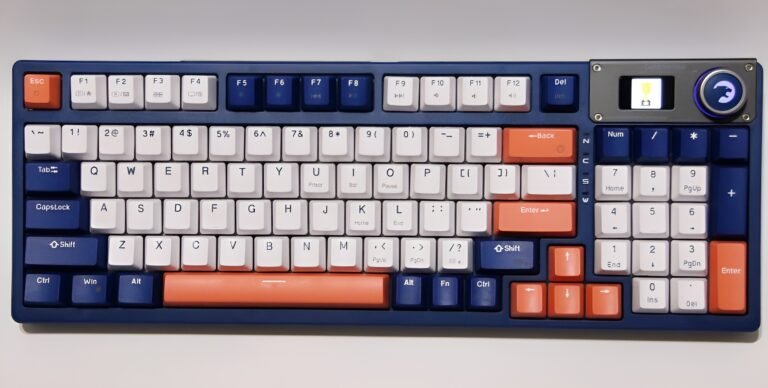
I’m a big fan of this keyboard’s overall cool design. When you turn it on, the LCD screen plays a neat animation, which is a nice touch. What I really appreciate is how many settings I can change directly on the keyboard itself.
I can easily switch between wireless or Bluetooth, select my operating system like Mac or Windows, and cycle through the built-in RGB lighting effects, all without opening any software. It’s great to have the option to just leave a fun animation playing on the screen too.
The Gamepower Gasket Elite Software was easy for me to find and install. It unlocks even more customization, allowing for detailed key remapping, advanced RGB lighting control, and macro creation.
For me, the best part is the ability to import my own short videos, which the software converts into GIFs to display on the keyboard’s screen. That level of personalization is an amazing feature and really makes the keyboard feel unique.
Who Would Likely Favor This Product?
Windows gamers who love to customize their gear might want to look into this keyboard. Its software support is designed for Windows, offering deep control over key remapping, macro creation, and advanced RGB settings, allowing players to create a fully personalized setup.
Competitive players could also find this keyboard appealing. It features 100% anti-ghosting to ensure every key press is registered accurately during fast-paced action. The included clicky blue switches provide a distinct tactile and audible feedback, which many gamers prefer for confirming their inputs in the heat of the moment.
Gamers who switch between different devices or just appreciate convenient tech might also be interested. The tri-mode connectivity makes it easy to connect to a PC, laptop, or other devices via a wire, Bluetooth, or 2.4GHz wireless. The built-in LCD screen and control knob are also a standout feature, letting you adjust settings on the fly without having to open the software.
FAQ (Frequently Asked Questions)
How do I get the software for this keyboard?
You can download the software from the official Gamepower website.
Main Method:
- Go to the Gamepower website.
- Click on the “Downloads” section.
- Search for “Gasket Elite“.
- Download the software.
Alternative Method:
- Go to the Gamepower website.
- Click on the “Keyboards” section.
- Find the Gasket Elite product page.
- Click on “Downloads” on that page to find the software.
What is Anti-Ghosting and N-key roll-over?
Anti-ghosting is a feature that ensures the keyboard correctly registers your inputs when you press multiple keys at the same time. N-key roll-over is a specific type of anti-ghosting that means every single key press will be recognized, no matter how many keys are held down at once, which is crucial for fast-paced gaming.
What is a Gasket Mounted Keyboard?
A gasket-mounted keyboard uses soft, flexible material (like silicone or rubber gaskets) to cushion the plate that holds the switches inside the keyboard case. This design gives the keyboard a softer, bouncier typing feel and helps to dampen sound for a quieter, more pleasant typing experience.
What is hot-swapping?
Hot-swapping means you can change the mechanical switches on your keyboard without having to do any soldering. You can simply pull the old switches out with a tool and plug new ones in, allowing you to easily customize the feel and sound of your keyboard.
What can I do with the LCD screen?
The LCD screen can display information like the current connection mode and selected operating system. You can also use it with the control knob to adjust settings like RGB lighting effects, brightness, and speed. The software allows you to upload custom GIFs to the screen for personalization.
Is this keyboard wired or wireless?
It supports three connection modes: wired via a detachable USB-C cable, 2.4GHz wireless with a USB dongle, and Bluetooth.
What kind of keycaps does it have?
It uses durable PBT keycaps made with a double-injection process. They are known for resisting the shine and wear that can happen with standard ABS keycaps.
Can I create macros?
Yes, the keyboard’s software includes a Macro Manager that allows you to record and assign custom sequences of keystrokes and mouse clicks to a single key.
If you are still interested in knowing more about the product, click the button below
GAMEPOWER Gasket Elite Mechanical Gaming Keyboard Triple Mode Connectivity | 95 Keys with Knob Switch | Gasket Structure | LCD Screen | RGB Backlit
Triple Mode Connectivity: Connect the keyboard your way with three different modes: a stable wired connection, low-latency 2.4GHz wireless, or versatile Bluetooth 5.1.
Customizable LCD Screen & Knob Control: Personalize your settings with ease using the built-in 1.14-inch customizable LCD screen. A multi-function knob switch allows for intuitive control over volume and the LCD screen’s functions.
Gasket-Mounted for a Superior Feel: Experience a premium typing feel with the keyboard’s gasket-mounted structure, which includes sound-dampening foam to isolate keycap noise and provide a softer, more satisfying keystroke.
Customizable RGB Lighting & Macros: Elevate your gaming setup with captivating and fully customizable RGB illumination. You can also maximize your efficiency by programming custom shortcuts and macros for both gaming and business use.
Pro-Gaming Performance & Durable Keycaps: Achieve flawless performance with 100% anti-ghosting, ensuring every key press is registered accurately during intense gaming and typing sessions. The keyboard comes with clicky Blue switches rated for 60 million clicks and features durable, double-injection keycaps with a futuristic, colorful design.
Images by Gaming Gear Drop unless otherwise noted. Additional photos sourced from the official GAMEPOWER Amazon listing for review purposes.