This post contains affiliate links. If you purchase through them, we may earn a small commission at no extra cost to you. This product was provided through the Amazon Vine program for our honest review. All opinions are our own. Thanks for supporting Gaming Gear Drop.
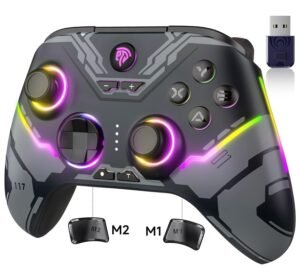
Pros
Hall Effect Controls
RGB Lighting
Back Buttons
Multiple Connections
Turbo Functions
Cons
- Manual Learning Curve
Quick Summary
The EasySMX X15 is a wireless gaming controller designed for PC, Nintendo Switch, Android devices, and compatible iPhone and iPad games. It focuses on providing multiple connection options, Hall Effect controls, and onboard customization features for players who use different gaming platforms.
The controller includes Hall Effect joysticks and triggers, programmable back buttons, RGB lighting controls, and support for wired, Bluetooth, and 2.4GHz wireless connections. Some features require button combinations and manual setup when adjusting settings such as Turbo functions, lighting modes, and button assignments.
Some users appreciate the controller’s customization options, connection flexibility, and comfortable layout, while others note that learning the advanced features can take some time and that the overall feel may not suit every preference.
For more information, stick around and read below for my take on this product.
Hey there, welcome to our review of the EasySMX X15 Wireless Gaming Controller.
For this review, we tested the EasySMX X15 Wireless Gaming Controller to offer honest insights and hopefully make your decision-making a tad easier. We have gathered the important details about this gaming controller to share with you, specifically focusing on its compatibility with PC, Nintendo Switch, Android devices, and compatible iPhone and iPad games.
Throughout this post, we will discuss its key features, highlight user feedback, share our personal impressions, and explain who might benefit most from it.
So, if you are looking for a wireless gaming controller for PC or Nintendo Switch gaming, stick around to find out if this suits your needs.
Key Features
Multi-Platform Compatibility
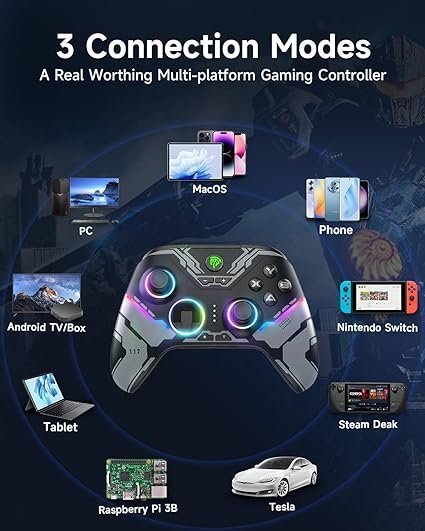
The EasySMX X15 is designed to work with several gaming platforms, including Windows PCs, Nintendo Switch systems, Android devices, and supported iPhone and iPad games. This allows players to use the same controller across multiple devices without needing separate controllers for each platform.
Multiple Connection Modes
The controller supports several connection methods, including 2.4GHz wireless, Bluetooth, and wired USB connections. Users can choose the connection method that best fits their gaming setup and switch between supported devices when needed.
Hall Effect Sticks and Triggers
The EasySMX X15 uses Hall Effect joysticks and triggers that rely on magnetic sensing technology. This design helps reduce wear over time while providing consistent movement and trigger input during gameplay.
Multi-System Compatibility
The EasySMX X15 controller is your go-to gaming companion, designed to seamlessly connect with a variety of platforms. Whether you’re a PC enthusiast, a console gamer, or love playing on your mobile device, our controller has you covered. Enjoy smooth and responsive gameplay across all your favorite platforms, from PC to Switch, iOS to Android. With the EasySMX X15, versatility meets simplicity, ensuring you can dive into gaming bliss without any compatibility headaches.
RGB Lighting Controls
The controller includes built-in RGB lighting that can be turned on or off using a dedicated switch. Users can also switch between lighting modes and adjust colors directly from the controller without requiring additional software.
Programmable Back Buttons
Two rear buttons can be programmed for supported actions and button combinations. This allows commonly used inputs to be placed on the back of the controller for easier access during gameplay.
Adjustable Vibration Settings
Vibration intensity can be adjusted directly from the controller. This allows users to increase, decrease, or fine-tune vibration feedback based on personal preference.
Battery and Charging
The controller uses a 1000mAh rechargeable battery and supports USB charging. Charging indicators help display battery status, while wireless operation allows for cable-free gaming on supported devices.
Turbo Functions
The EasySMX X15 supports both manual and automatic Turbo modes. Users can assign Turbo functions to supported buttons, adjust Turbo speed, and clear Turbo settings directly from the controller.
ABXY Layout Switching
The controller supports switching between PC and Nintendo Switch button layouts. This can help players maintain a familiar button arrangement when moving between different gaming platforms.
Performance & Feedback
Customers say the EasySMX X15 is comfortable to hold and easy to use during longer gaming sessions. The controller’s layout receives positive feedback, particularly from users who prefer a controller design similar to modern console controllers. The RGB lighting is also appreciated by those who like adding some visual customization to their gaming setup.
Users also speak positively about the controller’s customization options. Features such as programmable buttons, Turbo functions, vibration adjustment, and button layout switching provide additional flexibility for different gaming styles. The ability to connect through wired, Bluetooth, or 2.4GHz wireless modes is another feature that receives favorable feedback.
Some users mention that the controller feels lighter than expected compared to certain first-party controllers. Others note that learning the various customization features can take some time, especially when relying on button combinations and manual instructions for setup.
There are also occasional comments that the controller’s overall feel may not suit everyone’s preferences. While the available features are generally well received, some users would prefer a simpler setup process for accessing advanced functions.
My Thoughts: The EasySMX X15 Gaming Controller
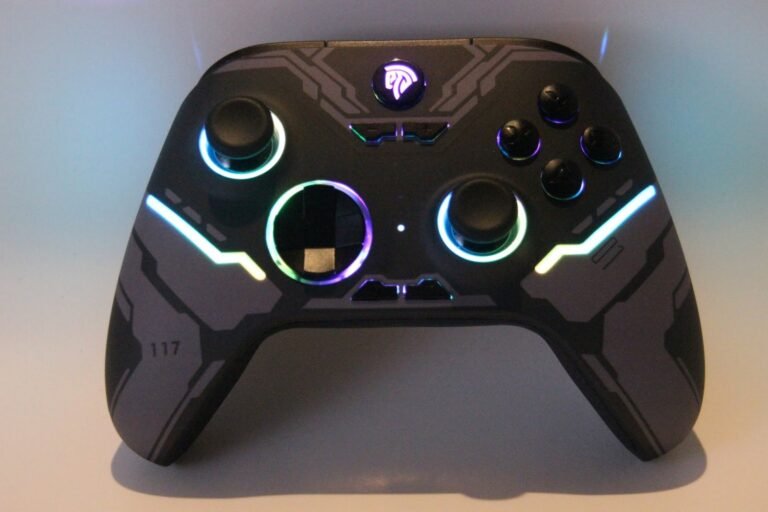
I have used a few EasySMX controllers over the years, and my experience has generally been positive. I have had an occasional controller develop issues in the past, but I did not run into any problems while using the EasySMX X15. It’s possible those earlier issues were isolated cases.
The controller feels comfortable in hand, and I adjusted to the layout quickly. I also liked having multiple connection options available. Between the wireless receiver, Bluetooth, and wired connection, it was easy to use the controller with different devices.
The RGB lighting is a nice addition, and I found the Turbo function useful in games that require repeated button presses. I did find myself referring to the manual when learning some of the controller’s advanced features, as several settings rely on button combinations rather than simple menus.
Overall, the controller felt straightforward to use once I became familiar with the controls and settings. The customization options are there if you want them, but learning how to access them may take a little time.
Who Would Likely Favor This Product?
Gamers who play across multiple platforms might want to consider the EasySMX X15. It supports PC, Nintendo Switch, Android devices, and compatible iPhone and iPad games, making it useful for those who regularly switch between systems.
Players who like customizing their controls might want to consider this controller. Features such as programmable back buttons, Turbo functions, vibration adjustments, and button layout switching provide additional control options for different gaming styles.
Those who use different connection methods might want to consider the EasySMX X15. The controller supports wired USB, Bluetooth, and 2.4GHz wireless connections, allowing it to work with a variety of gaming setups.
Gamers who prefer controllers with RGB lighting might want to consider this model. The built-in lighting controls allow users to adjust colors, switch lighting modes, or disable the lighting when it is not needed.
FAQ (Frequently Asked Questions)
What devices does the EasySMX X15 support?
The controller supports Windows PCs, Nintendo Switch systems, Android devices, and compatible iPhone and iPad games.
Does the EasySMX X15 support Bluetooth?
Yes. The controller supports Bluetooth connectivity for compatible devices.
Can I use the controller with a wired connection?
Yes. The controller supports wired USB connections in addition to Bluetooth and 2.4GHz wireless connectivity.
Does the EasySMX X15 use Hall Effect sticks and triggers?
Yes. The controller uses Hall Effect joysticks and Hall Effect triggers.
Can I customize the RGB lighting?
Yes. The controller supports multiple lighting modes and color adjustments.
Does the controller have programmable back buttons?
Yes. The EasySMX X15 includes two programmable back buttons.
Can I swap the ABXY button layout?
Yes. The controller supports switching between PC and Nintendo Switch button layouts.
How long does the battery last?
According to the manufacturer, the 1000mAh battery can provide up to 20 hours of use depending on settings and usage.
Does the controller include vibration feedback?
Yes. The vibration intensity can be adjusted directly from the controller.
Connectivity Quesitons
How to connect to a PC using the 2.4GHz wireless receiver
- Insert the wireless receiver into an available USB port.
- Press the Home button to power on the controller.
- Wait for the controller indicators to remain solid.
- Begin using the controller.
How to connect to a PC using Bluetooth
- Open Bluetooth settings on your PC.
- Hold the X and Home buttons for 3 seconds.
- Select Xbox Wireless Controller from the Bluetooth device list.
- Wait for the controller to connect.
How to connect to a PC using a USB cable
- Connect the controller to the PC using a USB cable.
- Wait for the controller indicators to remain solid.
- Begin using the controller.
How to connect to Nintendo Switch
- Open the Controllers menu on the Switch.
- Select Change Grip/Order.
- Hold the Home button for 3 seconds.
- Wait for the controller to pair successfully.
How to connect to Android
- Hold the A and Home buttons for 3 seconds.
- Open Bluetooth settings on the Android device.
- Select EasySMX X15 from the device list.
- Wait for the controller to connect.
How to connect to iPhone or iPad
- Hold the X and Home buttons for 3 seconds.
- Open Bluetooth settings on the device.
- Select Xbox Wireless Controller from the device list.
- Wait for the controller to connect.
Troubleshooting & Settings
How to turn RGB lighting on or off
- Locate the RGB lighting switch on the controller.
- Toggle the switch to turn the lighting on or off.
How to change RGB lighting modes
- Press and hold the Minus button.
- Press D-Pad Up to switch lighting modes.
How to change RGB lighting colors
- Press and hold the Minus button.
- Press D-Pad Left or D-Pad Right to cycle through available colors.
How to program a back button
- Press the Programming button.
- Press M1.
- Press the button or button combination you want to assign.
- Press M1 again to save the setting.
How to clear programmed buttons
- Press and hold the Programming button for 5 seconds.
- Wait for the programmed functions to be cleared.
How to enable manual Turbo
- Press the Turbo button and the desired button once.
- Hold the assigned button to activate continuous input.
How to enable automatic Turbo
- Press the Turbo button and the desired button twice.
- Press the assigned button once to activate continuous input.
How to disable Turbo
- Press the Turbo button and the assigned button a third time.
- The Turbo function will be removed.
How to clear all Turbo settings
- Press and hold the Turbo button for 5 seconds.
- Wait for all Turbo settings to be cleared.
How to adjust Turbo speed
- Press and hold the Turbo button.
- Press the Plus button to increase Turbo speed.
- Press the Minus button to decrease Turbo speed.
How to swap the ABXY button layout
- Press the B, Minus, and Plus buttons at the same time.
- Wait for the layout to switch between PC and Switch modes.
How to adjust vibration intensity
- Press and hold the Turbo button.
- Move the left joystick up to increase vibration strength.
- Move the left joystick down to decrease vibration strength.
How to power off the controller
- Press and hold the Home button for 5 seconds.
- Wait for the controller to shut down.
How to identify charging status
- Connect the controller to a charging source.
- Watch for the LED indicators to flash slowly while charging.
- Wait for the LEDs to turn off when charging is complete.
If you are still interested in knowing more about the product, click the button below
EasySMX X15 Wireless Gaming Controller – Hall Effect Controls | RGB Lighting | Multi-Platform Support
- Platform Compatibility – Designed for Windows PCs, Steam, Nintendo Switch, and Android devices. Not designed for Xbox, Luna, PlayStation 4, or PlayStation 5 systems.
- Hall Effect Sticks and Triggers – Uses Hall Effect joysticks and triggers with magnetic sensing technology to provide consistent control while reducing wear over time.
- RGB Lighting Modes – Includes multiple RGB lighting modes that can be adjusted directly on the controller. Lighting can also be turned off if preferred.
- Battery Performance – Features a 1000mAh rechargeable battery. According to the manufacturer, battery life can last up to 20 hours depending on usage and settings.
- Wireless Connectivity – Supports wireless connectivity for compatible PCs, Nintendo Switch systems, and Android devices.
- Programmable Back Buttons – Includes two rear buttons that can be assigned to supported functions or button combinations.
- ABXY Layout Switching – Supports switching between PC and Nintendo Switch button layouts to match the platform being used.
- Setup and Support – Includes a user manual with setup instructions and information about supported controller functions.
Images by Gaming Gear Drop unless otherwise noted. Additional photos sourced from the official EasySMX Amazon listing for review purposes.