This post contains affiliate links. If you purchase through them, we may earn a small commission at no extra cost to you. This product was provided through the Amazon Vine program for our honest review. All opinions are our own. Thanks for supporting Gaming Gear Drop.
Pros
- Hall Effect Controls
- Multiple Connections
- Customization Options
- Battery Life
- Faceplate Design
Cons
- Ergonomic concerns
Quick Summary
The EasySMX X10 is a wireless gaming controller designed for use with PC, Nintendo Switch, Android devices, and compatible iPhone and iPad games. It is built for players who want a controller that can move easily between different gaming platforms.
The controller supports multiple connection methods and includes features such as programmable back buttons, vibration adjustment, and a removable magnetic faceplate. An Android app is also available for additional customization options.
Some users appreciate the controller’s flexibility and customization features, while others note some ergonomic concerns.
For more information, stick around and read below for my take on this product.
Hey there, welcome to our review of the EasySMX X10 Wireless Gaming Controller.
For this review, we tested the EasySMX X10 Wireless Gaming Controller to offer honest insights and hopefully make your decision-making a tad easier. We have gathered the important details about this gaming controller to share with you, specifically focusing on its compatibility with PC, Nintendo Switch, Android devices, and supported iPhone and iPad games.
Throughout this post, we will discuss its key features, highlight user feedback, share our personal impressions, and explain who might benefit most from it.
So, if you are looking for a wireless gaming controller for PC, Nintendo Switch, or mobile gaming, stick around to find out if this suits your needs.
Key Features
Multi-Platform Connectivity
The EasySMX X10 supports multiple connection methods, including 2.4GHz wireless, Bluetooth, wired USB-C, and Nintendo Switch mode. A physical toggle switch on the back of the controller makes it easy to move between connection types.
It is compatible with PC, Nintendo Switch, Android devices, and supported iPhone and iPad games that use MFI compatibility.
Controller Layout and Design
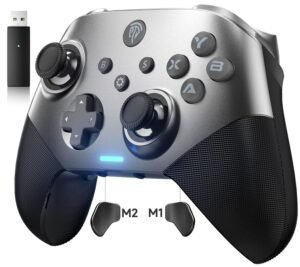
The controller features a familiar layout along with a removable magnetic faceplate that can be swapped without tools. EasySMX includes an additional magnetic cover in the box, allowing users to change the appearance of the controller.
The overall design also includes rear programmable buttons and dedicated controls for features such as Turbo and vibration adjustment.
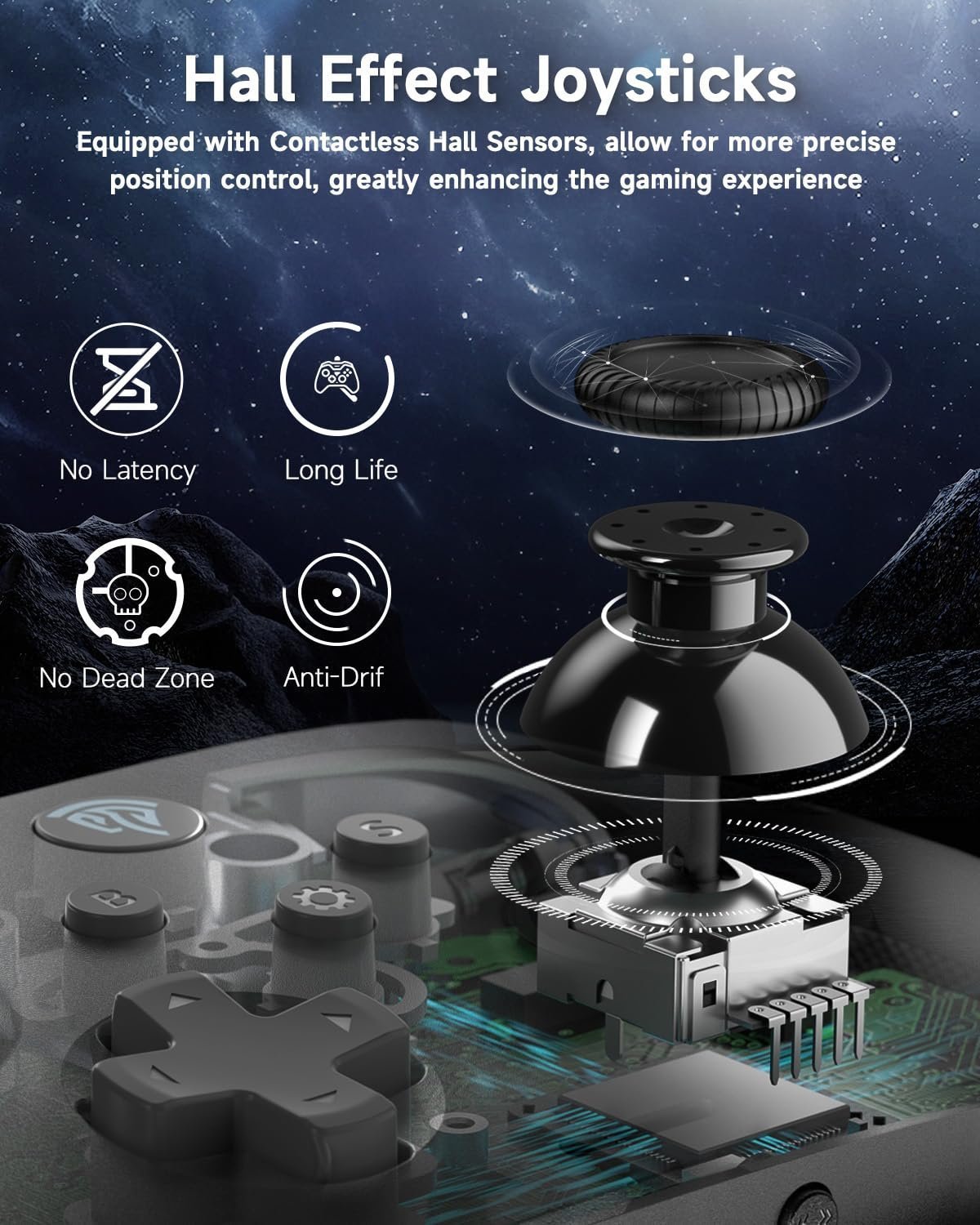
Hall Effect Control System
The EasySMX X10 uses Hall Effect joysticks and Hall Effect triggers. These components use magnetic sensors instead of physical contact points, helping reduce wear over time while maintaining consistent control.
This design is intended to provide smoother movement and trigger response during gameplay.
Programmable Back Buttons
The controller includes programmable rear buttons that can be assigned to different inputs. This allows frequently used commands or combinations to be moved to the back of the controller for easier access.
Programmed functions can also be cleared directly from the controller without additional software.
Turbo Functions
Turbo functionality can be assigned to supported buttons for repeated inputs. Users can choose between manual Turbo, which activates while holding a button, or automatic Turbo, which continues after a single press.
The Turbo speed can be adjusted directly from the controller, and all Turbo settings can be cleared when needed.
Adjustable Vibration Levels
The controller allows users to adjust vibration intensity without entering software menus. Multiple vibration levels are available, including an option to disable vibration completely.
This allows players to choose between stronger feedback or a lighter experience depending on personal preference.
Android App Support
An Android companion app is available for additional controller customization. The app allows users to adjust button assignments and modify controller settings directly from a mobile device.
This provides an alternative way to customize the controller without relying entirely on button combinations.
Battery and Power Management
The controller uses a 1000mAh rechargeable battery designed for extended gaming sessions. Charging is completed through a USB-C connection and typically takes around 2 to 3 hours.
Additional power management features include a low battery indicator and automatic power-off after periods of inactivity to help conserve battery life.
Performance & Feedback
Customers say the EasySMX X10 offers a wide range of customization options, which is one of its most appreciated features. The Hall Effect sticks and triggers are frequently mentioned for providing smooth and responsive control during gameplay. Users also speak positively about the controller’s compatibility across different platforms and the flexibility of having multiple connection methods available.
Some users mention that the controller feels well-built for its price range and appreciate features such as the programmable buttons, vibration adjustment, and companion app support. The ability to switch between wired, Bluetooth, and wireless receiver connections is also viewed as a practical advantage.
Some users note that the overall feel of the controller may take some adjustment, particularly for those who primarily use Xbox-style controllers. Others mention that the controller feels slightly smaller than expected, which may not be ideal for every hand size or grip preference.
My Thoughts: EasySMX X10 Gaming Controller
I spent some time using the EasySMX X10 across different devices, and the customization options stood out the most to me. Being able to adjust settings and make small changes to how the controller behaves made it easier to tailor it to my preferences.
I also liked having multiple connection options available. Between the wireless receiver, Bluetooth, and wired mode, it was easy to switch between devices when needed. The included manual was clear and made setup straightforward.
One thing I noticed is that the controller feels slightly smaller than some others I have used. It was not a major issue for me, but it is something worth noting depending on your hand size.
Overall, the EasySMX X10 felt easy to use and offered a good amount of flexibility without requiring much effort to get everything set up.
Who Would Likely Favor This Product?
Gamers who play across multiple devices might want to consider the EasySMX X10. It supports PC, Nintendo Switch, Android devices, and compatible iPhone and iPad games, making it useful for those who switch between platforms regularly.
Players who like adjusting their controls might also want to consider this controller. Features such as programmable buttons, Turbo functions, vibration settings, and app-based customization provide several ways to tailor the experience.
Those looking for flexible connection options may find this controller worth considering. It supports wired USB-C, Bluetooth, and 2.4GHz wireless receiver connections, allowing it to fit into a variety of gaming setups.
People who prefer a controller with Hall Effect sticks and triggers might also want to consider the EasySMX X10. These components are designed to reduce wear over time while maintaining consistent control during gameplay.
FAQ (Frequently Asked Questions)
What devices does the EasySMX X10 support?
The controller supports PC, Nintendo Switch, Android devices, and compatible iPhone and iPad games that use MFI support.
Does the EasySMX X10 support Bluetooth?
Yes. The controller supports Bluetooth connectivity for compatible devices.
Can I use the controller with a wired connection?
Yes. The controller supports wired USB-C connections in addition to Bluetooth and 2.4GHz wireless.
Does the EasySMX X10 support Xinput and Dinput?
Yes. The controller supports both Xinput and Dinput modes.
What is the difference between Xinput and Dinput?
Xinput is the standard mode used by most modern PC games and works similarly to an Xbox controller. Dinput is an older input mode that may be required for some older games or software.
Can I customize the buttons?
Yes. The controller supports programmable buttons and additional customization through the Android app.
How long does the battery last?
The controller uses a 1000mAh rechargeable battery. Battery life varies depending on usage and settings.
Does the controller include any accessories?
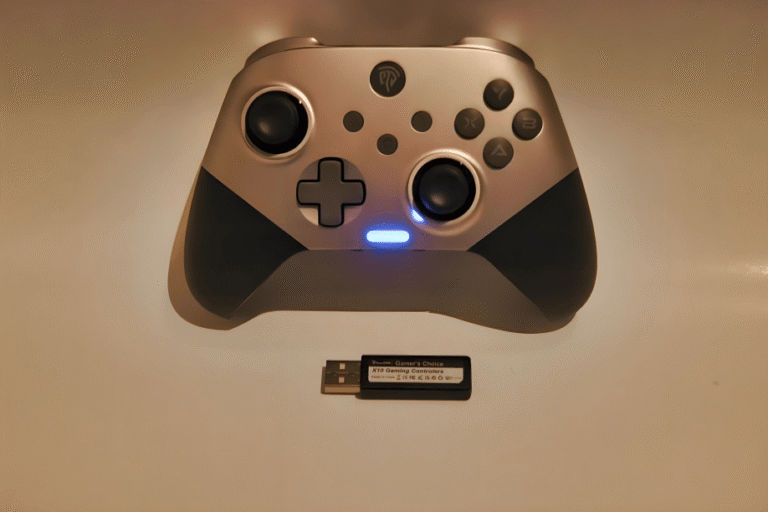
Yes. The package includes a wireless receiver, USB-C cable, magnetic replacement faceplate, and user manual.
Connectivity Questions
How to connect to PC using the 2.4GHz wireless receiver
Plug the receiver into a USB port
Switch the controller to Receiver mode
Press the Home button to power on
Wait for the indicator light to become solid
How to connect to PC using a USB-C cable
Switch the controller to Wired mode
Connect the USB-C cable to the controller and device
Wait for the indicator light to become solid
How to connect using Bluetooth
Switch the controller to Bluetooth mode
Hold the Home button for 3 seconds
Open Bluetooth settings on your device
Select Xbox Wireless Controller
Wait for the controller to pair
How to connect to Nintendo Switch
Switch the controller to NS mode
Hold the Home button for 3 seconds
Open Controllers on the Switch
Select Change Grip/Order
Wait for the controller to pair
How to switch between Xinput and Dinput
Connect the controller
Press and hold B and S for 3 seconds
Blue light indicates Xinput
Yellow light indicates Dinput
Troubleshooting & Settings
How to program a back button
- Hold the Settings button for 3 seconds
- Press M1/M2 once, then press the button or button combination you want to assign
- Press Settings again to save
How to clear programmed buttons
Hold the Settings button for 5 seconds
How to enable manual Turbo
- Press Turbo and the desired button once
- Hold the button for continuous input
How to enable automatic Turbo
- Press Turbo and the desired button twice
- Press the button once for continuous input
How to disable Turbo
Press Turbo and the desired button a third time
How to adjust Turbo speed
- Press Turbo and the Back button to decrease speed
- Press Turbo and the Start button to increase speed
How to clear all Turbo settings
Hold the Turbo button for 5 seconds
How to adjust vibration intensity
Press the Vibration button repeatedly
Available levels are 0%, 25%, 50%, 75%, and 100%
How to power off the controller
Hold the Home button for 5 seconds
If you are still interested in knowing more about the product, click the button below
EasySMX X10 Wireless Gaming Controller – Hall Effect Controls | Multi-Platform Support | Customizable Design
- Magnetic Faceplate Design- The controller includes a magnetic faceplate that can be removed and replaced without tools. This allows users to change the appearance of the controller using compatible faceplate options.
- Hall Effect Sticks and Triggers- The EasySMX X10 uses Hall Effect joysticks and triggers with magnetic sensing technology. These components are designed to provide consistent input while reducing wear associated with traditional contact-based designs.
- Battery Performance- The controller uses a 1000mAh rechargeable battery. According to the manufacturer, battery life can last up to 40 hours depending on usage, settings, and connection mode.
- Mechanical Button Design- The controller includes mechanical-style buttons designed to provide tactile feedback during gameplay. The buttons are intended to support quick and consistent inputs.
- Multi-Platform Compatibility- Compatible with PC, Nintendo Switch, Android devices, and supported iPhone and iPad games. Multiple connection options allow the controller to be used across different gaming platforms.
- Programmable Back Buttons- The controller includes two rear buttons that can be programmed for supported functions. These buttons can be configured to better match individual gameplay preferences.
- App Support- Additional controller settings and customization options are available through the EasySMX companion application on supported devices.
Images by Gaming Gear Drop unless otherwise noted. Additional photos sourced from the official EasySMX Amazon listing for review purposes.