This post contains affiliate links. If you purchase through them, we may earn a small commission at no extra cost to you. This product was provided through the Amazon Vine program for our honest review. All opinions are our own. Thanks for supporting Gaming Gear Drop.
Pros
- Hall Effect Thumbsticks
- Hall Effect Triggers
- Multi-Platform Compatibility
- Bluetooth Connectivity
- 2.4GHz Wireless Receiver
- Turbo Function
- Adjustable Vibration
- Button Layout Customization
- Stick & Trigger Calibration
- Zero Deadzone Mode
Cons
- No Printed Manual
- Confusing Documentation
- Lightweight Build
- Ergonomic Complaints
Quick Summary
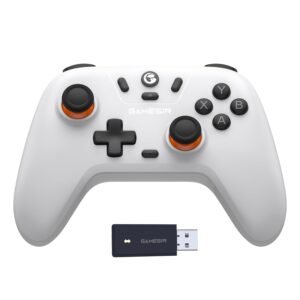
The GameSir Nova Lite is a wireless gaming controller designed for Nintendo Switch, Windows PCs, Android devices, and iOS devices. It supports Bluetooth, a 2.4GHz wireless receiver, and wired USB connections, making it easy to switch between multiple compatible platforms.
Its feature set includes Hall Effect thumbsticks, Hall Effect triggers, adjustable vibration, Turbo, interchangeable button layouts, thumbstick calibration, and 0 deadzone mode. These built-in customization options allow players to fine-tune the controller without requiring additional software.
While the controller offers a wide range of features for its price, some users feel the lightweight construction doesn’t feel as premium as higher-priced controllers. Others mention that the online documentation can be confusing, especially when learning the different connection modes and onboard controls.
For more information, stick around and read below for my take on this product.
Hey there, welcome to our review of the GameSir Nova Lite Wireless Gaming Controller!
For this review, we spent time testing the GameSir Nova Lite and exploring its features to better understand how it performs during everyday gaming. We also reviewed the available documentation to provide a balanced overview of its setup, customization options, and compatibility.
Throughout this review, we’ll cover its key features, customer feedback, our hands-on experience, and the type of player who may get the most value from this controller.
If you’re looking for a wireless gaming controller with Hall Effect thumbsticks, multiple connection options, and support for Nintendo Switch, Windows PCs, Android devices, and iOS devices, keep reading to see whether the GameSir Nova Lite is a good fit for your gaming setup.
Key Features
Multi-Platform Compatibility
The controller supports Nintendo Switch, Windows 7 and newer, Android 8.0 or later, and iOS 13 or later. Players can switch between supported platforms using different connection modes, making it a versatile controller for gaming across multiple devices.
Turbo Function
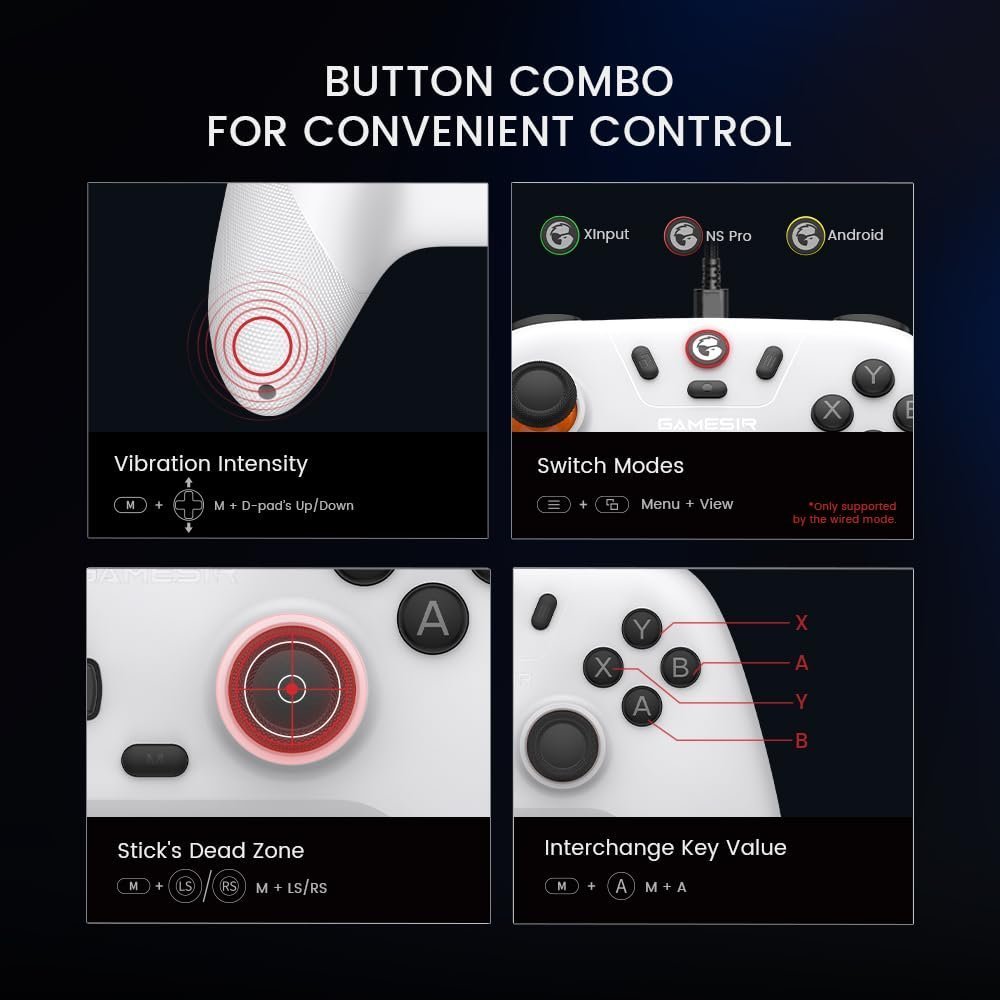
The built-in Turbo function allows supported buttons to repeat automatically while held down. Players can assign Turbo to compatible buttons, remove individual Turbo assignments, or clear all Turbo settings directly from the controller. These settings remain saved even after restarting.
Adjustable Vibration
The controller includes five vibration levels ranging from off to full intensity. Players can adjust the vibration strength directly from the controller to match their personal preference, and the selected setting is saved after the controller is powered off.
Button Layout & Controller Customization
The GameSir Nova Lite allows players to swap the A/B and X/Y button layouts, making it easier to match different gaming platforms or personal preferences. The controller also supports switching between XInput, Nintendo Switch Pro, and Android modes when using wired or receiver connections.
Hall Effect Thumbsticks & Hall Effect Triggers
The GameSir Nova Lite features Hall Effect thumbsticks and Hall Effect triggers, which use magnetic sensors instead of traditional contact points. This design helps reduce stick drift over time while providing smooth, accurate movement and trigger response during gameplay.
Rechargeable Battery
The built-in rechargeable battery provides up to 10 hours of gameplay on a full charge. LED indicators display charging progress, battery status, connection mode, and pairing status, while automatic power-saving features help extend battery life when the controller is idle.
Stick Dead Zone & Calibration
Players can enable or disable 0 deadzone mode for each thumbstick to fine-tune controller sensitivity. The controller also includes built-in stick and trigger calibration, helping maintain accurate movement and trigger response over time.
Multiple Connection Options
The Nova Lite supports Bluetooth, a 2.4GHz wireless USB receiver, and a wired USB connection. It also remembers the last paired device in each mode, making it quick to reconnect after powering the controller back on.
Performance & Feedback
Customers mention the GameSir Nova Lite’s responsive controls, Hall Effect thumbsticks, and multiple connection options as some of its standout features. The comfortable grip, lightweight design, and affordable price are also appreciated, making it a practical choice for gaming across Nintendo Switch, PC, Android, iOS, and other supported platforms.
Also, users appreciate the turbo function, adjustable vibration, interchangeable button layouts, and controller calibration options. These features provide additional customization and allow players to tailor the controller to different games and supported devices.
Some users mention that the controller’s lightweight construction doesn’t feel as premium as more expensive alternatives. Others comment that the controller can feel less ergonomic during longer gaming sessions. There are also complaints about the lack of a printed user manual, with some finding the online documentation confusing or difficult to follow when setting up certain features.
My Thoughts: GameSir Nova Lite Gaming Controller
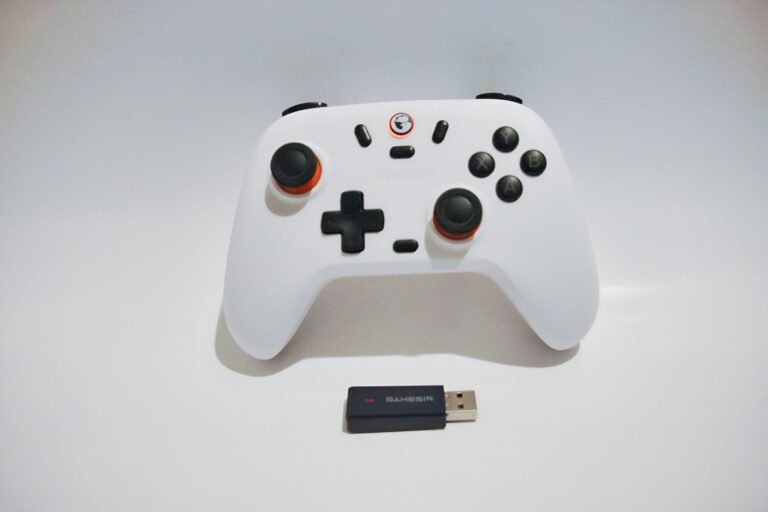
The GameSir Nova Lite feels lightweight in the hand and has a plastic construction, but considering its budget-friendly price, I didn’t find that to be a major drawback. My biggest frustration was the lack of a printed user manual. Instead of including one in the box, GameSir provides a QR code that directs users to the online documentation.
Unfortunately, I found the online manual to be confusing in a few areas. Some button combinations, particularly those for switching Bluetooth modes on PC and iOS, didn’t work as described during my testing. I eventually connected the controller to my PC using Android mode, but that created other limitations, including issues with Steam compatibility and vibration support.
Once I connected the controller to my Nintendo Switch and paired it with the included wireless receiver, it performed well. The pairing process took a little trial and error because the instructions weren’t always clear, but after the initial setup, the controller worked reliably and provided a smooth gaming experience.
One feature I appreciated was the variety of connection options. Being able to switch between Bluetooth, the wireless receiver, and a wired connection makes the Nova Lite a flexible controller for different gaming setups. My biggest suggestion for improvement would be clearer documentation, as I think a more detailed manual would make setup and some of the advanced features much easier to understand.
Overall, I think the GameSir Nova Lite offers good value for its price. While the documentation could be improved, the controller itself provides a solid feature set and performs well once everything is properly configured.
Who Would Likely Favor This Product?
Nintendo Switch players might want to look into the GameSir Nova Lite if they’re searching for a budget-friendly controller with multiple connection options and built-in features like Hall Effect thumbsticks, turbo, adjustable vibration, and motion controls. It offers a familiar controller layout while providing several customization options for supported games.
Players who game across multiple platforms may also find the Nova Lite appealing. It supports Nintendo Switch, Windows PCs, Android devices, and iOS devices through Bluetooth, a 2.4GHz wireless receiver, or a wired USB connection, making it convenient for those who regularly switch between compatible devices.
Gamers who enjoy customizing their controller settings might appreciate the Nova Lite’s built-in features, including adjustable vibration, interchangeable button layouts, stick dead zone settings, turbo functions, and thumbstick and trigger calibration. These options allow players to personalize the controller without requiring additional accessories.
Those looking for an affordable wireless controller with a wide range of features may also find the GameSir Nova Lite worth considering, especially if they’re comfortable spending a little extra time learning its connection modes and onboard controls.
FAQ (Frequently Asked Questions)
How do I access the GameSir Nova Lite User Manual?
- Visit the GameSir website.
- Open the Support section.
- Locate the Nova Lite controller.
- Download or open the latest User Manual.
The User Guide includes connection instructions, controller settings, troubleshooting tips, and explanations of the controller’s built-in features.
What devices is the GameSir Nova Lite compatible with?
The GameSir Nova Lite supports Nintendo Switch, Windows 7 and newer, Android 8.0 or later, and iOS 13 or later. It also works with compatible devices using Bluetooth, the included 2.4GHz wireless receiver, or a wired USB connection.
Does the GameSir Nova Lite have Hall Effect thumbsticks?
Yes. The controller features Hall Effect thumbsticks and Hall Effect triggers, which use magnetic sensors to provide smooth control while helping reduce the chance of stick drift over time.
How does the Turbo function work?
The GameSir Nova Lite includes a 20Hz Turbo function that can be assigned to supported buttons, including A, B, X, Y, LB, LT, RB, and RT. Turbo settings remain saved even after the controller is powered off.
How long does the battery last?
The built-in 600mAh rechargeable battery provides up to 10 hours of gameplay on a full charge and typically recharges in about 2 hours.
Can I customize the controller?
Yes. The controller allows you to adjust vibration intensity, swap the A/B and X/Y button layouts, enable or disable 0 deadzone mode, configure Turbo functions, and calibrate the thumbsticks and triggers directly from the controller.
Connectivity Questions
How do I connect the GameSir Nova Lite to a Nintendo Switch?
- Turn on your Nintendo Switch.
- Open Controllers from the HOME menu.
- Select Change Grip/Order.
- With the controller powered off, press Y + HOME until the Home indicator flashes red.
- Wait for the controller to pair.
- When the Home indicator stays solid red, the controller is connected.
How do I connect the GameSir Nova Lite to a Windows PC using Bluetooth?
- Make sure the controller is powered off.
- Press B + HOME until the Home indicator flashes blue.
- Open your PC’s Bluetooth Settings.
- Select Wireless Controller from the list of available devices.
- Wait until the Home indicator stays solid blue to confirm the connection.
How do I connect the GameSir Nova Lite using the 2.4GHz wireless receiver?
- Insert the included USB receiver into an available USB port.
- Press the pairing button on the receiver until its indicator flashes rapidly.
- With the controller powered off, press X + HOME until the controller’s indicator flashes green.
- Wait for both the receiver and controller indicators to stay solid.
- The controller is now connected and ready to use.
How do I connect the GameSir Nova Lite to an Android device?
- Make sure the controller is powered off.
- Press A + HOME until the Home indicator flashes yellow.
- Open the Bluetooth settings on your Android device.
- Select GameSir Nova Lite from the list of available devices.
- Wait until the Home indicator stays solid yellow to confirm the connection.
How do I connect the GameSir Nova Lite to an iPhone or iPad?
- Make sure the controller is powered off.
- Press B + HOME until the Home indicator flashes blue.
- Open the Bluetooth settings on your iPhone or iPad.
- Select DUALSHOCK 4 Wireless Controller from the available devices.
- Wait until the Home indicator stays solid blue to confirm the connection.
Does the controller reconnect automatically?
Yes. After the controller has been paired in a specific connection mode, simply press the HOME button to power it on. If the connection mode hasn’t changed, the controller will automatically reconnect to the last paired device.
Programming & Troubleshooting
What should I do if the controller won’t connect?
- Verify that the controller has enough battery power.
- Make sure you’re using the correct connection mode for your device.
- Confirm that Bluetooth is enabled if you’re pairing wirelessly.
- If necessary, remove the existing Bluetooth pairing and pair the controller again.
- If the issue continues, refer to the connection status section in the User Guide.
How do I reset the controller?
- Locate the small Reset hole on the back of the controller.
- Use a paperclip or another small object to press the Reset button.
- The controller will power off and can then be powered on again.
How do I calibrate the thumbsticks and triggers?
- Turn on the controller.
- Hold the calibration button combination described in the User Guide until the Home indicator blinks white.
- Fully press both triggers three times.
- Rotate both thumbsticks through their full range of motion three times.
- Press the A button to complete calibration.
- A solid white Home indicator confirms the calibration is finished.
Can I adjust the vibration strength?
Yes. The controller provides five vibration levels, including an option to turn vibration off. You can adjust the vibration intensity directly from the controller, and the selected level remains saved after restarting.
Can I change the button layout?
Yes. The GameSir Nova Lite lets you swap the A/B and X/Y button assignments directly from the controller. Your selected layout remains saved after the controller is restarted.
Can I adjust the thumbstick dead zone?
Yes. The controller allows you to enable or disable 0 deadzone mode for the left and right thumbsticks, allowing you to fine-tune stick sensitivity for different games or personal preferences.
If you are still interested in knowing more about the product, click the button below
GameSir Nova Lite 2.4g Wireless Controller for Windows PC, iPhone, Android, Switch & Steam Deck, Bluetooth Controller Gamepad with Hall Effect Trigger,Turbo,Rumble Vibration
Elevate your gaming experience with the GameSir Nova Lite wireless game controller, compatible with Windows 10/11, Switch, Android, iOS, and the new Steam Deck right out of the box, complete with a 2.4G dongle for added convenience.
Say goodbye to joystick dead zones and drifting with the GameSir Hall Effect joysticks, ensuring precise control and uninterrupted gameplay immersion like never before.
Enjoy the same level of precise control as the popular PS5 controller with the Nova Lite’s linear triggers, enhancing your gameplay enjoyment to new heights.
Experience unparalleled flexibility with three connectivity options—Bluetooth, 2.4G Wireless Dongle, and USB-C—allowing you to effortlessly switch between devices for a hassle-free gaming experience.
Unleash your gaming potential with the Nova Lite Bluetooth Controller’s 20Hz Turbo function and customizable buttons, providing a convenient way to enhance gameplay with just a press of the M button.
Keep the gaming excitement going for up to 10 hours on a single charge with the Nova Lite’s built-in 600mAh battery, ensuring uninterrupted playtime for extended gaming sessions.
Take control of your gaming experience with the multi-function M button, seamlessly adjusting various settings such as vibration intensity and button layout to suit your preferences.