This post contains affiliate links. If you purchase through them, we may earn a small commission at no extra cost to you. This product was provided through the Amazon Vine program for our honest review. All opinions are our own. Thanks for supporting Gaming Gear Drop.
Pros
Multi-platform
6 rear buttons
Tri-mode connect
Replaceable parts
Customizable buttons
Hall-effect sticks
Trigger locks
Motion controls
Software support
EQ & audio jack
Lighting options
Cons
Bad batch complaints
Software complaints
Back paddles complaints
Quick Summary
The BEITONG Zeus 2 Elite is a modular wireless controller designed for PC, Switch, Android, iOS (native games), and Steam Deck. It connects through Bluetooth, 2.4 GHz wireless, or USB-C, giving players plenty of flexibility across platforms.
Customers say the controller feels high quality, with solid buttons, comfortable grips, and useful extras like six rear paddles and a motion control switch. The modular parts are another highlight, letting users swap joysticks, D-pads, button modules, and even the face shell for a more personal setup. Features like trigger locks, vibration adjustment, EQ sound controls, and customizable lighting add to the sense that this controller is built for tinkering.
Some issues are reported, including connection hiccups, software that can be confusing for beginners, and back paddles that may be pressed by mistake. Still, most feedback is positive, with players appreciating the overall build quality and the wide range of customization options packed into this controller.
For more information, stick around and read below for my take on this product.
Hey there, welcome to our review of the BEITONG Zeus 2 Elite Wireless Gaming Controller!
We’re here to offer insights and hopefully make your decision-making a tad easier. We’ve collected details about the gaming accessory to share with you.
Throughout this review, we’ll delve into discussing its key features, highlighting user feedback, our impressions, and who might benefit most from it.
So, if you’re considering getting the BBEITONG Zeus 2 Elite Wireless Gaming Controller for multiple uses and want to know if it suits your needs, stick around!
Key Features
Controller Layout
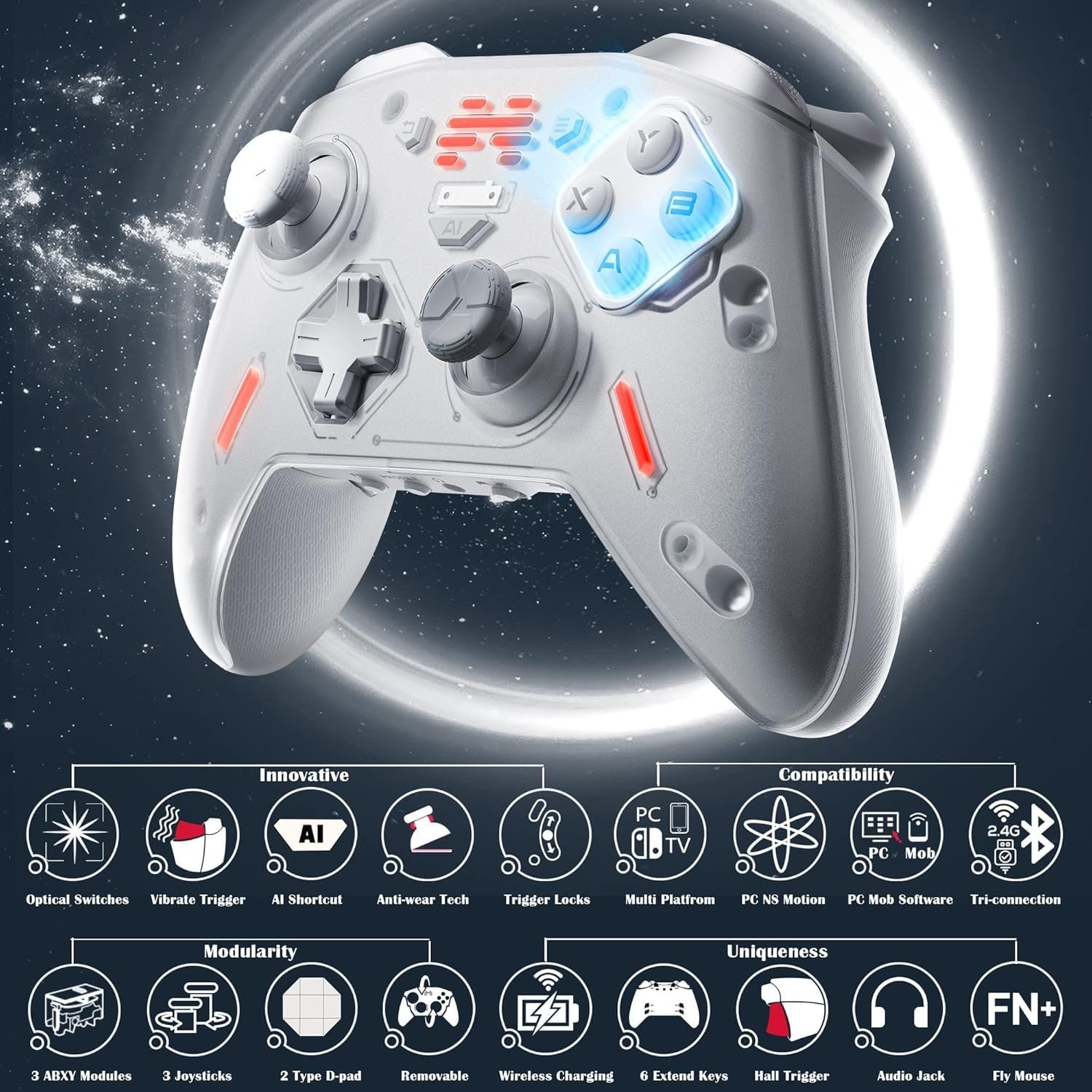
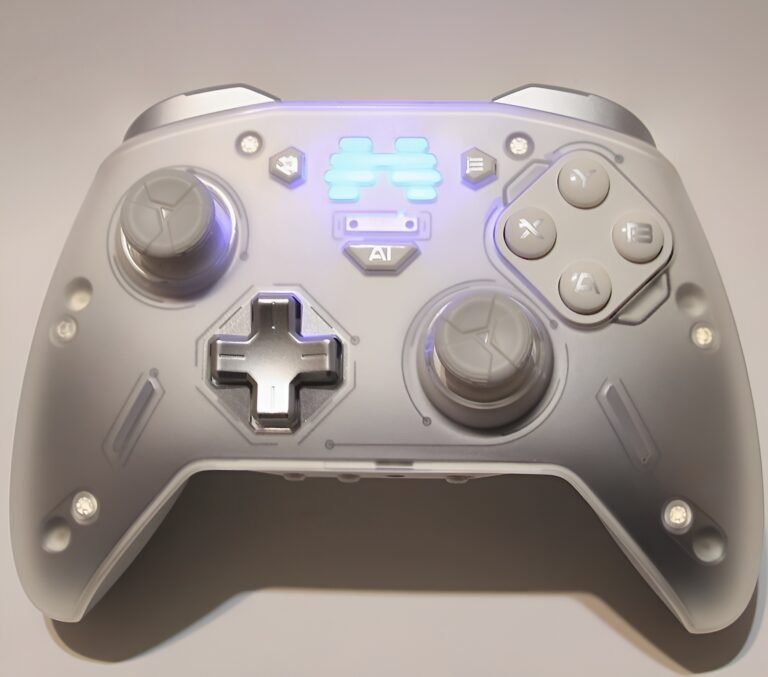
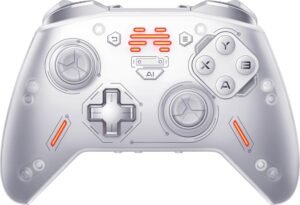
The Zeus 2 Elite has a clear and practical layout with several dedicated keys and switches. The FN key is used with other buttons to trigger shortcuts like screenshots, recording, or returning to the desktop. The Profile Key lets you store and switch between four different configurations, making it easy to swap setups between PC and Nintendo Switch. A standard 3.5 mm audio jack supports wired headsets with EQ settings, while the somatosensory switch enables motion controls for games that support tilt or six-axis input.
The controller also includes Hall effect triggers with locks and vibration, providing short or long pulls and added feedback. On the back, there are six extra programmable buttons (M1–M6) that can be mapped for macros or shortcuts. Standard system buttons like Start and Back double as capture or home functions when paired with the FN key. Finally, a mode switch on the back lets you select between wired, Bluetooth, or 2.4 GHz wireless connection.
Replaceable Parts
The Zeus 2 Elite is designed with modular parts that can be swapped to match your style. Joysticks come in three heights, letting you choose more control for shooters, racing, or sports games. The D-pad can also be switched between two designs depending on what feels best. Even the front face shell is magnetic and easy to replace for a fresh look.
The main action buttons are also modular. You can choose between three different styles: classic conductive buttons that feel soft and quiet, crisp mechanical buttons with a sharper click, or fast optical microswitch buttons that trigger almost instantly. This lets players adjust not only how the controller looks, but also how it feels when pressing each button.
Lighting Customization
You can adjust the controller’s lighting with multiple colors and effects, including breathing or always-on modes. The indicator lights can also be set to flash with vibration feedback, so the lights respond during in-game actions like collisions or hits.
Tri-Mode Connectivity
The Zeus 2 Elite supports three ways to connect: USB-C cable, 2.4 GHz wireless with the dongle, or Bluetooth. This makes it easy to switch between devices without hassle.
Multi-Platform Use
Compatible with Windows 7 and later, Android, iOS (native games), Steam Deck, and Nintendo Switch, giving players plenty of ways to use it across systems.
Joystick Sensitivity & Curves
You can fine tune how the joysticks respond. Choose preset curve types like smooth, delayed, or immediate, or make your own custom curve for precise control. The software also lets you calibrate sensitivity ranges, invert the axes, and even map the sticks to act as different inputs like keys or mouse controls.
Trigger Settings
The Hall-effect triggers can be customized for full, short, or delayed pulls, and you can set exactly where they start and stop responding. Trigger vibration can also be adjusted with separate strength for the left and right side.
Motion Controls (Somatosensory)
The Zeus 2 Elite includes built-in motion sensors. You can tilt the controller to aim or steer in games, and map the movement to the left stick, right stick, or even mouse control. Modes include Immediate (responds as you move) or Continuous (keeps input until you reset). You can also set sensitivity from 1 to 5, reverse axes, or calibrate motion before play.
Mouse Mode
Pressing the FN key switches to mouse mode, turning the sticks into a pointer for controlling a PC at a distance. You can adjust speed and scrolling, or even combine motion control with mouse mode for smoother movement.
Audio and EQ Customization
The controller’s audio jack supports EQ tuning with several preset profiles like Pop, Dance, Classical, or Jazz. You can also build your own sound profile by adjusting frequency bands for bass, mids, and highs.
Macros and Button Mapping
All buttons on the Zeus 2 Elite can be reassigned. You can map them to other inputs, create shortcuts, or use the six back buttons for macros to perform multiple actions with one press.
Profile Key
The profile button allows you to store and switch between four different configurations, making it easy to swap setups between PC and Nintendo Switch.
Software Support
The BEITONG Gamepad Assistant software adds extra value. It allows firmware updates, advanced joystick and trigger calibration, curve editing, lighting customization, vibration tuning, and full button remapping. This ensures the controller stays up to date and gives players a wide range of ways to personalize their setup.
Performance & Feedback
Many customers feel the Zeus 2 Elite is a high-quality controller with a solid overall build. They like that it includes back paddles, which can be set to different actions and give some extra flexibility in games. The buttons press well and feel reliable, and the grips are comfortable enough for longer play sessions. Customers also mention that the extra swappable parts, like different sticks and D-pads, are a nice touch, and the three connection options with Bluetooth, 2.4 GHz, and USB-C make it easy to use the controller on different systems. The included software is seen as useful since it allows updates and provides ways to adjust settings on the controller.
Some complaints do appear in reviews. A few customers mention disconnection issues where the controller can lose signal during use. Others find the software a bit confusing at first, which makes it harder for new users to set up. Some also point out that the back paddles can be pressed by mistake depending on how they hold the controller. While these issues exist, most users agree the controller feels well made, offers a good mix of features, and works as expected for gaming.
My Thoughts: BEITONG Zeus 2 Elite Wireless Controller

This controller comes with a lot right out of the box. The package includes extra thumbsticks, buttons, and D-pads, which makes it feel like you are getting a full kit. The grips are comfortable, the thumbsticks feel smooth, and the button layout is easy to get used to.
I tested it mainly on PC and also on the Nintendo Switch, and it worked well in both cases. It connects through Bluetooth, 2.4 GHz wireless, or a wired USB cable, so switching between setups is simple.
One of the things I like most is how customizable it is. I can swap out the buttons, D-pad, or thumbsticks to fit my own style. For example, if one set of buttons feels too sensitive, I can replace them with another option that feels better for me. Having that kind of flexibility lets me fine tune the controller for different types of games.
The battery has also been reliable. It lasted me about a week and a few extra days before I needed to recharge, even with long play sessions.
The software adds even more value. It gives firmware updates to improve performance and lets me change button mapping, lighting, and other settings. It also provides helpful explanations for each feature, which makes it easier to understand how to use all of the customization options.
Who Would Likely Favor This Product?
Gamers who want a multi-compatible controller might look into the Zeus 2 Elite. It works on PC, Nintendo Switch, Steam Deck, Android, and even iOS for native games, making it a good fit for anyone who plays across different systems.
Players who enjoy customizing their gear may also find this controller appealing. With swappable joysticks, D-pads, button modules, and even the front shell, it offers plenty of ways to adjust the look and feel.
Those who want software support might also be interested. The companion app provides firmware updates, calibration tools, and options to adjust lighting, vibration, macros, and EQ settings, giving players more control over their setup.
Finally, gamers looking for durable sticks and triggers may appreciate the use of Hall effect technology, which helps reduce drift and improves accuracy. The addition of trigger locks makes it easier to fine-tune performance in shooters or other fast-paced games.
FAQ (Frequently Asked Questions)
How do I get the software?
- Go to the BEITONG website
- Click Support
- Download the BEITONG Gamepad Assistant for PC, iOS, or Android
How do I get the manual?
- Go to the BEITONG website
- Click Support
- Find the User Manual section
- Download the Zeus 2 Manual
What does Hall effect mean for sticks and triggers?
It uses magnets instead of physical contact to detect movement. This helps prevent stick drift and makes the controller more durable over time.
What is the motion control feature?
The built-in motion sensor lets you tilt the controller to aim, steer, or perform actions in supported games.
Does the controller support macros?
Yes. You can record multiple actions and assign them to one of the six rear buttons for quick use.
What platforms does it work on?
Windows 7 and later, Nintendo Switch, Steam Deck, Android, and iOS (native games).
If you are still interested in knowing more about the product, click the button below
BEITONG Zeus 2 Elite Wireless Controller
- Multi-platform support: Windows PC, Steam Deck, Nintendo Switch, Android, and iOS (native controller-compatible games). Works with Xbox Cloud Gaming and popular titles like Fortnite, Roblox, CoD, CS, and Minecraft.
- Tri-mode connectivity: Bluetooth 5.0, 2.4 GHz USB receiver, or USB-C wired (6.5 ft cable included).
- Modular controls: Three AXBY button modules (different press feels), three joystick heights, two D-pad styles, and a replaceable face shell.
- Optical microswitch buttons + 1000 Hz wired polling: Short 0.25 mm actuation and fast response; enable up to 1000 Hz polling over USB after updating via BEITONG Gamepad Assistant.
- Hall triggers with locks & trigger vibration: Magnetic sensing for precise input, selectable short/long travel, plus built-in trigger rumble effects.
- Motion control & shortcuts: Six-axis gyro for Switch and supported PC games; AI Shortcut key for one-press screenshot/recording/game boost/app access.
- Pro mapping: Six rear buttons, macro-programmable (save up to ~30 actions each), with a Profile key to switch layouts on the fly.
- Audio & tools: 3.5 mm headset jack with onboard DAC, customizable EQ (bands, subwoofer, channel balance), and FN “fly mouse” mode to move the PC cursor.
- Battery & in the box: 1000 mAh rechargeable battery. Includes controller, 2.4 GHz receiver, 2 extra button modules, 2 extra joystick caps, 3 extra D-pads, and USB-C charging cable.
Images by Gaming Gear Drop unless otherwise noted. Additional photos sourced from the official BEITONG Amazon listing for review purposes.