This post contains affiliate links. If you purchase through them, we may earn a small commission at no extra cost to you. This product was provided through the Amazon Vine program for our honest review. All opinions are our own, and our original thoughts are enhanced with AI for clarity. Thanks for supporting Gaming Gear Drop.
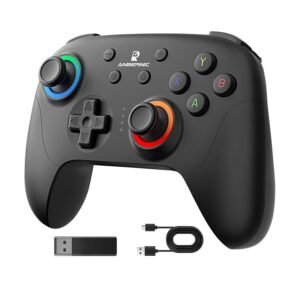
Pros
- Hall Effect Joysticks
- Tri-Mode Connectivity
- Great Battery Life
- Custom RGB Lighting
Cons
- Fast Sleep Mode
- Mixed Ergonomics
Quick Summary
The ANBERNIC RG P01 is a solid, budget-friendly choice that many users prefer for its versatility across platforms. It fits comfortably in most hands and features a long-lasting battery that holds up well over time. Gamers appreciate the responsive, drift-free Hall Effect joysticks and the easy-to-use extra features like programmable back buttons and RGB lighting. However, it has some minor downsides. Some users find the automatic sleep mode activates too quickly during short pauses, and ergonomics are mixed, with reports of the back buttons being easy to press by mistake. Though most customers feel it offers good value for the money compared to expensive pro controllers.
For more information, stick around and read below for my take on this product.
Hey there, welcome to our review of the ANBERNIC RG P01 Wireless Gaming Controller.
For this review, we tested this controller to offer honest insights and hopefully make your decision-making a tad easier. We have gathered all the important details about this gaming accessory to share with you, specifically focusing on the black version of the controller.
Throughout this post, we will discuss its key features, highlight user feedback, share our personal impressions, and explain who might benefit most from it.
So, if you are searching for a versatile all-rounder to handle your PC, Nintendo Switch, and mobile gaming, stick around to find out if this suits your needs.
Key Features
Multi-Platform Compatibility
The RG P01 is compatible with a wide range of devices, including PC, Steam, Nintendo Switch, Android, and iOS. This broad support allows you to use a single gamepad across your computer, console, and mobile phone without needing to purchase separate hardware for each system.
Tri-Mode Connectivity
This controller provides three different connection methods to suit your gaming setup. For mobile gaming and the Nintendo Switch, you can connect via Bluetooth 5.3 which operates at a 180Hz polling rate. For PC gaming, the included 2.4G Wireless Dongle offers a low-latency 200Hz connection. For the fastest response times, the Wired USB-C connection delivers a 1000Hz report rate.
Hall Effect Joysticks & Triggers
Both the thumbsticks and triggers utilize Hall Effect technology. Instead of using physical components that rub together, this system relies on magnets to detect movement. This design prevents “stick drift” and ensures the components remain precise and durable over a much longer lifespan compared to standard potentiometers.
Smart Power Management
A 600mAh battery powers the device, providing approximately 9 hours of continuous use on a single charge. To preserve battery life, the controller automatically enters sleep mode after 5 minutes of inactivity. Pressing the Home button wakes the device and immediately reconnects it to your system.
Programmable Back Buttons
Two additional buttons, labeled M1 and M2, are located on the back of the controller. You can program these buttons to perform specific functions, such as pressing multiple buttons simultaneously or executing a recorded sequence of inputs. This allows for easier execution of complex combos or repetitive actions.
Turbo & Vibration Control
The Turbo function allows you to assign rapid-fire capabilities to specific buttons, with options for both semi-automatic and fully automatic modes. Additionally, you can adjust the speed of the rapid-fire and modify the intensity of the dual vibration motors to customize the physical feedback during gameplay.
Customizable RGB Lighting
The controller includes a 16-million color RGB ring around the joysticks. You can cycle through various lighting modes, such as “Breathing,” static colors, or gradients. The device saves your lighting preferences automatically, so the settings remain saved even after the controller is powered off.
Advanced Customization & Firmware
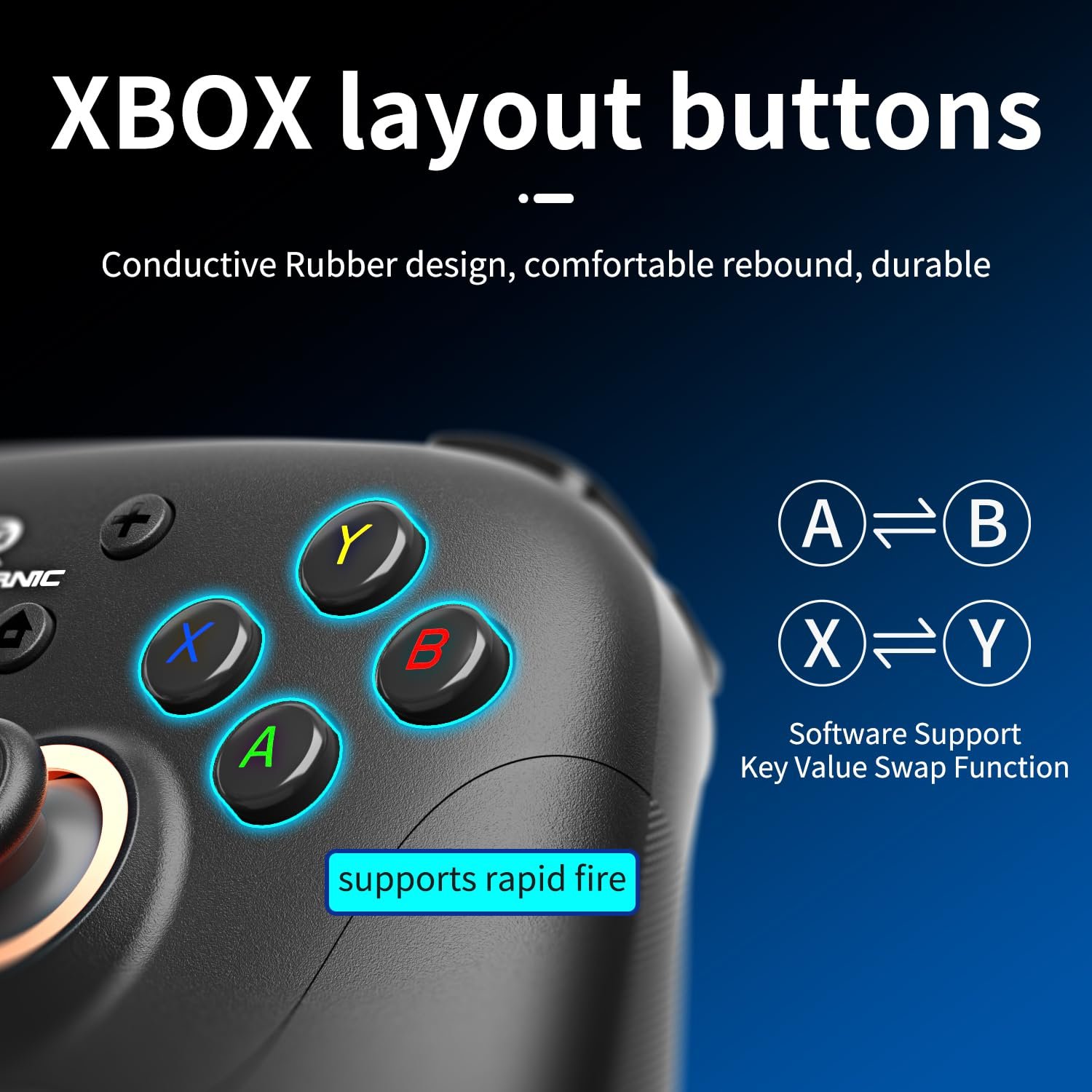
You can digitally swap the A/B and X/Y button inputs to match your preferred playstyle. Whether you are used to the standard Xbox/PC layout or prefer the Nintendo button arrangement, this feature lets you switch back and forth so your muscle memory stays intact across different games. You can also enable “No Dead Zone” mode for the joysticks or manually calibrate the gyroscope if the motion controls require resetting. It also supports wired firmware updates by downloading the software and instructions directly from the main website.
Performance & Feedback
Generally, customers have a lot of positive things to say about this controller, highlighting its budget-friendly price and the reliability of the Hall Effect joysticks and triggers. Users report that the sticks feel precise and don’t drift over time. Plus, the comfortable grip and snappy buttons make the controller feel much better than you would expect for the cost.
The flexibility is another strong point. Players love that they can easily switch between PC, Nintendo Switch, and mobile devices without any hassle. The extra features, like the programmable back buttons and customizable RGB lights, are seen as useful additions that actually help in games. Most owners are also happy with the battery life, which holds up well during long sessions.
There are a few complaints, though. Some users find that the sleep mode activates too fast, turning the controller off after just a short pause. The design also gets mixed reactions; while many find it comfortable, others struggle with the back buttons, saying they are either hard to reach or easy to hit by mistake. A few users also noted that the plastic feels a bit cheap compared to premium controllers.
My Thoughts: ANBERNIC RG P01 Wireless Game Controller
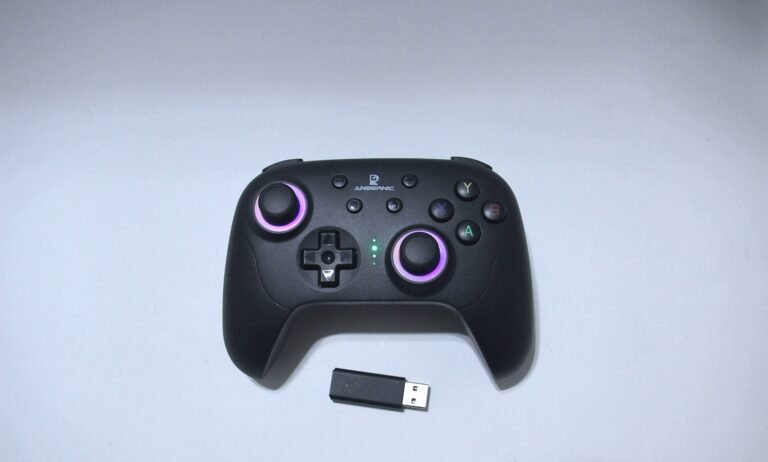
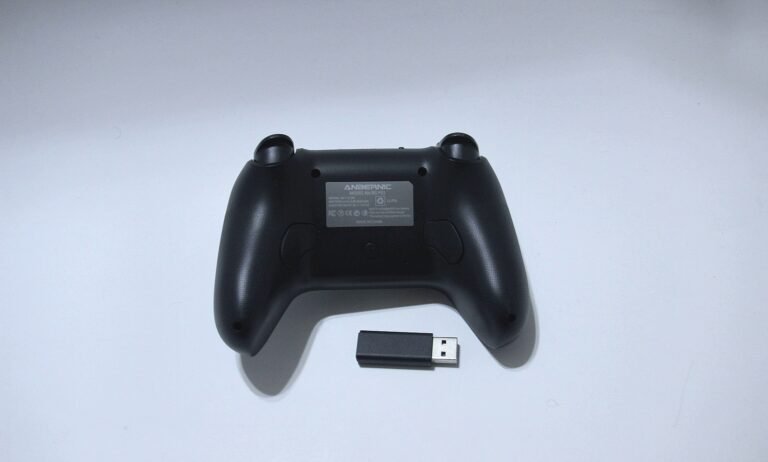
The controller feels good in the hand, and the textured grips are a nice touch for comfort. I really liked the RGB lighting around the analog rings; the color aesthetics and overall design are great. It even seems to animate lively when I move the joysticks around, and customizing the colors to match my taste was pretty fun. The two rear buttons are also helpful, providing a convenient way to execute macros easily.
Battery life has been impressive so far. I’ve been gaming with it for a couple of weeks, and it’s still going strong. I used the controller on both PC and Nintendo Switch, and it handled both platforms without a hitch. The only downside was the motion controls; even though it claims to have gyro support, I couldn’t seem to get it working properly on the Switch.
I did feel like the manual was required, though, to figure out how to use the controller and adjust the settings. I found it necessary for things like adjusting the vibration, setting up Turbo, and figuring out how to connect to different devices or use wireless mode
Who Would Likely Favor This Product?
Gamers who juggle multiple systems might want to look into this product because of its extensive multi-compatibility. Since it supports PC, Nintendo Switch, Android, and iOS, it can easily serve as a single, all-in-one controller for a variety of gaming setups.
Those who value connection stability and flexibility might also want to check this out due to the tri-mode connectivity. Having the choice between Bluetooth, a wired USB connection, and a low-latency 2.4G wireless receiver means it can adapt to different environments, whether gaming on the go or sitting at a desk.
Finally, players concerned about long-term durability and precision might want to consider this controller for its Hall Effect joysticks and triggers. These magnetic sensors are designed to eliminate stick drift and offer smoother, more accurate inputs, making it a strong option for anyone tired of replacing controllers due to wear and tear.
FAQ (Frequently Asked Questions)
Does the ANBERNIC RG P01 have Hall Effect Joysticks and Triggers?
Yes. This controller utilizes Hall Effect technology for both its joysticks and triggers. Because this system uses magnets instead of physical contact points, it is designed to prevent the wear and tear that typically causes stick drift, helping to ensure long-term precision.
Connectivity Questions
Where is the Pairing button on the ANBERNIC RG P01?
The Pairing button is the small button located on the top left of the controller, right next to the LB/LT triggers.
How do I connect the ANBERNIC RG P01 to Nintendo Switch?
You can connect to the Switch using either wireless or wired methods:
- Wireless Pairing:
- On your Switch, go to the Home screen, select Controllers, then Change Grip/Order.
- On the controller, press and hold the Pairing button for 2 seconds.
- The controller will connect, and the LEDs (1-4) will light up based on the player number.
- Wired Connection:
- Simply plug the controller into the Switch dock using the USB-C cable.
- The console will automatically recognize the device.
How do I connect the ANBERNIC RG P01 to PC?
You have three options for PC connectivity:
- Bluetooth (Xinput): Press and hold X + Pairing button for 2 seconds. LED2 will stay on when connected.
- 2.4G Wireless Dongle:
- Insert the receiver into your PC and hold the button on the receiver for 2 seconds (light flashes quickly).
- On the controller, press Y + Pairing button to sync. LED2 will stay on.
- Note: If the receiver light flashes slowly, just press Home to reconnect.
- Wired USB: Plug the controller in via USB-C. It defaults to Xinput mode (LED2 on).
- Switching Modes on PC: If you need “Switch Mode” for Steam/Motion controls, hold Select + Start for 3 seconds (LED1 turns on).
How do I connect the RG P01 to Android devices?
- Bluetooth: Press and hold A + Pairing button for 2 seconds. LED3 will stay on.
- 2.4G/Wired: If connected via Dongle or Cable and the light is on LED1 (Switch mode), press and hold Select + Start for 3 seconds to switch to Android mode (LED3 on).
How do I connect the RG P01 to iOS (iPhone/iPad)?
- Bluetooth: Press and hold B + Pairing button for 2 seconds. LED1 + LED4 will stay on when connected.
How do I reconnect the controller after pairing?
Once you have successfully paired the controller to a device, you do not need to repeat the pairing process. Simply press the Home button to wake the controller up, and it will automatically reconnect to the last used device.
Troubleshooting & Settings
Where is the Turbo button on this gaming controller?
The Turbo button is located on the back of the controller and is marked with a “T” icon.
How do I set up Turbo (Rapid Fire) on the RG P01?
- Enable: Press and hold the button you want to set, then press the TURBO button once for Semi-Automatic (press and hold to fire). Press them again to switch to Fully Automatic (auto-fire without holding).
- Disable: Press the button + TURBO a third time to cancel rapid fire for that button.
- Clear All: Press TURBO + Start to cancel all Turbo settings at once.
How do I adjust Vibration and Turbo Speed on the gaming controller?
- Vibration Intensity: Hold the TURBO button and move the Left Joystick Up or Down.
- Turbo Speed: Hold the TURBO button and move the Right Joystick Up or Down.
How do I change the RGB Joystick Lighting on the RG P01?
Press R3 (click the right stick) + Capture button to cycle through the different modes. You can choose between automatic gradients, static colors, breathing effects, or turn the lights off completely. The controller saves your preference even after powering off.
How do I calibrate the Gyroscope on this gaming controller?
If motion controls feel off, follow these steps:
- Ensure the controller is in Sleep Mode.
- Press Select + Home. The LEDs (1-4) will flash up and down.
- Place the controller on a flat, horizontal surface.
- Press the Start key. The LEDs will all light up, indicating calibration is complete.
How do I swap the button layout (A/B and X/Y) on the RG P01?
If you want to switch between Nintendo and Xbox button layouts digitally, press TURBO + Select. This swaps the values of A/B and X/Y.
How do I set up the back buttons (Macros) on the RG P01?
You can program the M1 and M2 buttons in two different ways:
- Simultaneous Press (Pressing buttons at the same time):
- Hold down M1 (or M2) and press Select.
- Press the buttons you want to trigger at the same time.
- Press M1 (or M2) again to save and end the programming.
- Sequential Press (Pressing buttons in a specific order):
- Hold down M1 (or M2) and press Start.
- Press the buttons you want to record in the exact sequence you want them to play.
- Press M1 (or M2) again to save and end the programming.
How do I enable “No Dead Zone” mode on the ANBERNIC RG P01?
If you want raw input without any dead zones, use these shortcuts:
- Left Stick: Press and hold TURBO + L3 (click the stick) for 2 seconds.
- Right Stick: Press and hold TURBO + R3 (click the stick) for 2 seconds.
My joystick, trigger, or gyroscope is acting weird. How do I fix it?
If you experience glitches or drift, try a soft reset. Press and hold the Home button for 5 seconds to turn the device fully off, then turn it back on. If you are using a wired connection, unplug the cable and plug it back in.
How do I get the firmware?
If you need to update the controller, just follow these steps:
- Visit the official ANBERNIC homepage.
- Click on the Support or Firmware Update tab.
- Find the RG P01 model in the list.
- Select Download and follow the instructions included in the file.
If you are still interested in knowing more about the product, click the button below
Doriteney RG P01 Wireless Gaming Controller – Hall Effect Joysticks | RGB Lighting | Multi-Platform
- Universal Compatibility: Designed to work seamlessly across platforms, this controller supports PC, Nintendo Switch, Android (11.0+), and iOS devices. It offers versatile connectivity options including Bluetooth, a 2.4G wireless receiver, and wired USB.
- Precision Control: Features Hall Effect joysticks and a 6-axis gyroscope for precise, drift-free movement. You can easily calibrate the gyro or adjust vibration intensity to suit your gameplay style.
- Customizable Layout & Macros: Includes layout switching capabilities (swapping A/B and X/Y) and two programmable back buttons (M1/M2) that allow you to record complex button sequences for a competitive edge.
- RGB Lighting & Turbo: Personalize your setup with adjustable RGB joystick lighting effects. The controller also features a Turbo function with adjustable rapid-fire speeds for intense action games.
- Smart Power Management: Equipped with clear LED indicators for battery status and pairing. It automatically enters sleep mode after 5 minutes of inactivity to save power and supports a convenient “One-Key Wake-Up” via the Home button.
Images by Gaming Gear Drop unless otherwise noted. Additional photos sourced from the official Doriteney Amazon listing for review purposes.