CYOYPPY One-Piece Joypad Controller for Nintendo Switch Review

This post contains affiliate links. If you purchase through them, we may earn a small commission at no extra cost to you. This product was provided through the Amazon Vine program for our honest review. All opinions are our own. Thanks for supporting Gaming Gear Drop.

Pros

  • Egronmic
  • Hall joysticks
  • Gyro  support
  • Turbo
  • RGB Lighting
  • Built-in stand
  • Game card slots
  • No charging required
  • Budget Friendly

Cons

  • Wired only (Console powered)

  • No Bluetooth

  • No NFC

  • Quality Complaints

  • Vibration Complaints

Quick Summary

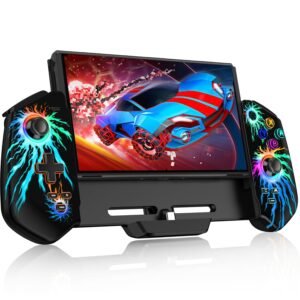
The CYOYPPY Joypad Controller is a wired handheld controller designed for the Nintendo Switch and Switch OLED. It features Hall Effect joysticks, adjustable turbo speeds, motion support, vibration control, RGB lighting, and built-in game card storage. The one-piece design focuses on improving grip and stability during handheld play.

Because it operates in wired mode, it relies entirely on the Nintendo Switch for power and does not support Bluetooth or wireless connection. While the handling and core features stand out, some users note that the materials and vibration feel less premium. Overall, it aims to offer a budget-friendly handheld upgrade with added functionality over standard Joy-Cons.

For more information, stick around and read below for my take on this product.

Hey there, welcome to our review of the CYOYPPY Joypad Controller for Nintendo Switch and Switch OLED.

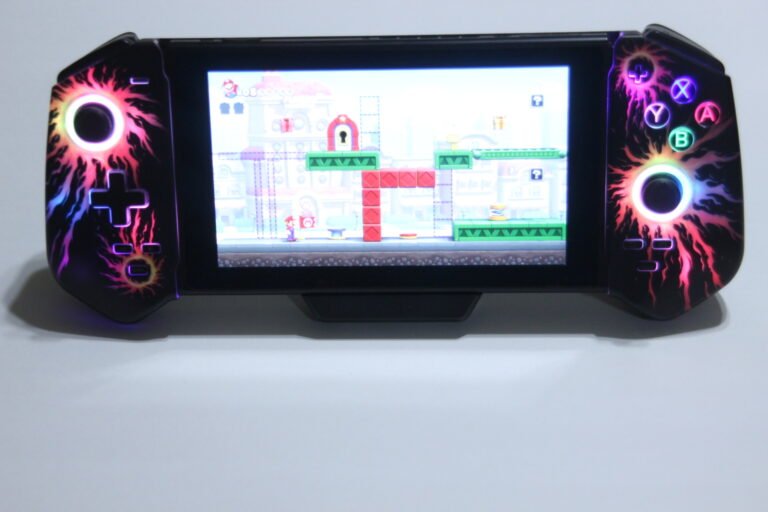
For this review, we tested this controller to offer honest insights and hopefully make your decision-making a tad easier. We have gathered all the important details about this handheld gaming accessory to share with you, specifically reviewing the Black with flame light version.

Throughout this post, we will discuss its key features, highlight user feedback, share our personal impressions, and explain who might benefit most from it.

So, if you are looking for a wired handheld controller for your Nintendo Switch or Switch OLED with Hall Effect joysticks and turbo support, stick around to find out if this suits your needs.

Key Features​

Wired Plug-and-Play Connection

This controller operates in wired mode only. It does not contain a built-in battery and must remain physically connected to the Nintendo Switch or Switch OLED while in use. Because it has no internal battery, it cannot power on or wake a sleeping console.

Setup is simple. Insert the console into the controller from top to bottom, turn on the system, and it is ready to use. Before first use, “Pro Controller Wired Communication” must be enabled in the Nintendo Switch settings.

It also supports play while charging when using the original Nintendo Switch charger. If the charging cable is unplugged during use, the controller may briefly disconnect. Pressing any button will reconnect it.

Hall Effect Joystick Control System

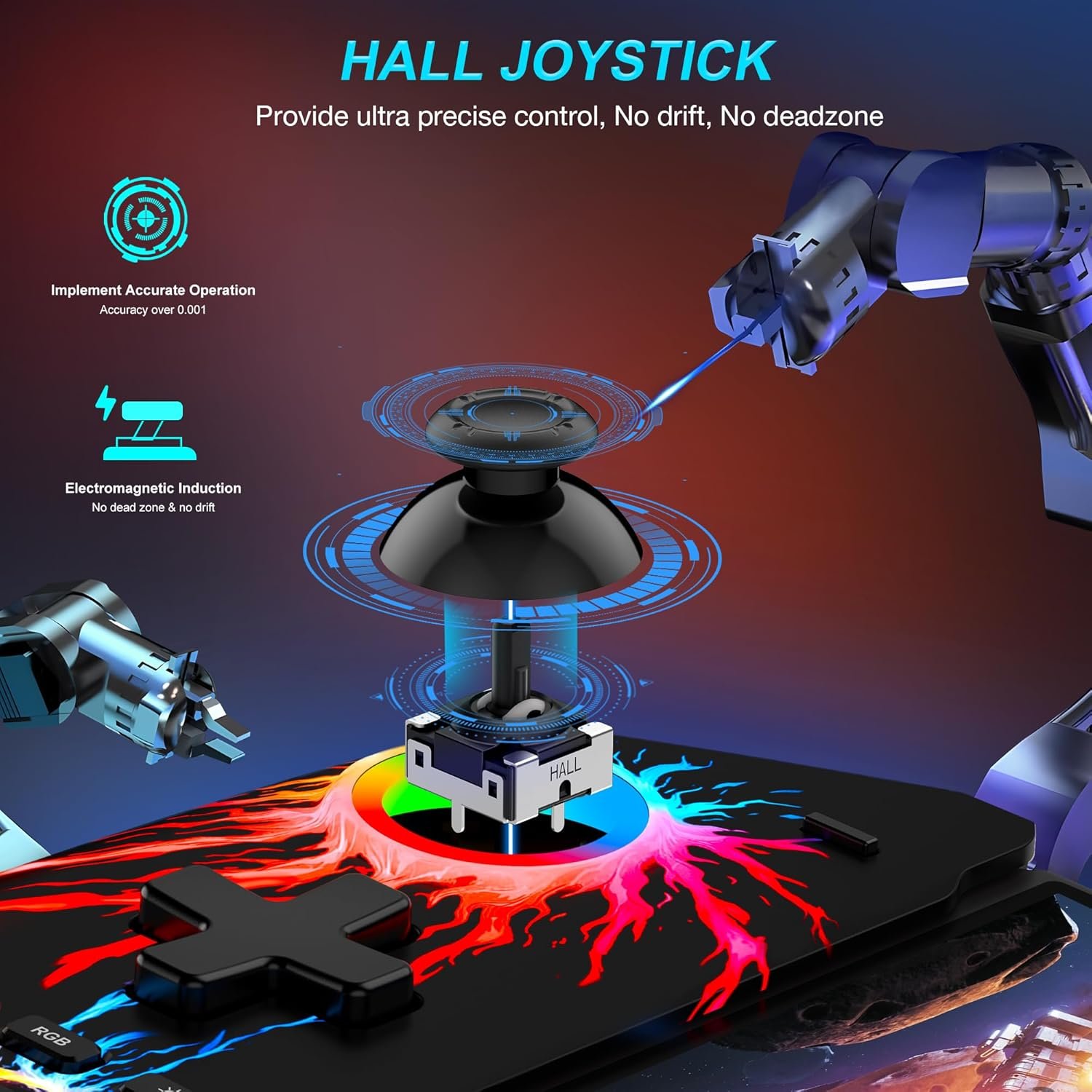
The controller features Hall sensing joysticks. This design is intended to reduce stick drift and maintain more consistent input over time.

The joysticks are built into a one-piece handheld-style controller frame, offering a full-size grip compared to standard Joy-Cons. This can provide a more stable feel during longer gaming sessions.

Turbo Function with Adjustable Speeds

Turbo can be assigned to A, B, X, Y, L, ZL, R, and ZR buttons. Both manual and automatic turbo modes are supported.

Manual turbo activates when holding the TURBO button and pressing a chosen function key. Auto turbo can be enabled by repeating the setup process on a button already assigned manual turbo.

Three turbo speeds are available: 5, 12, or 20 presses per second. Turbo speed can be increased using TURBO + D-pad Up and reduced using TURBO + D-pad Down. Holding the TURBO button for about three seconds disables turbo for all buttons at once.

Adjustable Vibration Levels

The controller includes dual vibration motors with four intensity settings: none, weak, medium, and strong.

Vibration strength can be adjusted by pressing the dedicated vibration button while the controller is connected. Each press cycles through the available intensity levels.

RGB Lighting Controls

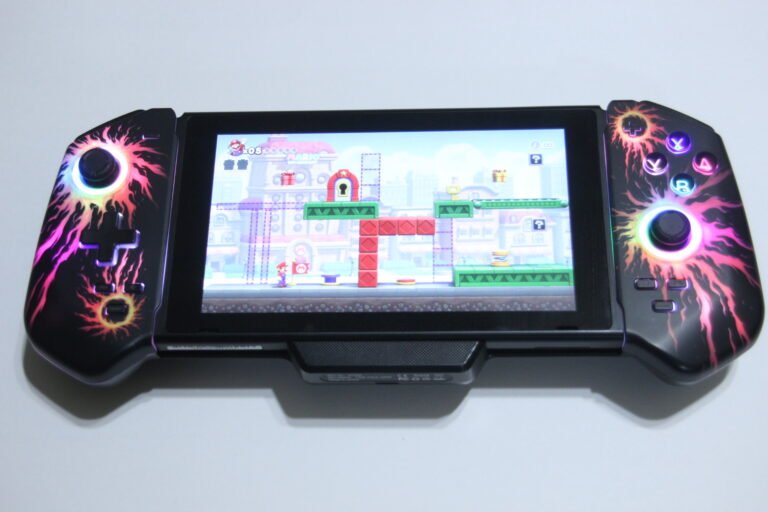
The controller includes ring lighting around the joysticks. Lighting modes can be changed by tapping the RGB button.

Brightness can be adjusted using the dimming control. Holding the RGB button for three seconds turns off all lighting effects. Pressing the RGB button again restores lighting.

Built-In Stand and Game Card Storage

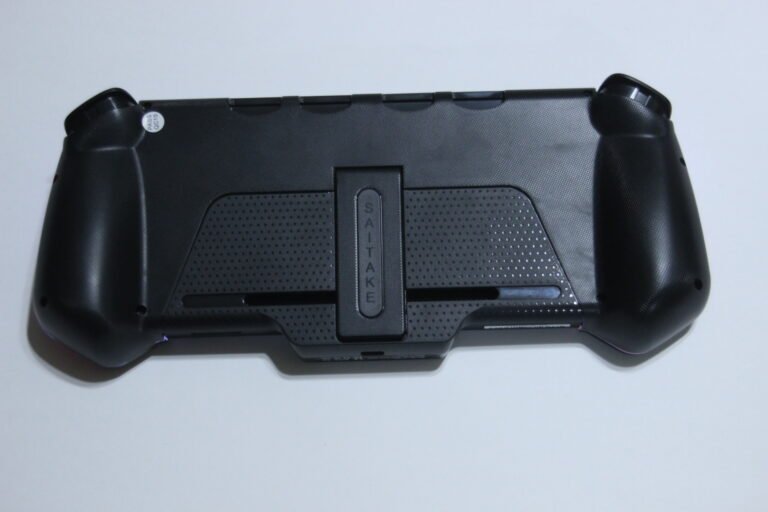
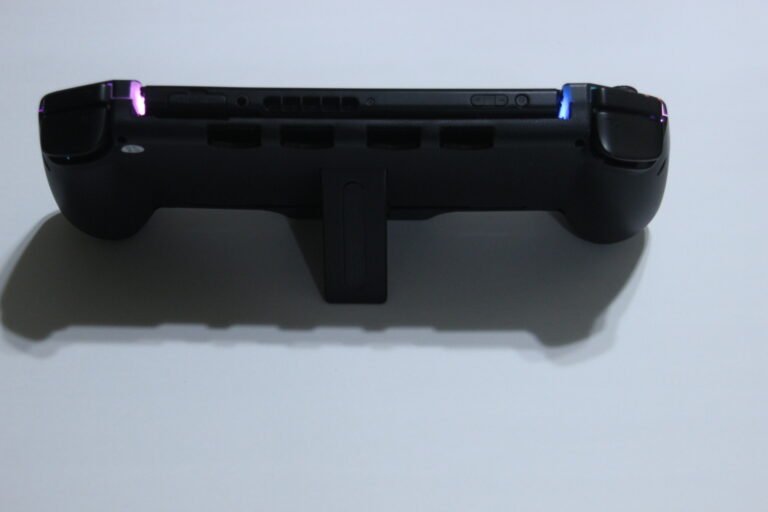
The back of the controller includes a fold-out stand for tabletop play. This allows the console to stand upright on a flat surface.

Four card storage slots are built into the back panel, allowing game cartridges to be stored directly on the controller for easier transport.

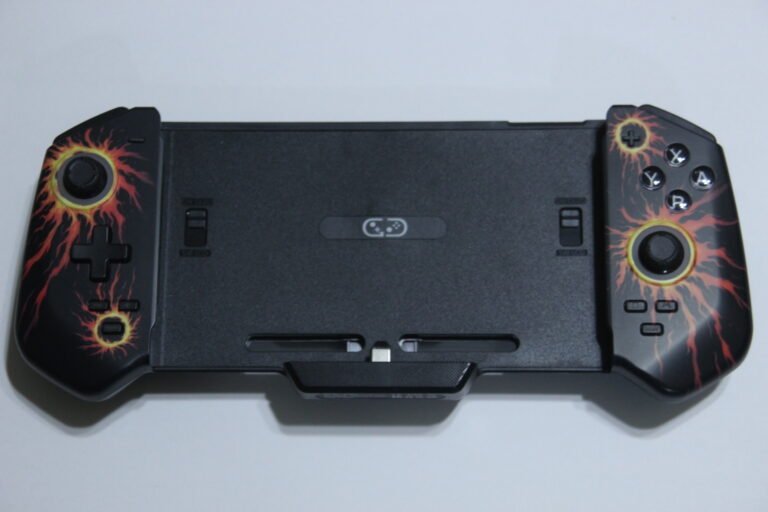
Ergonomic One-Piece Design

The controller uses a full-size grip structure designed to provide a more comfortable hold than smaller Joy-Con controllers. Internal anti-slip padding and a locking mechanism help secure the console during use.

The black version with flame-style lighting accents adds a visual element, though lighting can be turned off if preferred.

Performance & Feedback

Customers say the controller feels comfortable to hold during handheld play. The button layout, including the face buttons and D-pad, is described as easy to reach and responsive. The Hall Effect joysticks are noted for maintaining steady control during gameplay. Motion control support is also mentioned as working properly in compatible games. Setup is described as simple, and the controller is viewed as a budget-friendly alternative to separate Joy-Cons. The built-in stand and full-size grip are mentioned as improving the overall handheld experience.

On the negative side, some customers describe the materials as feeling less premium compared to higher-priced controllers. Because it operates in wired mode, it relies entirely on the Nintendo Switch for power and cannot function independently. There are also mentions that swapping game cartridges while docked is not as convenient, even though the back includes card storage slots.

My Thoughts: CYOYPPY Joypad Controller

I like how this joypad controller feels during handheld play. The grip makes the Switch more comfortable to hold, and even though the joysticks are slightly smaller than a full-size controller, they still provide steady control. The wired design means it draws power directly from the Switch, so there is no separate battery to charge.

The RGB lighting adds a bit of personality, and it can be adjusted or turned off if needed. Turbo mode is also useful, especially in games that benefit from repeated button presses.

The vibration could use improvement. It feels lighter and makes a noticeable sound during use. Aside from that, it performs well overall and makes handheld gaming on the Nintendo Switch feel more comfortable.

Who Would Likely Favor This Product?

Gamers who mainly play in handheld mode on the Nintendo Switch or Switch OLED might want to consider this controller. Its one-piece design provides a larger grip compared to standard Joy-Cons, which can make extended handheld sessions feel more stable.

Those looking for a budget-friendly alternative to separate Joy-Cons or premium pro-style controllers might also want to consider it. It focuses on core features without adding extra accessories that increase cost.

Players who use turbo functions in certain games may find it useful, since turbo can be assigned to multiple buttons and adjusted for different speeds.

It may also appeal to those who prefer not having to manage another battery. Because it draws power directly from the Nintendo Switch, there is no separate charging required for the controller itself.

FAQ (Frequently Asked Questions)

What devices is this controller compatible with?


Nintendo Switch and Nintendo Switch OLED in handheld mode.


Does it work with Nintendo Switch Lite?


No. It is designed for the standard Switch and Switch OLED models.


Does it support Bluetooth?


No. It operates in wired mode only.


Does it have a built-in battery?


No. It draws power directly from the Nintendo Switch.


Can it wake the Switch from sleep?


No. It cannot wake a sleeping console.


Does it support motion controls?


Yes. It supports motion sensing for compatible games.


Does it support NFC?


No. NFC is not supported.


Does it support Turbo mode?


Yes. Turbo can be assigned to A, B, X, Y, L, ZL, R, and ZR.


Does it require charging?


No. It is powered by the Nintendo Switch itself.
Connectivity Questions

How does this controller connect?


It connects through a direct wired handheld connection to the Nintendo Switch.


How do I connect it to my Switch?

  1. Enable “Pro Controller Wired Communication” in the Switch settings.
  2. Insert the Nintendo Switch console into the controller from top to bottom.
  3. Power on the Switch.
  4. The controller will be ready to use.


Does it support wireless connection?


No. It does not support wireless connection.


Does it support Bluetooth pairing?


No. Bluetooth is not supported.

Programming & Troubleshooting

How do I set manual Turbo?

  1. Hold the TURBO button.


  2. Press the desired button (A, B, X, Y, L, ZL, R, or ZR).


How do I set auto Turbo?

  1. Hold TURBO.


  2. Press the same button again that already has manual Turbo enabled.


How do I turn off Turbo for a button?

  1. Hold TURBO.


  2. Press the button again.


How do I turn off Turbo for all buttons?


Hold the TURBO button for about 3 seconds until vibration confirms it is disabled.


How do I change Turbo speed?


Increase speed: Hold TURBO + press D-pad Up.
Decrease speed: Hold TURBO + press D-pad Down.

Turbo speeds:
Slow = 5 presses per second
Medium = 12 presses per second
Fast = 20 presses per second


How do I adjust vibration strength?

  1. Ensure the controller is connected.


  2. Press the vibration button to cycle through intensity levels.


Vibration levels: None, Weak, Medium, Strong.


How do I change lighting modes?


Tap the RGB button to cycle through light modes.


How do I adjust brightness?


Press the dimming button to cycle brightness levels.


How do I turn off lighting?


Hold the RGB button for 3 seconds.
Press RGB again to turn lights back on.


Can I charge while playing?


Yes. Use the original Nintendo Switch charger.


Why did the controller disconnect when plugging in the charger?


This is normal. Press any button to reconnect.

If you are still interested in knowing more about the product, click the button below

CYOYPPY Joypad Controller for Nintendo Switch and Switch OLED – Wired Pro-Style Handheld Controller with Hall Joystick and Turbo Support
  • Charge and Play Support: This wired Nintendo Switch and Switch OLED controller uses a power-sharing design that allows the console to be charged while playing. The console connects directly through the controller’s USB-C interface so charging and gameplay can happen at the same time. It is recommended to use the original console charger.

  • Hall Effect Joysticks with Adjustable Turbo: The controller includes Hall sensing joysticks designed to reduce drift and maintain consistent input response. It supports both automatic and manual turbo functions, which can be assigned to A, B, X, Y, L, ZL, R, ZR, ML, and MR buttons. Turbo speed can be adjusted to 5, 12, or 20 presses per second depending on preference and game type.

  • Full-Size Ergonomic Design with LED Ring Lighting: This one-piece handheld-style controller is designed for ergonomic grip during extended use. It includes internal anti-slip padding and a locking mechanism to help secure the console in place. Adjustable ring lighting surrounds the joysticks with seven brightness levels. The rear section includes a built-in stand for tabletop play.

  • Dual Vibration and Motion Control: The controller features dual vibration motors with four adjustable intensity levels. It also supports motion sensing for compatible Nintendo Switch games. NFC functionality is not supported.

  • Additional Controls and Storage Features: A dedicated screenshot button allows for quick capture or long-press video recording. The rear of the controller includes four game card storage slots designed to securely hold cartridges during transport.

Images by Gaming Gear Drop unless otherwise noted. Additional photos sourced from the official CYOYPPY Amazon listing for review purposes.