This post contains affiliate links. If you purchase through them, we may earn a small commission at no extra cost to you. This product was provided through the Amazon Vine program for our honest review. All opinions are our own. Thanks for supporting Gaming Gear Drop.
Pros
- TMR Thumbsticks
- Extra Buttons
- Precise Controls
- Comfortable Grips
- Clicky Buttons
- Profile Support
- Software Support
- Long Battery
- Carrying Case
- Removable Buttons
Cons
- No Vibration
- No Adaptive Triggers
- No Bluetooth
- No Gyro
- No Speaker
- Large Size
- Dongle Required
- Limited Remapping
- Back Button Placement
- Software Issues
Quick Summary
The Razer Raiju V3 Pro is a PS5 and PC controller that focuses on customizable controls, TMR thumbsticks, extra buttons, and adjustable triggers. It supports both 2.4GHz wireless and wired connections, with additional customization options available through Razer Synapse.
The controller has a larger shape with comfortable grips, clicky buttons, and removable back buttons. In my experience, the size worked well for my larger hands, and the included carrying case and replacement thumbstick caps provide some added flexibility.
The controller has several useful customization options, but it leaves out features found on some other controllers, including vibration feedback, adaptive triggers, gyro controls, Bluetooth, and a built-in speaker. Some customers have also reported software, connectivity, and hardware issues.
For more information, stick around and read below for my take on this product.
Hey there, welcome to our review of the Razer Raiju V3 Pro Wireless Esports Controller.
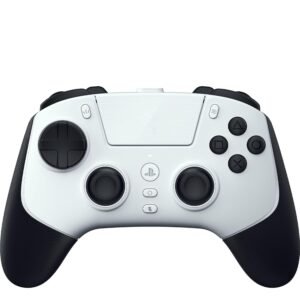
For this review, we tested the White version to offer honest insights and hopefully make your decision-making a tad easier. We gathered the important details about this PS5 and PC controller, with a focus on its extra controls, TMR thumbsticks, adjustable triggers, and customization options.
Throughout this post, we will discuss its key features, highlight user feedback, share our personal impressions, and explain who might benefit most from it.
So, if you are looking for a PS5 and PC controller with extra buttons and customizable controls, stick around to see how the Razer Raiju V3 Pro performs.
Key Features
TMR Thumbsticks
To provide smooth and consistent movement while helping reduce stick drift, the Razer Raiju V3 Pro uses TMR magnetic thumbsticks. TMR uses magnetic sensing to detect the movement of the thumbsticks.
The thumbstick caps can also be replaced. The controller includes a tall concave cap and a short convex cap, giving you two different shapes to choose from.
6 Extra Buttons
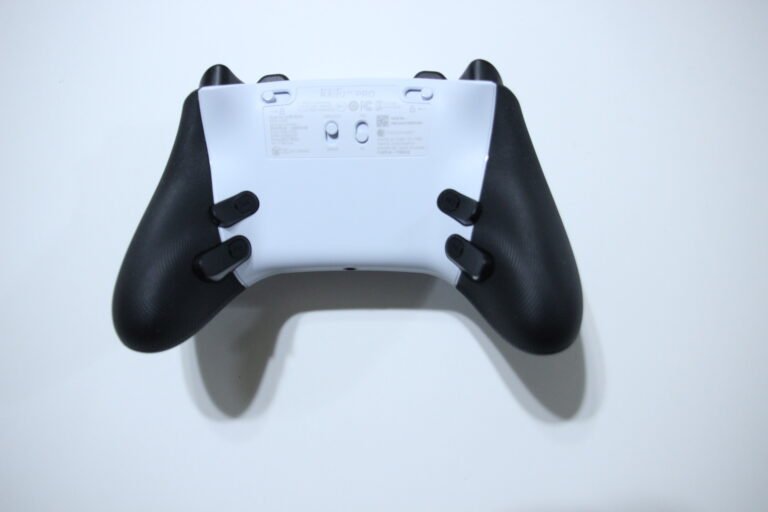
The Razer Raiju V3 Pro comes with six extra buttons that give you more control during gameplay. Four mouse-click buttons are positioned on the back of the controller, while two claw-grip bumpers are located near the L1 and R1 buttons.
All six buttons can be remapped, so you can assign different controls to them. This gives you another way to reach certain commands while keeping your thumbs on the analog sticks.
Adjustable Aim Sensitivity
You can adjust your analog stick sensitivity with the sensitivity clutch when you need more precise control. Holding the assigned button lowers the sensitivity of the selected analog stick by up to 50%.
A lower sensitivity setting can make smaller stick movements easier to manage, which may be useful when making fine adjustments while aiming.
Trigger Controls
The trigger settings let you choose between quicker presses and the full movement of the L2 and R2 buttons. Trigger stop switches on the back can limit how far the triggers travel or allow them to move through their full range.
The shorter setting can be useful for games where quick trigger presses are important. Unlocking the triggers gives you the longer analog movement that can be useful for things such as gradually controlling acceleration in racing games.
Clicky Buttons and 8-Way D-pad
The action buttons have a clicky, tactile feel that gives you noticeable feedback with each press. The Razer Raiju V3 Pro uses Mecha-Tactile PBT action buttons, while the D-pad uses the same type of button construction.
The D-pad also has an 8-way floating design, allowing it to register diagonal directions in addition to the standard up, down, left, and right inputs.
PlayStation Style Layout
The familiar PlayStation style layout keeps the main controls where you would expect them while adding extra controls around the back and upper grips. You get symmetrical analog sticks, the PS button, Create and Options buttons, touchpad, action buttons, D-pad, L1 and R1 bumpers, and L2 and R2 triggers.
There is also a 3.5mm headset jack, microphone mute button, USB-C port, and switches for changing between PS5 and PC modes as well as wired and wireless operation.
2.4GHz Wireless and Wired Connection
You can use the controller wirelessly or connect it directly with USB-C depending on how you want to play. Wireless operation uses the included Razer HyperSpeed Wireless 2.4GHz USB dongle, while wired play connects directly through the USB-C port.
The controller supports up to 500Hz polling wirelessly on PC and up to 2,000Hz when connected by USB on PC. PS5 operation is listed at 250Hz for both wired and wireless connections.
On-the-Fly Game Profile Switching
Switching between different game setups is easier with the four onboard profiles available on the Raiju V3 Pro. You can save different controller configurations and switch between them when needed.
For example, one profile could be set up for a racing game while another uses different button assignments for an FPS. That means you can change setups without having to reconfigure everything each time.
Function Button Shortcuts
The Function button puts a few useful controls directly on the controller instead of making you reach for the software. It can be used with the D-pad to adjust volume and can also be used for switching between saved profiles.
This makes those particular adjustments easier to access while you are already holding the controller.
Removable Back Buttons
The four rear mouse-click buttons can be removed if you prefer a different grip or simply do not need all of the extra controls. The controller comes with replacement covers and rubber plugs for the back when the removable buttons are taken out.
A screwdriver is included to help with removing the buttons and changing the rear setup.
Razer Synapse Customization
Razer Synapse gives you more control over how the Raiju V3 Pro is configured when using a Windows PC. The software can be used for button remapping, sensitivity adjustments, trigger calibration, and managing controller profiles.
The manual lists Windows 11 64-bit or higher as the requirement for Razer Synapse. More of the available software controls can be covered in the troubleshooting and settings section rather than repeating them here.
Thumbstick Settings and Calibration
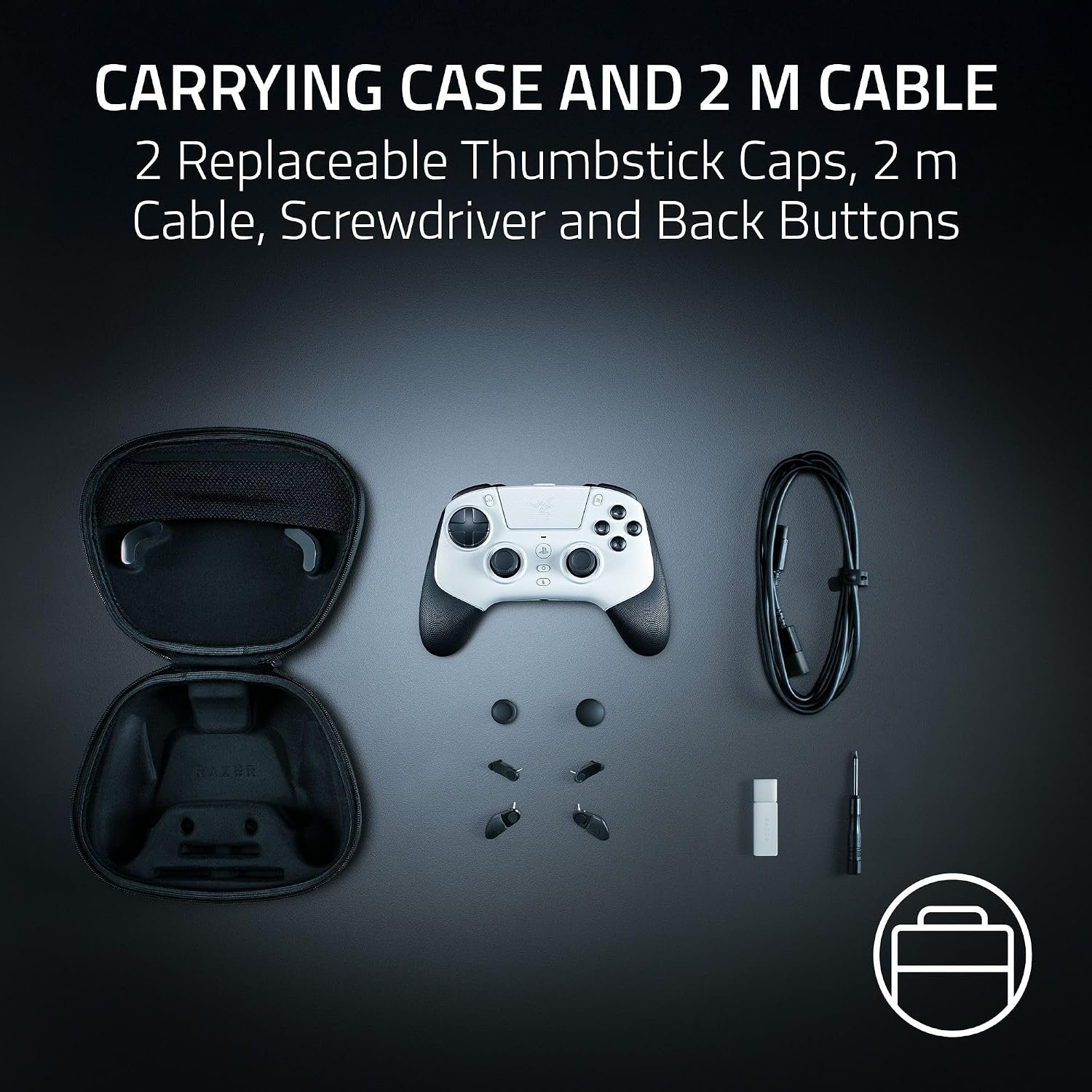
The included carrying case gives you a convenient place to store and protect the controller when it is not being used. It also gives you somewhere to keep the smaller accessories together instead of having the replacement parts and wireless dongle sitting separately.
The package includes the HyperSpeed Wireless 2.4GHz dongle, USB-A to USB-C cable, replacement thumbstick caps, back-button covers, screwdriver, and carrying case.
Trigger Settings
The trigger settings give you more ways to adjust how the L2 and R2 buttons respond. Synapse lets you choose between Analog and Digital modes, adjust the trigger range in Analog mode, or set how far the trigger needs to be pressed before it activates in Digital mode.
There is also a Rapid Trigger option that lets the trigger reset as soon as you release it, allowing it to activate again more quickly
Game-Specific Profiles
You can link games to specific controller profiles in Synapse, allowing the controller to automatically switch to the selected setup when a linked game launches. This can save you from manually changing your configuration every time you move between games.
Custom Button Assignments
The controller gives you more freedom over your controls through Razer Synapse. Customizable buttons can be assigned to other controller functions, keyboard functions, or disabled completely if you do not want to use a particular button.
Adjustable Polling Rate
You can change the controller’s polling rate through Synapse, which controls how frequently the computer checks for updated controller input. Higher polling rates can reduce input latency and improve responsiveness on supported systems.
Customizable D-pad Settings
The D-pad can be configured for either 4-way or 8-way input through Synapse. The 8-way option includes diagonal directions, while 4-way limits input to the main directional controls.
There is also a D-pad SOCD setting that lets you choose what happens when opposing directions are pressed at the same time.
Performance & Feedback
Customers describe the Razer Raiju V3 Pro as feeling like an upgrade from the standard PS5 controller, with positive comments about its build quality, comfortable grips, and additional buttons. Some appreciate the lightweight design, while others find the shape better suited to larger hands.
The TMR thumbsticks receive positive feedback for their precision and responsiveness. Customers also mention the tactile buttons, customization options, battery life, and included accessories. Reports about latency and stick drift vary, with some users experiencing no noticeable issues and others reporting problems.
There are some complaints about comfort and button placement. Some users find the controller uncomfortable to hold, while others report accidentally pressing the rear buttons because of their positioning. The lack of Bluetooth and gyro support is another drawback for customers who want those features, and some PC users mention limitations with how certain games or programs recognize the controller.
Software and hardware feedback is also mixed. Some customers report connectivity problems, software issues, or unusual behavior, with some saying software updates resolved their problems. Others have reported defective units or a build quality that felt cheaper than expected.
My Thoughts: Razer Raiju V3 Pro Wireless Controller
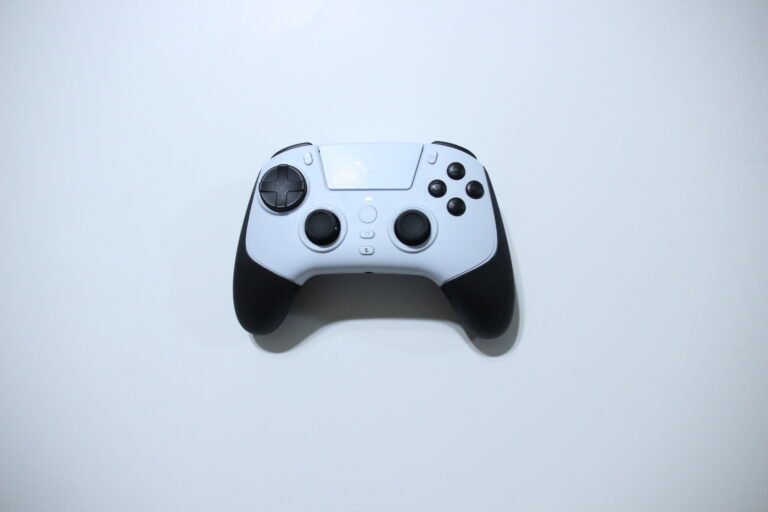
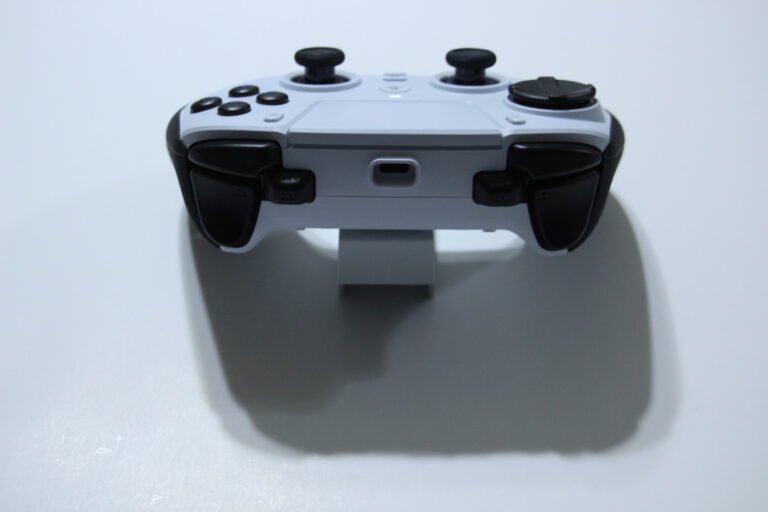
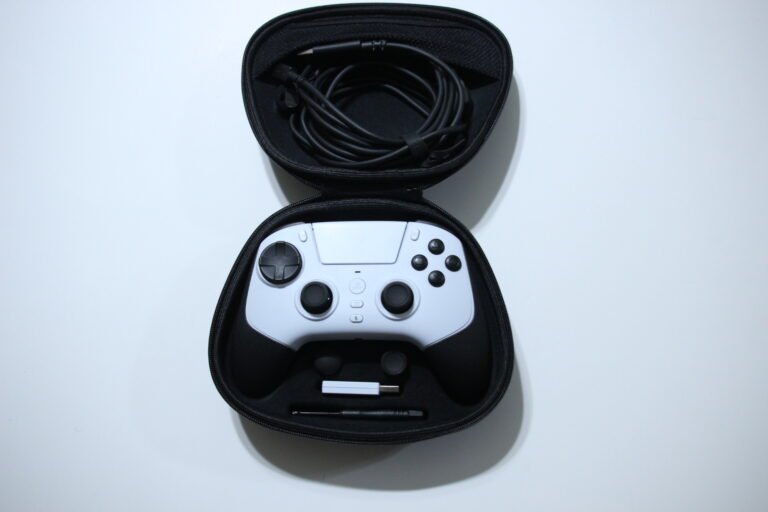
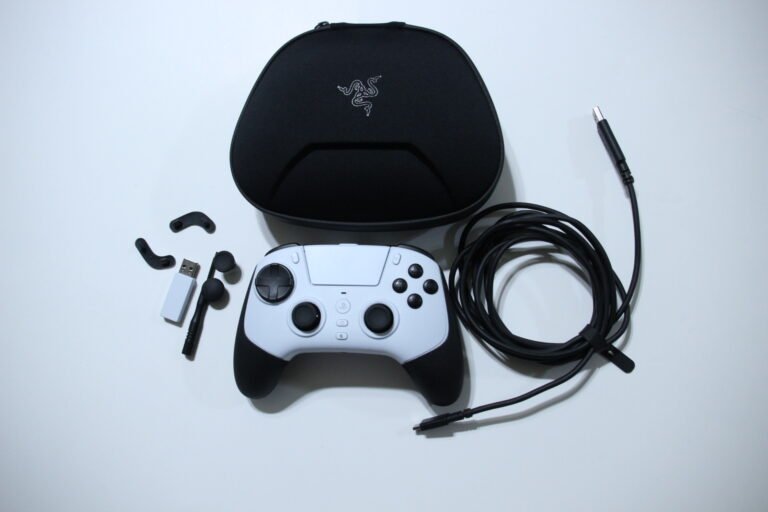
The Razer Raiju V3 Pro is a little different from a standard PS5 controller. It only uses a wired or 2.4GHz wireless connection on PC and PS5, and it leaves out some features found on the regular PS5 controller, such as vibration feedback, a built-in speaker for in-game audio, and adaptive triggers.
Where I think it does better is the overall shape and layout. I have larger hands, so the size isn’t an issue for me, and I find the grips comfortable to hold. The buttons also have a nice clicky feel, including the extra controls around the back and shoulders.
I like having the additional buttons available because they can be useful depending on the game. I also like that the rear buttons can be removed if I decide they are getting in the way. The included case is useful as well, and having extra thumbstick caps, back-button covers, and the removal tool included gives you some options for changing the controller’s setup.
The included manual is okay, but I found the online manual more useful because it goes into greater detail about the controller and Razer Synapse. Synapse gives you a decent amount of control over things like calibration, sensitivity, and button assignments.
One thing I wish was different is the button remapping. While using the controller, I was able to customize the extra buttons, but I would have liked the ability to remap more of the standard buttons as well. I also would have liked to see button combinations or macros available when using the controller on PS5, as that could have made the extra buttons even more useful.
Who Would Likely Favor This Product?
Gamers who prefer a more customizable PS5 controller might want to consider the Razer Raiju V3 Pro. The six extra buttons, adjustable trigger settings, TMR thumbsticks, and sensitivity controls give players more ways to set up the controller around different types of games.
PC gamers who like adjusting controller settings through software might also want to look into it. Razer Synapse provides options for remapping, trigger adjustments, thumbstick settings, calibration, polling rate, and game-specific profiles.
Players with larger hands might find the larger shape more comfortable, especially if a standard PS5 controller feels a little small. The removable rear buttons may also appeal to gamers who want extra controls available for certain games but prefer to take them off when they are not needed.
It may be worth looking into for gamers who mainly play on PS5 or PC and prefer a wired or 2.4GHz wireless controller. However, players who specifically want features such as Bluetooth, vibration feedback, adaptive triggers, or a built-in controller speaker might want to consider other options.
FAQ (Frequently Asked Questions)
Is the Razer Raiju V3 Pro compatible with PS5?
Yes. It is designed for use with PlayStation 5 and can connect through 2.4GHz wireless or a wired USB connection.
Is the Razer Raiju V3 Pro compatible with PC?
Yes. It supports PC through 2.4GHz wireless or a wired USB connection.
Does the Razer Raiju V3 Pro support Bluetooth?
No. Wireless connection uses the included 2.4GHz USB dongle rather than Bluetooth.
Does the Razer Raiju V3 Pro have gyro support?
No. The controller does not include gyro controls.
Does it have vibration feedback?
No. The Razer Raiju V3 Pro does not provide vibration feedback.
Does it have adaptive triggers?
No. The L2 and R2 triggers have adjustable trigger settings, but they do not provide the adaptive trigger feature found on the standard PS5 controller.
Does the controller have a built-in speaker?
No. It does not include a built-in speaker for in-game audio.
Does the Razer Raiju V3 Pro have a headset jack?
Yes. It has a 3.5mm headset jack for connecting a compatible headset.
How many extra buttons does it have?
There are six extra controls. Four are removable mouse-click back buttons, while two are claw-grip bumpers near L1 and R1.
Can the back buttons be removed?
Yes. The four removable back buttons can be taken off, and replacement covers and rubber plugs are included.
Can the thumbstick caps be changed?
Yes. The controller includes a tall concave cap and a short convex cap that can be swapped onto the thumbsticks.
How many profiles can it store?
The Razer Raiju V3 Pro supports up to four onboard profiles.
Does it work with Razer Synapse?
Yes. Razer Synapse provides additional controller settings for PC, including button assignments, trigger adjustments, thumbstick settings, calibration, polling rate, and profiles.
Does it support Rapid Trigger?
Yes. Rapid Trigger is available through Razer Synapse and allows the trigger to reset immediately after being released.
Connectivity Questions
Connecting to PS5 Wirelessly
- Connect the included 2.4GHz wireless dongle to the PS5.
- Set the controller’s connection switch to Wireless.
- Set the other switch to PS5.
- Hold the PS button for 3 seconds to turn on the controller.
- Wait for the controller to connect to the wireless dongle.
Razer recommends using the front USB port on PS5 models in the CFI-1000 series when using the wireless dongle.
Connecting to PC Wirelessly
- Connect the included 2.4GHz wireless dongle to a USB port on the PC.
- Set the connection switch to Wireless.
- Set the other switch to PC.
- Hold the PS button for 3 seconds to turn on the controller.
- Wait for the wireless connection to establish.
Connecting to PS5 With USB
- Set the connection switch to Wired.
- Set the other switch to PS5.
- Connect the controller to the PS5 using the included USB-A to USB-C cable.
- Turn on the controller if needed.
Connecting to PC With USB
- Set the connection switch to Wired.
- Set the other switch to PC.
- Connect the controller to the PC using the included USB-A to USB-C cable.
- The controller can then be used as a wired PC controller.
Bluetooth is not supported. Wireless operation requires the included 2.4GHz USB dongle.
Programming & Troubleshooting
How do I change the trigger travel?
Use the physical trigger-stop switches on the back of the controller. Move the switches outward to limit the triggers to a shorter range, or inward to allow their full movement.
How do I customize the triggers?
Open Razer Synapse and select the Raiju V3 Pro. Under the trigger settings, you can choose Analog or Digital mode, adjust the trigger range, and set the actuation point for Digital mode. Rapid Trigger is also available.
How do I adjust the thumbstick deadzone?
Open the Raiju V3 Pro settings in Razer Synapse and select the thumbstick settings. The left and right sliders can be adjusted separately to change the deadzone for each stick.
Lower values make the sticks more responsive, but setting them too low can also make unwanted movement more noticeable.
How do I calibrate the thumbsticks?
Open the Calibration section in Razer Synapse and follow the on-screen calibration process. The calibration tool can be used to test the thumbsticks and may help address issues such as stick drift.
How do I adjust the sensitivity clutch?
In Razer Synapse, open the thumbstick settings and adjust the Sensitivity Clutch option. You can assign a button to activate the clutch and use the slider to determine how much the selected stick’s movement is limited.
How do I change the polling rate?
Open the Raiju V3 Pro settings in Razer Synapse and select your preferred polling rate. Higher polling rates allow the PC to receive controller updates more frequently.
How do I change the D-pad from 8-way to 4-way?
Open the D-pad settings in Razer Synapse. Select 8-way to include diagonal directions or 4-way to restrict the D-pad to its main directional inputs.
What does D-pad SOCD do?
SOCD controls what happens when two opposing directions are pressed at the same time. You can select the available behavior from the D-pad SOCD settings in Synapse.
How do I remap the extra buttons?
Select the customizable button in Razer Synapse and choose the function you want to assign. Available options include controller functions, keyboard functions, returning the button to its default function, or disabling the button.
How do I switch controller profiles?
Use the controller’s Function button controls to switch between your saved profiles. You can also manage the profiles through Razer Synapse.
How do I make a game automatically use a specific profile?
Open the Linked Games section in Razer Synapse and link the game to the Raiju V3 Pro and the profile you want to use. Synapse can then automatically switch to that profile when the linked game launches.
How do I adjust wireless sleep settings?
Open the Power section for the Raiju V3 Pro in Synapse. The wireless sleep setting lets you choose how long the controller can remain idle before entering sleep mode.
What should I do if the wireless connection is unstable?
Make sure the 2.4GHz dongle is connected securely and that the controller is set to the correct Wireless and PS5/PC modes. The manual also notes that other 2.4GHz wireless devices can cause interference, so moving the dongle away from potential sources of interference may help.
How do I update Razer Synapse?
If Synapse shows a Download Update option, select it to install the available software update. Razer notes that Synapse requires an internet connection to install and update.
If you are still interested in knowing more about the product, click the button below
Razer Raiju V3 Pro Wireless Esports Controller – TMR Thumbsticks | Remappable Buttons | Adjustable Triggers
- PlayStation 5 and PC Compatibility: The Razer Raiju V3 Pro is officially licensed for PlayStation 5 and PC. It features a symmetrical button layout and supports wireless play on PS5 and wired connections on PC.
- Six Remappable Controls: The controller includes four removable rear buttons and two additional bumpers for claw-style grips. These controls can be remapped to suit different games and control preferences.
- TMR Thumbsticks: The controller uses symmetrical TMR magnetic thumbsticks designed for precise movement. It also includes replaceable thumbstick caps, allowing users to change the stick tops.
- Adjustable Trigger Response: Razer Pro HyperTriggers let you switch between short, click-style trigger presses and full analog travel. The shorter setting suits games that benefit from quick inputs, while the analog setting allows more gradual trigger control.
- Mecha-Tactile Buttons and D-Pad: The action buttons use PBT materials and mechanical-style switches for tactile feedback. The controller also includes an eight-direction floating D-pad.
- 2.4GHz Wireless and Wired Performance: Razer HyperSpeed Wireless uses a 2.4GHz receiver for wireless play on PS5. On PC, the controller supports a wired polling rate of up to 2000Hz.
- Customizable Controls and Profiles: Razer Synapse 4 and the Razer Mobile App provide options for adjusting thumbstick sensitivity, remapping buttons, and calibrating triggers. The controller can store up to four onboard profiles.
- Carrying Case and Included Accessories: The package includes a protective carrying case, a 2-meter USB-C to USB-A cable, replacement thumbstick caps, and a tool for removing the rear buttons.
Images by Gaming Gear Drop unless otherwise noted. Additional photos sourced from the official Razer Amazon listing for review purposes.