This post contains affiliate links. If you purchase through them, we may earn a small commission at no extra cost to you. This product was provided through the Amazon Vine program for our honest review. All opinions are our own. Thanks for supporting Gaming Gear Drop.
Pros
Brown Switches
RGB Lighting
Programmable Controls
Onboard Profiles
Full Anti-Ghosting
Removable Top Cover
Aluminum Frame
Multimedia Hotkeys
Cons
Software Access
Heavy Build
Limited Manual
Design Preferences
- Wired Only
Quick Summary
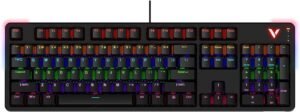
The Rapoo V500Pro 2024 Edition is a wired mechanical gaming keyboard designed for gaming and everyday use. It features brown mechanical switches, full anti-ghosting support, programmable controls, and customizable RGB lighting.
The keyboard includes a removable top cover, onboard profile storage, multimedia shortcuts, and an aluminum alloy frame. Users can also customize supported lighting effects, macros, and key functions through the companion software.
Some users appreciate the mechanical switches, RGB lighting, and sturdy construction, while others note that locating the software can be difficult and that the included manual provides limited guidance for setup and customization.
For more information, stick around and read below for my take on this product.
Hey there, welcome to our review of the Rapoo V500Pro 2024 Edition Gaming Mechanical Keyboard.
For this review, we tested the Rapoo V500Pro 2024 Edition to offer honest insights and hopefully make your decision-making a tad easier. We have gathered the important details about this mechanical gaming keyboard to share with you, specifically focusing on its brown mechanical switches, programmable controls, and RGB lighting features.
Throughout this post, we will discuss its key features, highlight user feedback, share our personal impressions, and explain who might benefit most from it.
So, if you are looking for a wired mechanical gaming keyboard with customizable lighting, macro support, and full anti-ghosting functionality, stick around to find out if this suits your needs.
Key Features
Brown Mechanical Switches
The Rapoo V500Pro uses brown mechanical switches designed to provide tactile feedback while producing less noise than many clicky switch types. This makes the keyboard suitable for both gaming and everyday typing.
Programmable Controls
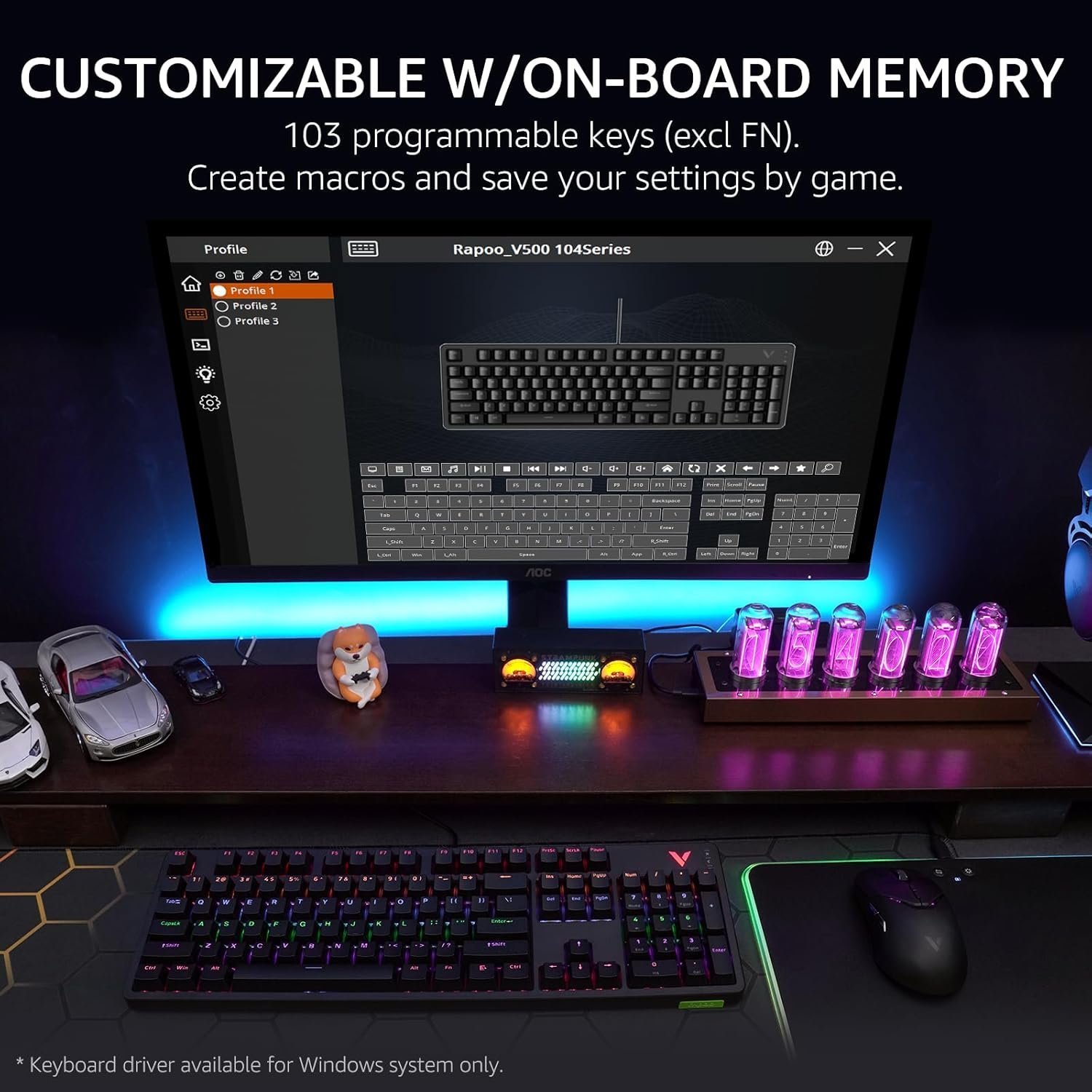
The keyboard supports key remapping, macro creation, and onboard profile storage. Supported settings can be saved directly to the keyboard, allowing users to use their preferred configurations across compatible systems.
RGB Lighting Controls
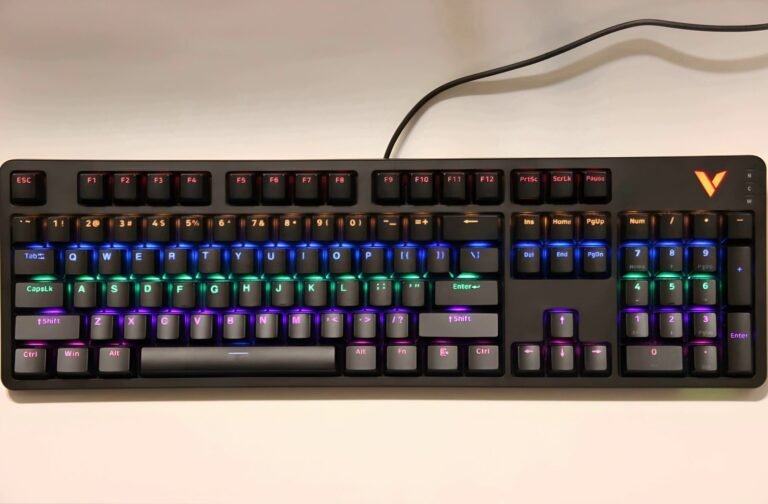
The V500Pro includes multiple lighting effects with adjustable brightness, animation speed, logo lighting, and side lighting controls. Lighting settings can be adjusted through onboard shortcuts and supported software.
Full Anti-Ghosting
All 104 keys support anti-ghosting functionality, allowing multiple keys to be pressed simultaneously without missed inputs. This can be useful for gaming, shortcuts, and other situations that require several key presses at once.
Removable Top Cover
The magnetic top cover can be removed for cleaning and maintenance. The design also allows users to switch between a recessed key appearance and a floating key appearance based on personal preference.
Aluminum Alloy Frame
The keyboard uses an aluminum alloy frame designed to provide additional rigidity and durability during everyday use.
Multimedia Hotkeys
Built-in shortcut commands provide quick access to media controls, volume adjustments, email, calculator functions, web browsing shortcuts, and Windows key lock controls.
Performance & Feedback
Customers often praise the Rapoo V500Pro for its mechanical switches and responsive typing experience. The keyboard’s RGB lighting also receives positive feedback, with users enjoying the available lighting effects and customization options.
The removable top cover is another feature that receives attention from users. Some appreciate being able to remove the cover for easier cleaning and maintenance, while others like the ability to change the keyboard’s appearance between different key presentation styles.
Users also mention the keyboard’s sturdy construction and anti-ghosting performance during gaming. The onboard customization options, programmable keys, and macro support are appreciated by those who like adjusting their keyboard settings for specific games or workflows.
Some customers find the switches louder than expected, particularly when compared to quieter keyboard designs. There are also reports of difficulty locating the software, and some users feel the included manual does not provide enough guidance for setup and customization.
A few customers mention that the keyboard feels heavier than expected, which may not appeal to those who frequently move their setup. Others express mixed opinions about the overall appearance of the keyboard or report receiving units that did not perform as expected.
My Thoughts: Rapoo V500Pro 2024 Edition Gaming Mechanical Keyboard
The Rapoo V500Pro made a good first impression with its solid construction and mechanical switches. The keyboard feels sturdy on the desk, and the removable top cover is a nice touch for cleaning and general maintenance.
One area that stood out during my testing was the software setup process. The keyboard supports a variety of customization options, but actually finding the correct software was more difficult than I expected. The included manual provided very little guidance, and I spent quite a bit of time searching for the proper download before finding the correct program.
Once everything was set up, I was able to access the keyboard’s lighting controls, macro features, firmware updates, and key customization options. There are plenty of settings available, although some parts of the software took a little time to learn and navigate.
The RGB lighting looked good across the keyboard, and I appreciated having multiple ways to customize the effects. I also found the keyboard noticeably heavier than some other models I’ve used, which may be a positive or negative depending on whether you prefer a more stationary setup.
My biggest complaint remains the documentation. The keyboard itself worked well during my testing, but the overall setup experience would have been much smoother if the manual included clearer instructions for software downloads and customization features.
Who Would Likely Favor This Product?
Gamers who prefer mechanical keyboards might want to consider the Rapoo V500Pro. The brown switches provide tactile feedback while remaining quieter than some clicky mechanical switch types.
Users who like customizing their controls might want to consider this keyboard. The software supports key remapping, macro creation, and profile management for those who prefer personalized layouts and shortcuts.
Those who frequently press multiple keys at once during games might want to consider the Rapoo V500Pro. Its full anti-ghosting support is designed to register simultaneous key presses without missed inputs.
People who regularly clean or maintain their peripherals might want to consider this keyboard. The removable top cover makes it easier to access areas that often collect dust and debris.
Users who enjoy RGB lighting setups might also want to consider the Rapoo V500Pro. The keyboard includes multiple lighting effects along with adjustable brightness, speed, logo lighting, and side lighting controls.
FAQ (Frequently Asked Questions)
How do I download the software for the Rapoo V500 2024 Edition?
To download the software:
- Visit Rapoo Website.
- Click on the Support tab and then select Download Center.
- Locate “V500PRO Wired 104Keys 2024Version” in the download center.
- You can find it by expanding categories, typing “V500” in the search bar, or selecting Gaming Keyboards under product categories.
Can I customize the Rapoo V500Pro?
Yes. The keyboard supports key remapping, macro creation, profile management, and RGB lighting customization through the companion software.
Does the Rapoo V500Pro support anti-ghosting?
Yes. The keyboard supports full anti-ghosting across all 104 keys, allowing multiple keys to be pressed simultaneously.
Does the keyboard have RGB lighting?
Yes. The V500Pro includes multiple RGB lighting effects with adjustable brightness, speed, logo lighting, and side lighting controls.
Does the keyboard include a removable top cover?
Yes. The keyboard features a removable magnetic top cover that can make cleaning and maintenance easier.
Are the keycaps replaceable?
Yes. The keycaps can be removed and replaced with compatible alternatives.
What type of switches does the Rapoo V500Pro use?
This version uses brown mechanical switches, which provide tactile feedback while producing less noise than many clicky switch types.
What operating systems are supported?
The keyboard supports Windows XP, Vista, Windows 7, Windows 8, Windows 10, and later Windows versions through a wired USB connection.
Does the Rapoo V500Pro support Bluetooth?
No. This keyboard uses a wired USB connection only.
Does the Rapoo V500Pro support 2.4GHz wireless connectivity?
No. The keyboard does not include wireless connectivity options.
Does the Rapoo V500Pro require software to work?
No. The keyboard supports plug-and-play operation for basic typing, gaming, lighting controls, and multimedia functions. Software is only required for advanced customization features.
Connectivity Questions
How do I connect the Rapoo V500Pro 2024 Edition?
- Connect the USB-C cable to the keyboard.
- Connect the USB cable to an available USB port on your computer.
- Wait for the system to detect the keyboard.
- Begin using the keyboard.
Troubleshooting & Settings
How do I switch lighting modes?
- Press FN + Page Up to cycle through lighting modes in the forward direction.
- Press FN + Page Down to cycle through lighting modes in reverse order.
How do I adjust brightness?
- Press FN + Up Arrow to increase brightness.
- Press FN + Down Arrow to decrease brightness.
How do I adjust lighting speed?
- Press FN + Right Arrow to increase animation speed.
- Press FN + Left Arrow to decrease animation speed.
How do I control the logo lighting?
- Press FN + V.
- Continue pressing to cycle through logo lighting modes, including On, Breathing, and Off.
How do I control the side lighting?
- Press FN + Insert to switch side lighting modes.
- Press FN + Delete to change the side lighting color.
How do I lock the Windows key?
- Press FN + Windows.
- Repeat the shortcut to unlock the Windows key.
How do I restore factory settings?
- Press and hold FN + ESC for approximately 3 seconds.
- The keyboard will restore its default settings.
How do I turn the keyboard lighting on or off?
- Press FN + ESC briefly.
- Repeat the shortcut to turn the lighting back on.
Additional Product Information
Rapoo V500Pro 2024 Mechanical Keyboard – Brown Switches | RGB Lighting | Programmable Controls
- Brown Mechanical Switches: Designed to provide tactile feedback while producing less noise than many clicky mechanical switch types, making the keyboard suitable for gaming and everyday typing.
- RGB Lighting Controls: Features multiple lighting effects with adjustable brightness, animation speed, logo lighting, and side lighting customization.
- Programmable Controls: Supports key remapping, macro creation, and profile customization through the companion software.
- Onboard Profile Storage: Allows supported settings and profiles to be saved directly to the keyboard for use across compatible systems.
- Full Anti-Ghosting Support: Supports simultaneous key presses across all 104 keys without input conflicts.
- Removable Top Cover: The detachable top cover makes cleaning easier and allows users to switch between different visual styles.
- Aluminum Alloy Frame: Built with a durable metal frame designed to provide stability during everyday use.
- Multimedia Hotkeys: Includes shortcuts for media playback, volume controls, email, calculator functions, and Windows key lock.
- USB-C Wired Connection: Uses a wired USB-C connection with plug-and-play support on compatible systems.