This post contains affiliate links. If you purchase through them, we may earn a small commission at no extra cost to you. This product was provided through the Amazon Vine program for our honest review. All opinions are our own. Thanks for supporting Gaming Gear Drop.
Pros
- 75% Layout
- Volume Knob
- RGB Lighting
- Hot-Swap Support
- QMK/VIA Support
- Cream Switches
- PBT Keycaps
Cons
- Sensitive Keys
- Software Learning Curve
- Batch Variations
Quick Summary
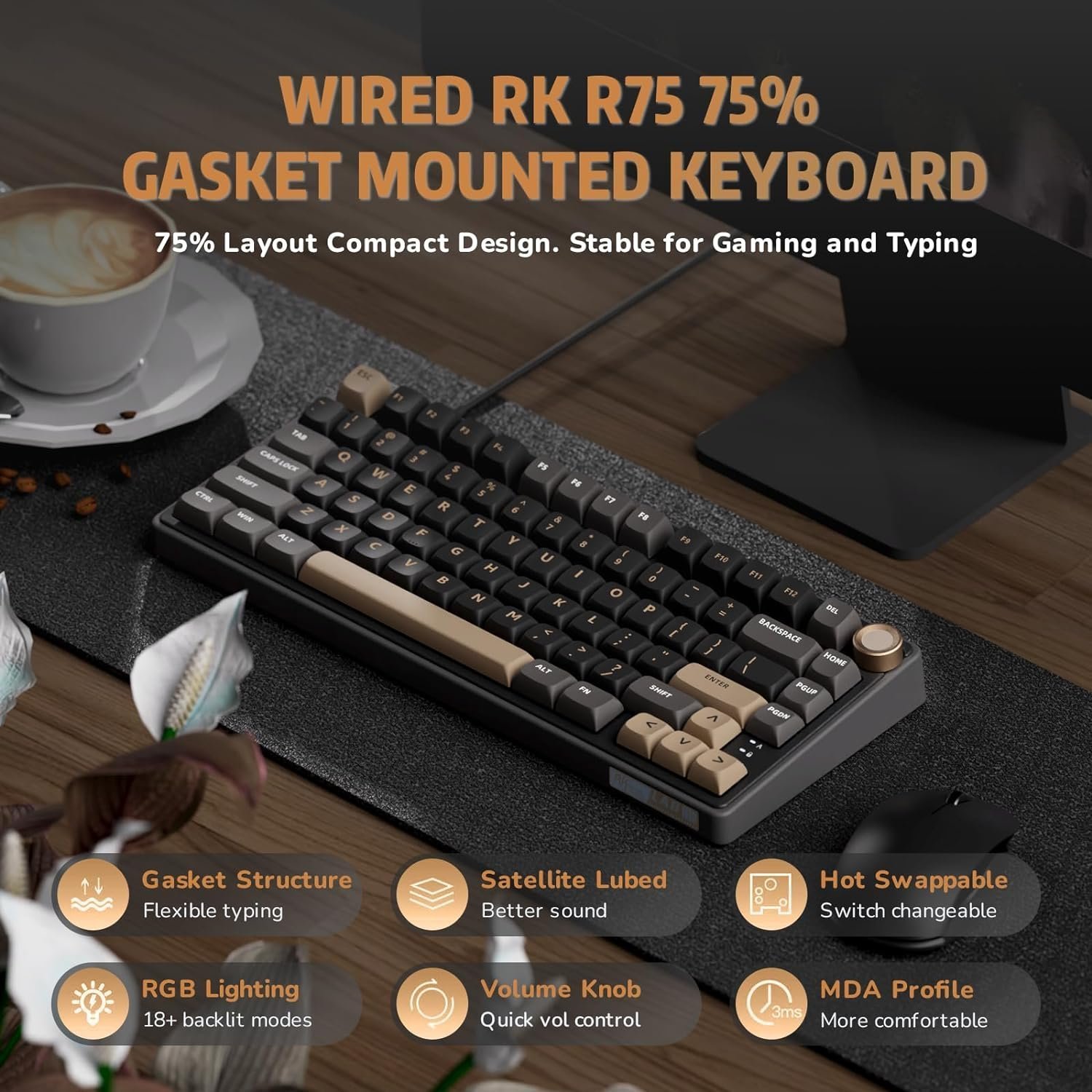
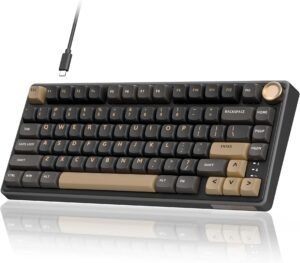
The RK Royal Kludge R75 is a wired mechanical keyboard designed for gaming, typing, and everyday computer use. It focuses on providing a compact 75% layout, hot-swappable switches, and customizable RGB lighting while maintaining access to commonly used keys.
The keyboard includes a gasket-mounted design, MDA profile PBT keycaps, a volume control knob, and support for QMK/VIA customization. While the keyboard works out of the box, some users may need additional time to learn the software and advanced customization features.
Some users appreciate the keyboard’s layout, typing feel, and lighting controls, while others note that the keys can feel sensitive and that QMK/VIA setup may take some patience.
For more information, stick around and read below for my take on this product.
Hey there, welcome to our review of the RK Royal Kludge R75 Wired Gaming Keyboard.
For this review, we tested the RK Royal Kludge R75 Wired Gaming Keyboard to offer honest insights and hopefully make your decision-making a tad easier. We have gathered the important details about this mechanical keyboard to share with you, specifically focusing on the wired version with QMK/VIA support.
Throughout this post, we will discuss its key features, highlight user feedback, share our personal impressions, and explain who might benefit most from it.
So, if you are looking for a wired mechanical keyboard with a compact 75% layout for gaming or everyday use, stick around to find out if this suits your needs.
Key Features
75% Compact Layout
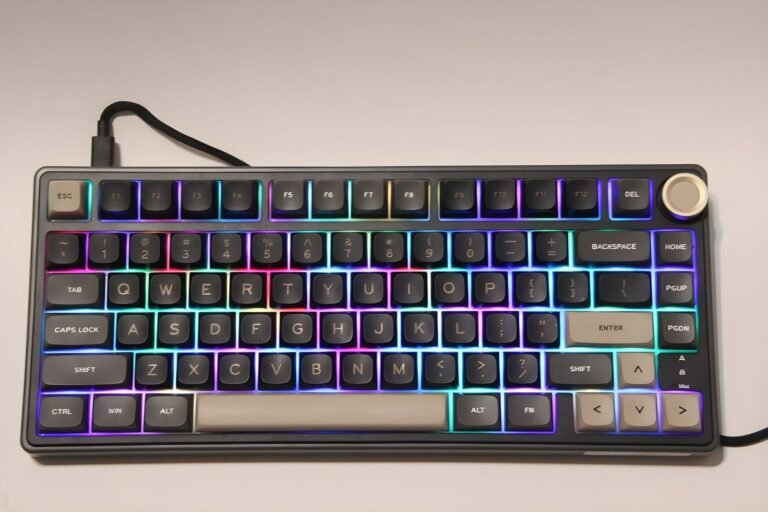
The RK Royal Kludge R75 uses a 75% layout with 81 keys. This design keeps dedicated arrow keys and essential functions while taking up less desk space than a full-size keyboard. It is a practical option for users who want a smaller keyboard without giving up commonly used keys.
Gasket Mount Design
The keyboard uses a gasket-mounted structure designed to help reduce vibration and soften the typing feel. Additional sound-dampening materials inside the keyboard help reduce noise and create a more muted typing experience.
MDA Profile PBT Keycaps
The RK R75 comes with double-shot PBT keycaps in an MDA profile. PBT keycaps are designed to resist wear from regular use, while the MDA profile provides a different typing feel compared to traditional OEM-style keycaps.
Hot-Swappable Switch Support
The keyboard supports hot-swappable switches, allowing compatible 3-pin and 5-pin mechanical switches to be replaced without soldering. This makes it easier for users to experiment with different switch types over time.
Linear Cream Switches
This version of the RK R75 includes linear cream switches. These switches provide a smooth keypress without a tactile bump and are designed for both gaming and everyday typing.
RGB Lighting Controls
The keyboard includes RGB backlighting with multiple lighting modes, brightness levels, and speed adjustments. Users can switch effects directly from the keyboard using function key shortcuts without requiring software.
The keyboard also supports custom lighting profiles, allowing specific keys to be illuminated based on personal preference.
Volume Knob Controls
The RK R75 includes a metal volume knob for quick audio adjustments. Rotating the knob increases or decreases volume, while pressing the knob mutes audio.
The knob provides a convenient way to manage volume without leaving a game or opening additional software.
QMK and VIA Support
The RK R75 supports QMK and VIA customization software. These tools allow users to remap keys, create macros, and customize keyboard functions to better match their workflow or gaming preferences.
Some users may find the software setup process takes additional time to learn, especially if they are new to VIA customization.
Windows and Mac Compatibility
The keyboard supports Windows, macOS, and Linux systems. Dedicated shortcuts allow users to switch between Windows and Mac modes while maintaining access to platform-specific functions and multimedia controls.
Performance & Feedback
Customers say the RK R75 provides a smooth typing experience, with the included cream switches receiving positive feedback for their feel and sound. The compact 75% layout is also well received, allowing users to save desk space while still keeping dedicated arrow keys and commonly used functions.
Users also speak positively about the RGB lighting options and the volume knob. The lighting controls provide several customization choices, while the knob offers a convenient way to adjust volume directly from the keyboard.
Some users mention that the keys can feel more sensitive than expected, which may lead to accidental inputs until they become familiar with the keyboard. Others note that setting up and learning QMK/VIA customization can take time, particularly for those who are new to keyboard programming software.
There are also occasional reports of quality control issues, including keys registering unexpectedly or certain functions not working as intended. Some users believe these issues may be related to individual units rather than the keyboard as a whole.
My Thoughts: RK ROYAL KLUDGE R75 Wired Gaming Keyboard
The RK R75 has been comfortable to use during both gaming and everyday computer use. I like the smaller layout because it gives me a little more desk space without removing keys that I regularly use. The volume knob is also a nice addition since it makes quick volume adjustments easy.
One thing I noticed fairly quickly was that the keys felt more sensitive than I expected. I found myself making accidental presses occasionally until I became more familiar with the keyboard. The typing sound is also louder than some keyboards I have used in the past, which may come down to personal preference.
The RGB lighting took a little experimenting to learn, but after spending some time with the manual, I was able to understand the different lighting controls and settings. The lighting options themselves were easy enough to use once I knew the shortcuts.
My biggest challenge was getting started with QMK/VIA. The customization options are there, but the setup process was not as straightforward as I expected and took some extra time to figure out. To be fair, I am not a QMK/VIA expert, so users who are already familiar with those tools may have an easier time getting everything configured.
Aside from that, the keyboard worked well during my testing and was easy to use day to day.
Who Would Likely Favor This Product?
Users who prefer smaller keyboards might want to consider the RK Royal Kludge R75. Its 75% layout keeps commonly used keys such as the arrow keys while taking up less desk space than a full-size keyboard.
Those who enjoy customizing their keyboard setup might want to consider this model. It supports hot-swappable switches, RGB lighting adjustments, and QMK/VIA customization for users who like to personalize their controls and layouts.
Gamers and everyday users who want dedicated media controls might want to consider the RK R75. The built-in volume knob provides quick access to audio adjustments without needing additional shortcuts or software.
Users who frequently switch between Windows and Mac systems might also want to consider this keyboard. It supports both operating systems and includes shortcuts for changing between supported modes.
FAQ (Frequently Asked Questions)
How do I customize the RK Royal Kludge R75 using VIA?
The RK R75 supports QMK and VIA customization for key remapping, macros, and other supported functions.
- Visit the RK Royal Kludge Software Page.
- Locate the R75 75% Wired Gaming Keyboard (QMK/VIA) section.
- Download the VIA drivers and related files.
- Open the downloaded folder and locate the VIA Download Guide.
- Follow the guide to complete the setup process.
Some users may find the setup process takes a little time, especially if they are new to QMK or VIA software.
Does the RK R75 have RGB lighting?
Yes. The keyboard includes RGB backlighting with multiple lighting modes, brightness levels, and speed adjustments.
Are the switches hot-swappable?
Yes. The RK R75 supports hot-swappable 3-pin and 5-pin mechanical switches, allowing compatible switches to be replaced without soldering.
What type of keycaps does the RK R75 use?
The keyboard uses MDA profile double-shot PBT keycaps designed for durability and long-term use.
Does the RK R75 have a volume knob?
Yes. The built-in metal knob can be used to adjust volume and mute audio.
What operating systems are supported?
The RK R75 supports Windows, macOS, and Linux systems.
Can the keyboard switch between Windows and Mac modes?
Yes. Press FN + A to switch to Windows mode and FN + S to switch to Mac mode.
Does the keyboard support full key rollover?
Yes. The keyboard supports switching between 6-key rollover and full key rollover using FN + B.
Connectivity Questions
How to connect the RK R75 to a computer
- Connect the included USB-C cable to the keyboard.
- Connect the USB-A end of the cable to an available USB port on your computer.
- Wait for the keyboard to power on automatically.
- Begin using the keyboard.
Does the RK R75 support Bluetooth?
No. This version of the RK R75 is a wired keyboard and connects through a USB cable.
Does the RK R75 support 2.4GHz wireless connectivity?
No. This version of the RK R75 is designed for wired USB connections only.
Troubleshooting & Settings
How to adjust keyboard brightness
- Press FN + Up Arrow to increase brightness.
- Press FN + Down Arrow to decrease brightness.
How to adjust lighting speed
- Press FN + Right Arrow to increase effect speed.
- Press FN + Left Arrow to decrease effect speed.
How to change RGB lighting modes
- Press FN + \ to cycle through available lighting modes.
How to switch RGB colors
- Press FN + , to cycle through available colors.
How to create a custom lighting profile
- Press FN + 1 to select custom lighting mode.
- Press FN + Backspace to enter recording mode.
- Press the keys you want illuminated.
- Press FN + Backspace again to save the profile.
How to lock the Windows key
- Press FN + Windows.
- Press the same shortcut again to unlock it.
How to switch between Windows and Mac mode
- Press FN + A for Windows mode.
- Press FN + S for Mac mode.
How to restore factory settings
- Press and hold FN + Spacebar for 3 seconds.
- Wait for the keyboard to reset.
How to enter DFU firmware mode
Method 1
- Hold the switch located beneath the spacebar.
- Connect the keyboard to the computer.
Method 2
- Connect the keyboard to the computer.
- Press FN + Right Shift + Esc at the same time.
If you are still interested in knowing more about the product, click the button below
RK Royal Kludge R75 Wired Mechanical Keyboard – 75% Layout | Hot-Swap Support | RGB Lighting
- 75% Compact Layout – Uses an 81-key layout that retains arrow keys and essential functions while taking up less desk space than a full-size keyboard.
- Volume Knob Controls – Includes a CNC aluminum volume knob that can be used for quick audio adjustments directly from the keyboard.
- Gasket Mount Structure – Uses a gasket-mounted design with multiple internal sound-dampening layers intended to help reduce vibration and typing noise.
- MDA Profile PBT Keycaps – Features double-shot PBT keycaps in an MDA profile. The keycaps are designed to resist wear from regular use and provide a textured typing surface.
- Hot-Swappable Switch Support – Supports compatible 3-pin and 5-pin mechanical switches, allowing switches to be replaced without soldering.
- Speed Silver Switches – Includes Speed Silver switches designed with a shorter travel distance for quicker key activation.
- RGB Lighting Controls – Supports multiple RGB lighting modes, monochrome lighting options, brightness adjustments, and lighting speed controls directly from the keyboard.